Free Construction Timesheet Template
Weekly Crew Hours by Job, with Overtime Calculated
Paper time cards get lost, and hours that never reach a job never get costed. This free construction timesheet template logs crew hours by day, job, and cost code, splits regular and overtime, and calculates gross pay.

Hours by Job and Cost Code
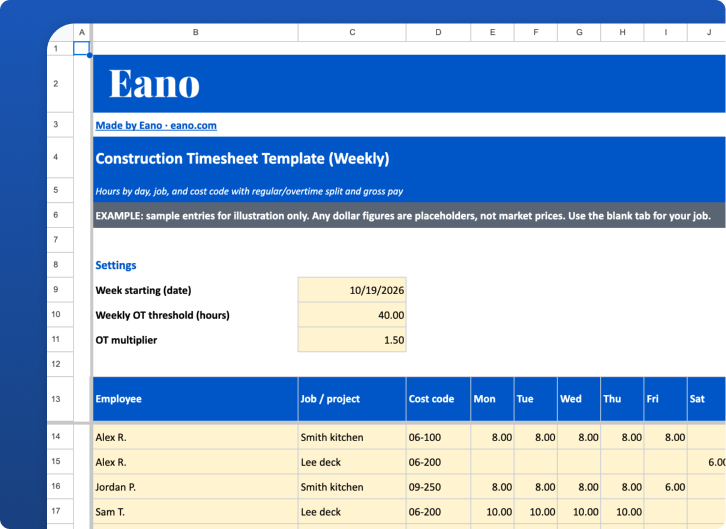
Log each employee’s hours Monday through Sunday on a line per job and cost code, so labor lands on the right job for job costing, not just on payroll.
Weekly Overtime Split and Gross Pay
The sheet totals each employee’s week across all jobs, splits regular and overtime hours at your threshold (40 by default) and multiplier (1.5x by default), and calculates gross pay.
How to Use This Construction Timesheet
What's in the Construction Timesheet Template
A construction timesheet does two jobs: it tells payroll how much to pay, and it tells you which job the labor belongs to. This free weekly template handles both. Each line is one employee on one job and cost code, with hours for each day of the week, an overtime split, and gross pay.
How to Fill Out the Weekly Timesheet
1. Set the week and overtime rules
Enter the date the workweek starts. The overtime threshold defaults to 40 hours per workweek and the multiplier to 1.5, which matches the federal rule under the Fair Labor Standards Act described by the U.S. Department of Labor. If your state has stricter rules, adjust or calculate those separately.
2. One line per employee per job
Enter the employee, the job or project, and the cost code. If someone works on two jobs, use two lines with the exact same employee name. The template adds up their whole week before deciding how many hours are overtime.
3. Enter daily hours and pay rate
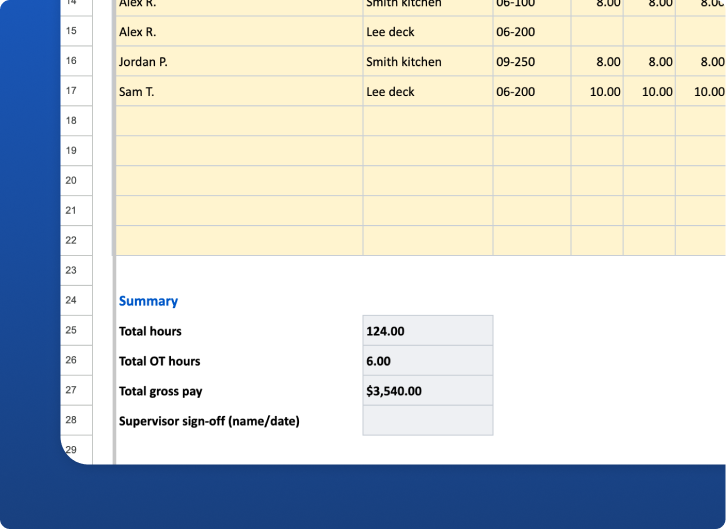
Enter hours for each day. The sheet totals hours per line and per employee week, splits regular and overtime, and calculates gross pay at the employee's rate.
4. Sign off
Have each employee initial their lines and a supervisor sign and date the sheet before it goes to payroll. A consistent approval step heads off disputes later.
Columns Explained
Worked Example
In the Example tab, Alex works 40 hours Monday through Friday on a kitchen remodel and 6 hours Saturday on a deck job. That's a 46-hour week, so 6 hours are overtime. The sheet spreads those 6 OT hours across both jobs in proportion to hours worked, so the kitchen and the deck each carry part of the overtime cost. Jordan works 38 hours and Sam works 40, so neither has overtime.
Common Timesheet Mistakes
Go Digital with Eano Pro Timesheets
Spreadsheets work until the crew grows. Timesheets in Eano Pro let crews clock in from the jobsite on their phones, tag time to jobs, and feed labor straight into job costing. Compare options in our guide to the best time tracking apps for contractors, and pair timesheets with the free construction daily log template to record what crews did each day.
Who This Timesheet Is For
Residential contractors and remodelers with hourly crews who need a simple way to collect hours for payroll and job costing. It works for a single crew lead filling it out for everyone, or for each employee filling out their own lines.
How to Customize It
Add your own cost codes, such as demo, framing, drywall, finish, and punch, so labor lands on the right budget line. If you pay different rates for different work (for example prevailing wage on one job), use a separate line with that rate. For per diem or mileage, add a column and keep it out of the gross pay formula. Save one copy per week and keep them; the U.S. Department of Labor requires employers to keep payroll records, and state rules may add more.
Turning Hours into Better Estimates
Timesheets with job and cost code data are the most reliable source for your labor units. At the end of each job, total the hours by cost code and compare them to what you estimated. Over a few jobs, you’ll see which tasks you consistently under-bid. Feed those numbers back into your estimates and your budgets.