Free Construction Budget Template
See Budget Overruns While You Can Still Fix Them
Most contractors find out a job lost money after the final invoice. This free construction budget template tracks budget, approved changes, committed cost, actual cost, and forecast profit by cost code while the job is still running.

Budget, Committed, and Actual Side by Side
Each cost code shows the original budget, approved changes, revised budget, committed cost from subs and POs, and actual cost to date, so you can see where money is going line by line.
.png)
Forecast Final Cost and Profit
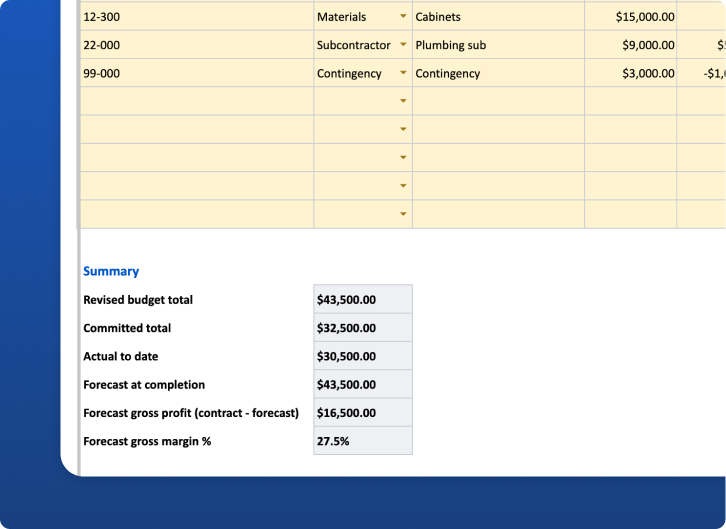
Enter an estimated cost to complete for open lines and the sheet forecasts final cost, over/under budget by line, and forecast gross profit and margin against your contract price.
How to Use This Construction Budget Template
What's in the Construction Budget Template
A construction budget is only useful if you compare it to what you're actually spending while the job is underway. This free template is a budget vs. actual job cost tracker built for residential contractors. It shows the original budget for each cost code, approved changes, committed cost, actual cost, variance, and a forecast of where the job will finish.
The download includes:
How to Use the Budget vs. Actual Tracker
1. Start from your estimate
Enter the project name and your contract price. Then list each cost code from your estimate with its original budget. Use the cost code structure you already use; consistency matters more than the specific system.
2. Record approved changes
When a change order is approved, add its cost to "Approved changes" on the affected line and update the contract price in Settings. Your revised budget then reflects the real scope, and you don't mistake approved extra work for an overrun. Use the free change order template to document each change before work proceeds.
3. Track committed and actual cost
When you sign a subcontract or issue a purchase order, enter it as committed. As invoices come in or you pay them, update actual to date. Committed cost tells you what you've already promised to spend, which is often the earliest warning of a problem.
4. Forecast cost to complete
Each week, estimate what each open line still needs to finish. The sheet adds that to actual cost to forecast final cost, and shows forecast over/(under) budget for each line. Positive numbers mean the line is heading over.
5. Watch forecast profit
The Summary compares forecast final cost with your contract price to show forecast gross profit and gross margin. If margin is slipping, you can still act: tighten scope, issue change orders for extra work, or renegotiate with a supplier.
Columns Explained
Worked Example
In the Example tab, framing labor started with an $8,000 placeholder budget plus a $1,000 approved change, for a $9,000 revised budget. With $6,500 spent and $2,500 left to complete, the forecast lands right on budget. The contingency line drops by $1,000 to fund a plumbing change. With a $60,000 placeholder contract price, the Summary shows forecast gross profit and margin for the whole job.
Common Budgeting Mistakes
Move Budgets into Eano Pro
Spreadsheets work for one job at a time. When you're running several, construction budget software in Eano Pro ties budgets to estimates, change orders, bills, and timesheets so budget vs. actual updates itself. Learn more about the process in our guide to construction job costing for residential contractors, and plan company-level targets with the contractor revenue planner.
Who This Budget Template Is For
It’s built for residential general contractors and remodelers running fixed-price or cost-plus jobs who want a simple weekly view of budget health without accounting software reports. It also works for owner-builders who need to show a lender or partner where the money is going.
How to Customize It
Match the cost codes to your estimate so every line maps one-to-one. Add an "Allowance" line for each client allowance and track it like any other line. If you work cost-plus, add your fee as a separate line so the forecast reflects what you’ll bill. For larger jobs, copy the tab once per phase or building and add a roll-up tab that sums each one.
Weekly Budget Review Routine
Set a fixed time each week. Enter new commitments and bills, update cost to complete for open lines, and look at three numbers: forecast over/(under) by line, total forecast at completion, and forecast gross margin. If a line is trending over, decide that week whether it’s a change order, a scope problem, or a cost you’ll absorb, and write it in the Notes column.