Free Construction Invoice Template (Excel)
Invoice Clients Professionally After Every Milestone
A clean construction invoice documents what was built, what it costs, and when payment is due — and signals professionalism to every client. This free template handles labor, materials, retainage, and payment tracking in one download.

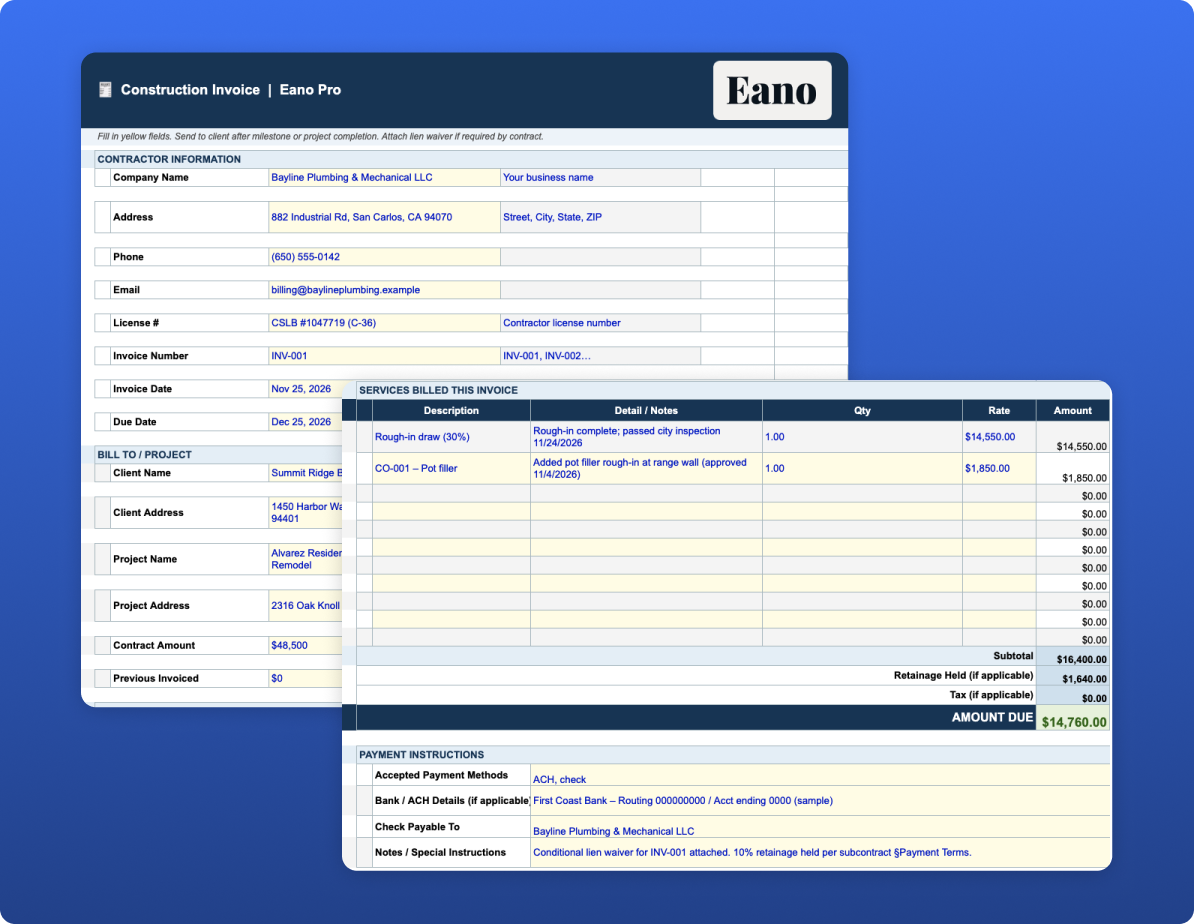
Line-Item Invoice with Retainage and Tax
Enter each billable item with quantity and rate — the total calculates automatically. Retainage and tax lines are included so the amount due reflects the actual payment expected, not just the gross invoice total. Payment instructions give your client everything they need to pay you promptly.
Payment Tracker for Multi-Invoice Projects
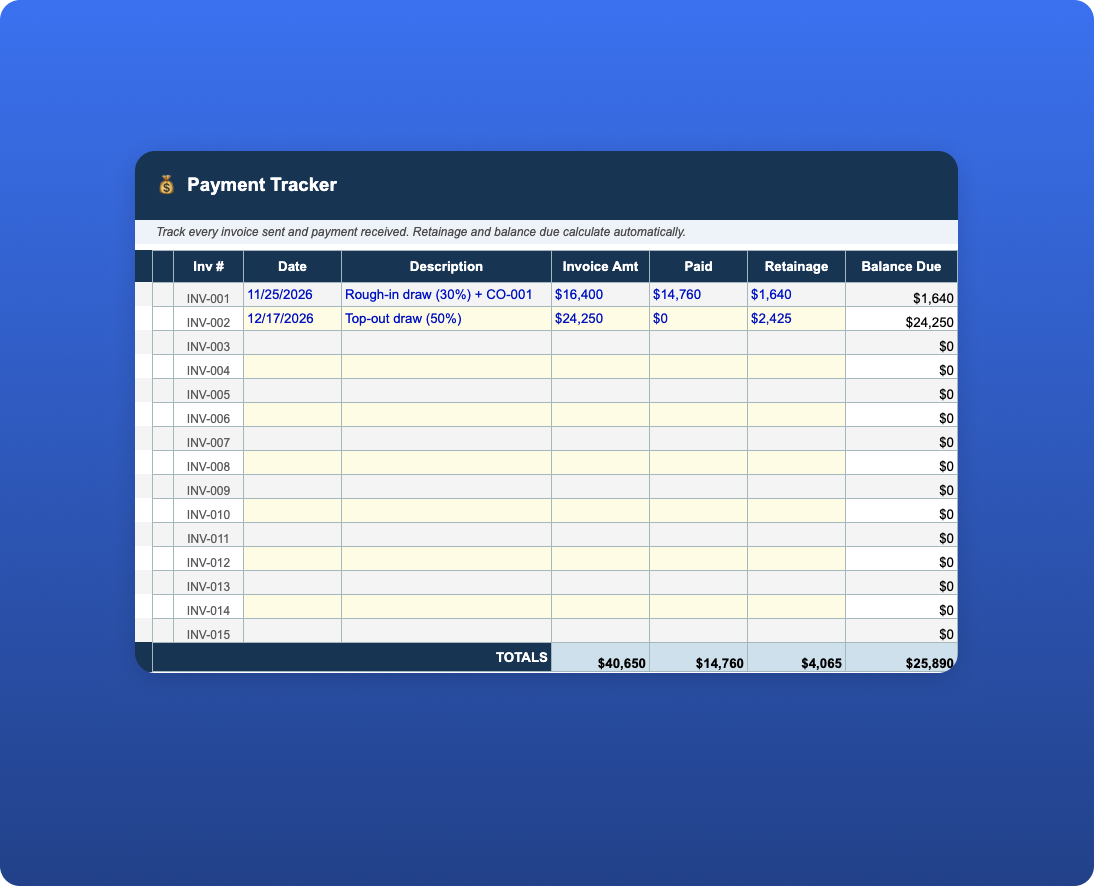
Larger projects generate multiple invoices over time. The Payment Tracker tab logs every invoice sent, amount invoiced, amount paid, retainage held, and balance due — so you always know what's outstanding without digging through emails.
What's Included in the Download
What’s Included in the Construction Invoice Template
This construction invoice template gives contractors a straightforward way to create professional invoices, calculate the amount due, account for retainage, and track payments throughout a project.
Construction billing can be more complicated than sending a single invoice at the end of a job. Contractors may bill for completed phases, labor and materials, approved change orders, deposits, or other project costs. Payments may also be subject to retainage. Keeping each invoice organized and maintaining a running payment record makes it easier to see what has been billed, what has been paid, what is being held, and what the customer still owes.
The Excel download includes two connected tabs:
- Invoice — Create a client-facing construction invoice with contractor information, bill-to details, invoice number, invoice date, and payment due date. Add individual services or charges with a description, notes, quantity, and rate. The spreadsheet automatically calculates each line-item amount, subtotal, applicable tax, retainage held, and final amount due. A dedicated payment instructions section gives you space to tell the customer how and where payment should be submitted.
- Payment Tracker — Maintain a running record of invoices issued for the project. Track each invoice number, date, description, amount invoiced, amount paid, retainage held, and remaining balance. Totals calculate automatically so you can quickly review the project's overall billing and payment status without adding up individual invoices manually.
Yellow cells indicate fields intended for manual entry. Line-item totals, subtotal, and amount due calculate automatically, helping reduce repetitive calculations and potential spreadsheet errors. Invoice rows are pre-numbered beginning with INV-001 to provide a consistent numbering system across the project.
How to Use the Construction Invoice Template
Start with the Invoice tab by entering your company information and the customer's billing details. Assign the invoice a unique invoice number, then enter the invoice date and payment due date based on the payment terms established for the project.
Next, itemize the work being billed. Depending on the project and your contract, this might include labor, materials, subcontracted work, completed project phases, equipment, approved change order work, or other billable costs. Include enough detail that the customer can understand what the current invoice covers.
The spreadsheet calculates the charges based on the quantity and rate entered for each line item. If retainage applies, record the amount being withheld so the invoice distinguishes between the value of the work billed and the amount currently due for payment.
Once the invoice is issued, add it to the Payment Tracker. As payments are received, update the amount paid and remaining balance. Over the course of a project, the tracker provides a simple view of outstanding invoices, payments received, retainage held, and total accounts receivable for that job.
What Should Be Included on a Construction Invoice?
A construction invoice should generally identify who is billing, who is being billed, the project or work performed, invoice number, invoice date, payment due date, itemized charges, subtotal, applicable taxes or adjustments, retainage when applicable, total amount due, and payment instructions.
For larger projects, contractors may also need to reference the original contract, project address, billing period, change order numbers, purchase orders, or supporting documentation. The appropriate level of detail depends on the project and the billing requirements established in the contract.
A clear invoice should make it easy for the customer or project owner to answer three basic questions: What am I being charged for? How much do I owe? When and how do I need to pay it?
How Does Retainage Work on a Construction Invoice?
Retainage is a portion of payment withheld from a contractor or subcontractor until specified project requirements are met, often until substantial or final completion. When retainage applies, the invoice should clearly distinguish between the value of work completed, the amount being withheld, and the amount currently payable.
For example, if an invoice covers $10,000 of completed work and the applicable retainage is 10%, $1,000 would be held as retainage and $9,000 would be due before considering other adjustments such as taxes or previous payments.
Tracking retainage separately is important because retainage is generally still money associated with completed work even though it has not yet been collected. Keeping it visible in your billing records makes it easier to determine what remains outstanding when the project reaches the appropriate release milestone.
Why Track Construction Invoices and Payments Together?
Creating an invoice documents what you are requesting payment for. A payment tracker answers the equally important question of whether you actually received that money.
Keeping the two records together can help contractors identify unpaid balances, reconcile project revenue, track outstanding retainage, and compare amounts billed against amounts collected. It also provides a more organized billing history if a customer has questions about previous invoices or payments.
Consistent invoice numbering makes that record easier to follow. Using sequential numbers such as INV-001, INV-002, and INV-003 gives each invoice a unique reference that can be used in payment records, emails, accounting entries, and other project documentation.
Billing, retainage, tax, payment notice, and invoice requirements can vary by contract, project type, and jurisdiction. This template is intended as a practical starting point for construction invoicing and recordkeeping and does not replace accounting, tax, or legal advice. Contractors should confirm the requirements that apply to their projects and businesses.