
Send It Through the Portal: Why Contractors Close Faster with a Client Portal
"I'll just export the PDF and email it over." Almost every contractor has said it. It feels faster, because you're done the moment you hit send. But once that PDF leaves your outbox, you lose sight of the deal. You can't tell whether the homeowner opened it, read it, or forwarded it to a spouse, and you're left guessing when to follow up.
We wanted to know what that blind spot actually costs. So we looked at every proposal contractors built on Eano from June through September 2026 and compared two groups: deals sent to the client through Eano's client portal, and deals that went out only as an exported PDF. The difference was big enough that we're writing this post for two audiences: contractors still shopping for proposal software that replaces Word and PDFs, and Eano customers who build great proposals but still email them as attachments.
Key takeaways
- Clients actually open portal proposals. Nearly 9 in 10 proposals sent through the portal get opened by the client.
- Signing happens in the portal. When a portal deal closes, the client signs right there more than 9 times out of 10.
- Portal deals close about a third faster. From job creation to a won deal, the typical portal deal closed in under a week. The typical PDF-only deal took noticeably longer.
- Same contractor, faster result. Every contractor in our data who closed deals both ways closed their portal deals faster.
Why the PDF habit sticks (and why it costs you)
Emailing a PDF is how most contractors learned to send a bid. It's familiar, it works with any client, and it feels finished. The problem isn't the PDF itself. It's everything you can't see after it's sent.
When a homeowner gets an attachment, a few things can happen. They open it on their phone, pinch-zoom through the line items, and mean to come back later. They forward it to a partner who never opens it. They print it, mark it up, and leave it on the kitchen counter. Or it gets buried under a week of school emails and promotions. Meanwhile, you're deciding whether to call. Call too early and you seem pushy. Call too late and the competitor who followed up first gets the job.
Then, when they're ready to say yes, there's more friction. They need to sign. With a PDF that usually means printing, signing, scanning, and emailing it back, or you sending a separate e-signature request. Each extra step is a chance for the decision to slide to "this weekend," and weekends have a way of turning into next month. We cover this in more depth in how proposal management stops you losing jobs.
What the data shows
Here's what changed when the same kind of proposal went through the portal instead of out as a PDF.
1. Clients open what you send
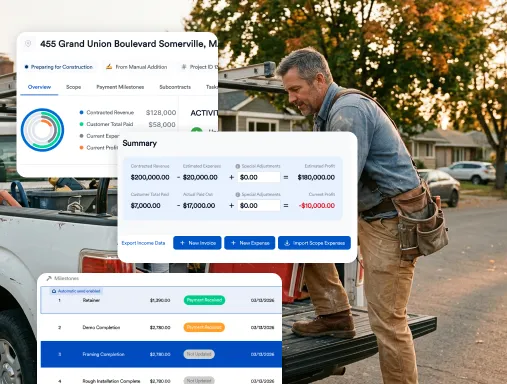
Nearly 9 in 10 proposals sent through the portal were opened by the client. Just as important, you know they opened it. Eano marks a portal proposal "Viewed by Client" with the time they opened it. With a PDF, that information simply doesn't exist.
2. The signature comes in the same sitting
When a portal deal closed, the client signed in the portal more than 9 times out of 10. And they signed quickly. The large majority of portal e-signatures came within an hour of the contract being ready for the client. There's no printing, no scanning, and no "I'll get to it this weekend." From the first portal send to the client's signature, the typical deal was signed in just a few days.
3. Deals close about a third faster
Measured from the day the job was created to the day the contractor marked it won, portal-signed deals closed roughly a third faster than PDF-only deals. In practical terms, the typical portal deal wrapped up in under a week, while the typical PDF deal was still open days later.
4. It's not just who's using it
A fair question is whether faster contractors simply happen to use the portal more. So we looked at contractors who closed deals both ways. Every one of them closed portal deals faster than their own PDF deals. At the same company, PDF deals typically took a couple of extra days, and in the slowest cases weeks longer. Same contractor, same crews, same pricing. The only difference was how the proposal reached the client.
What it looks like on real jobs
Numbers are useful, but it helps to see how a deal actually moves. These three jobs come from the same period. We've lightly generalized the details to protect the contractors' and homeowners' privacy.
A six-figure backyard pool and patio (portal)
The contractor built the scope and sent the proposal through the portal the same afternoon. This was a big decision, and the homeowner took about a week to think it over. That's normal for a project of this size. The difference is what happened when they were ready. They opened the portal, reviewed the contract, and e-signed it in under two minutes. The contractor marked the job won about an hour later. No chasing, no paperwork round trip.
A five-figure deck build (portal)
The client opened the proposal within hours of the job being created, and the contractor could see that they had. A few days later the client signed the contract in the portal, minutes after it was generated. From first look to signature, the whole deal took less than a week.
A five-figure bathroom remodel (PDF)
Here the contractor did everything right on speed. They exported the PDF within an hour of building the scope. The job was marked won nearly three weeks later. What happened in between? Nobody knows. There's no record of when the client opened it, whether they had questions, or when they decided. Maybe the follow-up call came at the perfect moment. Maybe the job almost went to someone else. With a PDF, you can't tell, and you can't learn from it for next time.
Why the portal closes faster
None of this is magic. The portal removes three specific kinds of friction from the sales process.
- You know when they've looked. "Viewed by Client" tells you the moment a homeowner opens the proposal, so you can follow up while it's fresh in their mind instead of guessing. That turns follow-up from an awkward check-in into a timely, helpful call. Our guide to building a follow-up system that wins more jobs explains why timing matters so much.
- The proposal and the signature are the same step. The client signs the same line items you built, on their phone, with no separate signing tool and no re-keying. Eano's proposals are built to be signed securely from anywhere, which is the whole point when your client is reading on the couch at 9 p.m.
- Nothing gets lost in an inbox. The proposal lives in one link the client can come back to, not an attachment buried under a week of email. If they need to show a partner, they share the same place, not a forwarded copy of version two.
A worked example: what "about a third faster" means for your calendar
Let's make it concrete. Imagine you're a remodeler who sends a handful of proposals a month, and most of your PDF deals take a week and a half or so from job creation to a signed contract.
- Cash flow. If portal deals close about a third faster, a deal that would have taken roughly ten days might close in closer to six or seven. That's several days sooner you can collect a deposit and order materials.
- Scheduling. Signed work goes on the calendar sooner. When your crews have a gap next month, a few days can decide whether that gap gets filled.
- Fewer losses to "we went another way." Every day a proposal sits unsigned is a day a competitor can call your client. Shrinking that window doesn't guarantee a win, but it shortens the time you're exposed.
- Less admin. No printing, scanning, or retyping a signed PDF back into your system. The signed contract is already attached to the job.
Your numbers will differ depending on job size, trade, and how quickly you follow up. But the direction was consistent across every contractor in our data who used both methods: the portal was faster.
What your client sees
For prospects evaluating Eano, it's worth knowing that the portal isn't just a signing page. According to Eano's client dashboard page, clients can view quotes and milestones in one place, submit project requests and questions, receive updates, and sign contracts and pay retainer fees. Contractors who also use milestone photo sharing, selections, and change orders give homeowners one place for the whole project instead of a dozen email threads. That's a big part of reducing miscommunication once the job starts.
It also changes how your company comes across. A clean, branded proposal the client can open and sign on a phone looks like a business that has its act together. For more on presenting scope clearly, see estimates homeowners actually understand and how to write a construction proposal.
Already on Eano? Get more out of the portal
If you're an Eano customer who builds proposals and then exports a PDF, you're one habit away from these results. You don't need to change how you build estimates or price jobs. Just change how the proposal reaches the client.
- Put a real email or phone number on every client. The portal needs one to reach them. A placeholder like "000-000-0000" sends you back to PDF and email. Make it part of how you create a job in your CRM.
- Send the proposal through the portal, even if you also attach a PDF. Some of our most active contractors do both: the PDF for the client's records and the portal for the signature. You don't have to give up the PDF to get the benefits.
- Watch for "Viewed by Client." That's your cue to call. A quick "I saw you had a chance to look, any questions?" lands much better than a cold check-in a week later.
- Let the client sign in the portal. Skip the print-and-scan step. The contract they sign is tied to the same line items you built.
- Try it on your next five proposals. Compare how fast they close against your last few PDF deals. Your own numbers are the most convincing data there is.
If you're not sure how the portal is set up on your account, our team is happy to walk you through it. You can book a session here.
Common objections, answered
"My clients are older and prefer paper." You can still send a PDF for their records. Sending through the portal too gives them the option to sign on a phone or computer, and gives you visibility either way.
"Big jobs take time no matter what." True. The pool job above still took about a week of thinking. The portal doesn't rush a homeowner's decision. It removes the delay between "yes" and a signed contract, and it tells you when they're engaged.
"I already follow up." Great. The portal makes your follow-up better timed, because you know when the proposal was actually opened rather than guessing.
How we measured this
This analysis uses Eano platform data for contractor proposals created June 1 through September 30, 2026, with outcomes measured through October 2026. "Portal" deals were sent to the client through Eano's client portal or e-signature flow. "PDF" deals had a proposal PDF exported by the contractor and were never sent through the portal. Time to sign is measured from the first portal send to the client's e-signature. Time to close is measured from job creation to the date the contractor marked the deal won, excluding jobs entered into Eano after they had already closed. It excludes accounts that use Eano for work-order dispatch rather than proposals, and it's calculated so that no single high-volume account dominates the results. Figures are medians unless noted, and job examples are lightly generalized for privacy.
Bottom line
A PDF tells your client what the job costs. The portal tells you what your client is doing about it, and lets them say yes on the spot. In our data, that meant nearly every client opened the proposal, almost every closed portal deal was signed right in the portal, and deals closed about a third faster. That held even when we compared contractors against themselves. If you're still emailing attachments, the fastest win in your sales process may be how you hit send.
Send your next proposal through the Eano client portal. Start a free trial