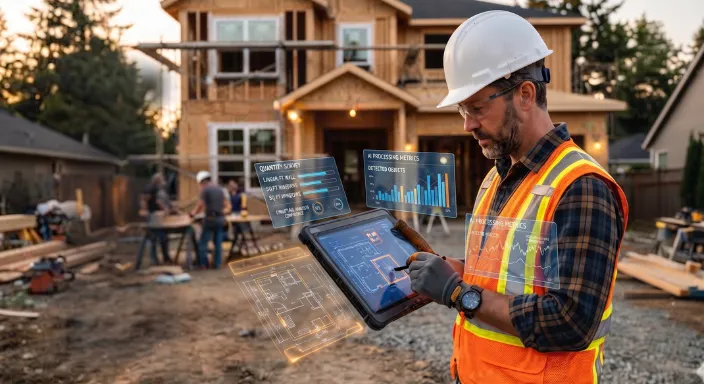

AI for Residential Construction: Practical Use Cases
AI is becoming a practical tool for residential contractors, but its value goes beyond generating text or automating a single construction task. General contractors can use AI to assist with lead management, estimating, takeoffs, proposals, scheduling, project coordination, communication, field documentation, reporting, and financial management.
The biggest opportunity is connecting these capabilities inside construction management software. Instead of adding separate AI tools for individual tasks, residential GCs can use AI within a connected workflow that carries project information from the first customer inquiry through estimating, proposals, scheduling, project execution, and financial management.
For owner-operators and operations leads, the goal is straightforward: spend less time on repetitive administrative work and more time managing projects, making decisions, and delivering work.
AI Across the Residential Construction Workflow
AI can assist with many of the tasks that make up a residential contractor's daily workflow.
The important point is that AI does not need to make construction decisions for the contractor.
In many cases, its most practical role is to process information faster so the contractor can make the decision.
That distinction matters because residential construction is highly dependent on context. A plan, estimate, schedule, or financial report can contain information that requires experienced human judgment.
AI is most useful when it handles repetitive information-processing work while the contractor remains responsible for the final decision.
From individual AI tools to connected workflows
A contractor can use one AI tool to write emails, another application to create estimates, another to manage schedules, and another to track project finances.
The problem is that someone still has to connect all of those systems.
Project information may need to be copied between applications. Customer details may need to be entered more than once. Changes made in one system may not automatically appear somewhere else.
Construction management software takes a different approach by keeping core project workflows connected.
When AI is added to that environment, it can assist with tasks while working from the information already associated with the project.
That makes AI less of an isolated productivity tool and more of a layer across the construction management workflow.
Also see: The Complete Guide AI Construction Management Software
AI-Powered Lead Management
The construction workflow begins before there is an estimate or active project.
A residential GC may receive inquiries through a website, phone call, email, referral, or social media. Someone then has to collect the customer's information, understand the project, determine whether it fits the company's services, and follow up.
For a small company, this work often falls directly on the owner.
AI can help organize this early-stage information. An AI-enabled CRM workflow can capture information from conversations, summarize what the homeowner needs, and help turn an inquiry into a structured opportunity.
For example, instead of starting from a blank CRM record after every phone call, AI can help organize details such as:
- Project type
- Customer requirements
- Location
- Approximate scope
- Desired timeline
- Next steps
- Missing information
This is especially useful when the owner is also handling jobsite work.
The goal is not to have AI decide which projects the company should accept. The goal is to reduce the administrative work required to understand and follow up on each opportunity.
Connecting sales information to construction
Lead management may seem separate from construction management, but the information collected at this stage becomes the foundation for the project.
If customer information has to be manually re-entered when a lead becomes a project, the contractor creates another administrative task.
An integrated construction management platform can keep customer and project information connected as the opportunity moves forward.
That connection becomes increasingly valuable as the project moves into estimating, proposals, scheduling, and execution.
AI for Construction Estimating
Estimating is one of the most practical applications of AI in residential construction.
AI can assist contractors by analyzing project information, identifying relevant work, organizing quantities, and helping create estimates.
Here's local contractor who leveraged Eano Pro AI estimating to reduce estimating from 2 days to an afternoon.
Depending on the software, contractors may be able to provide project descriptions or use existing project files as inputs for AI-assisted estimating.
Eano's AI construction software supports AI-assisted estimates from project information and existing project files.
But AI should not be treated as a replacement for an experienced estimator.
Construction estimates depend on more than quantities. Labor, materials, subcontractor pricing, site conditions, project complexity, scope assumptions, and company-specific pricing all affect the final number.
An AI-generated estimate therefore needs human review.
The bigger opportunity is what happens after the estimate is created.
An estimate contains valuable information about project scope, costs, quantities, and pricing. If that information remains isolated in an estimating application, the contractor may need to manually transfer it into a proposal, project budget, schedule, or financial workflow.
A connected construction management platform can reduce that friction.
For contractors specifically evaluating AI-assisted estimating, Eano's AI construction estimating software provides a dedicated entry point into this workflow.
AI-Powered Construction Takeoffs
AI can assist with construction takeoffs by analyzing digital plans and identifying or measuring items that need to be included in an estimate.
For residential contractors, this can be useful when reviewing drawings with many rooms, materials, dimensions, or repeated elements.
Instead of manually identifying every relevant item, AI can perform an initial analysis. The estimator can then review the results and make corrections where necessary.
This review step is important.
Plans may contain details that require interpretation. A drawing may have an unusual condition, an unclear dimension, a note that changes the scope, or information that cannot be reliably interpreted without construction context.
AI can accelerate the process, but the contractor remains the expert.
Check out a quick peek at estimating from an AI takeoff.
Takeoffs as one part of construction management
Takeoffs represent only one stage of the construction workflow.
A contractor can save time preparing a takeoff and still spend hours moving that information into other systems.
The larger productivity opportunity comes from connecting takeoffs to estimating, proposals, project budgets, scheduling, and project management.
This is the difference between an AI feature and AI-enabled construction management software.
One solves a specific task.
The other can improve the workflow surrounding that task.
AI-Assisted Proposal Creation
Once an estimate is prepared, the contractor needs to turn the scope and pricing into something the homeowner can understand.
Proposal creation can involve repetitive writing and formatting.
AI can help draft scope descriptions, organize project information, summarize work, and turn structured information into customer-facing language.
For example, technical information about demolition, framing, electrical work, cabinetry, or finishes may need to be communicated in language that makes sense to a homeowner.
AI can help produce a clearer first draft.
The contractor should still review the proposal before sending it.
This is particularly important when the proposal contains pricing, scope commitments, exclusions, allowances, or contractual language. AI should not invent work that was never included in the estimate.
Connected proposals reduce rework
A generic AI writing tool has no inherent knowledge of the contractor's project.
The user has to provide the context.
An AI capability inside construction management software can work from information already associated with the customer and project.
That means the contractor spends less time copying project details between applications and less time explaining the same project to multiple tools.
This also creates a cleaner transition from sales to operations.
Once a customer approves a proposal, the information already captured can continue into the project workflow instead of requiring the team to rebuild the project from scratch.
AI for Project Scheduling
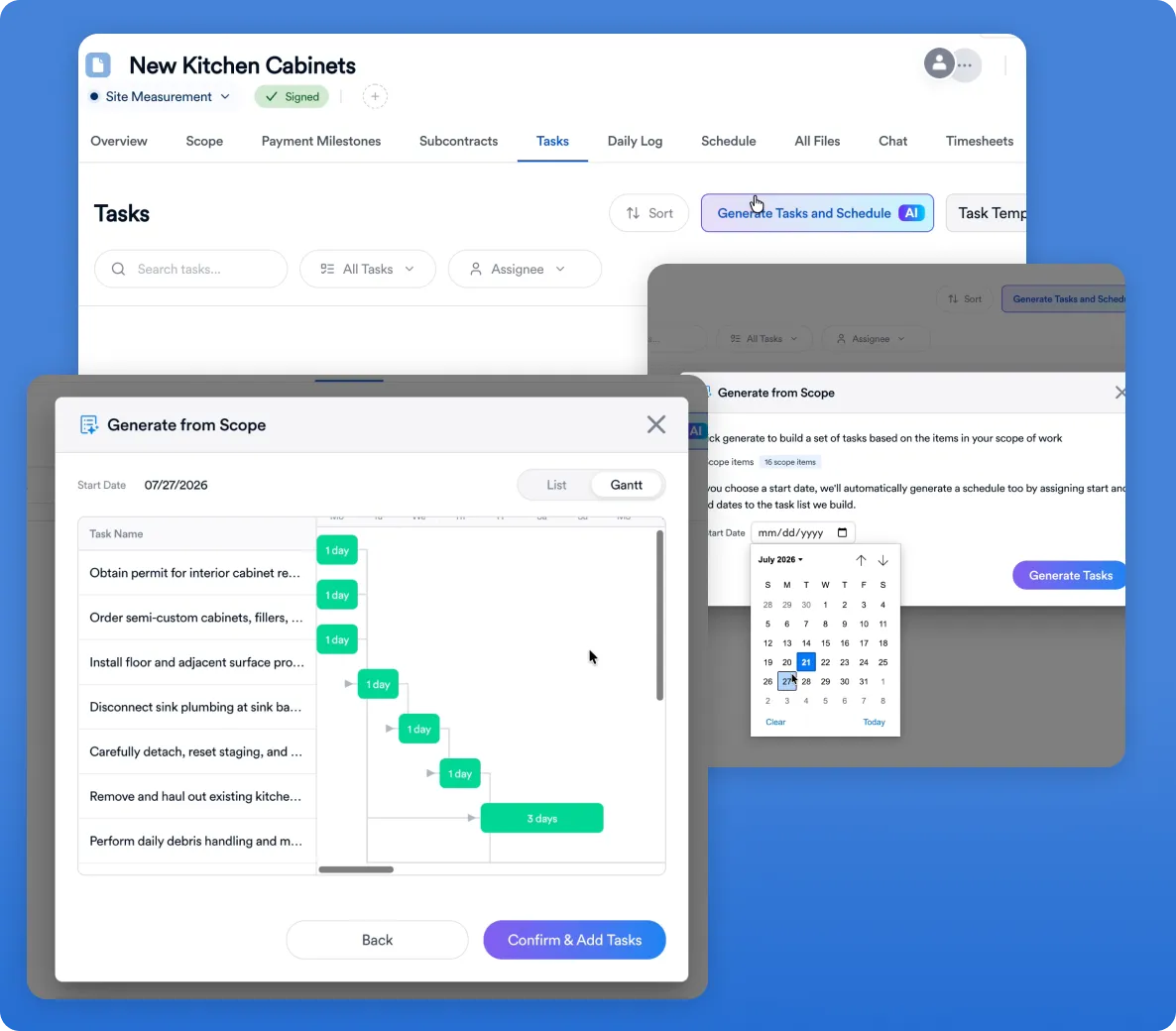
Scheduling is another area where AI can support construction management.
A residential project can involve dozens of activities and multiple trades. One delayed activity can affect several others.
For example, if a material delivery is delayed, the contractor may need to reconsider when a subcontractor starts work. That can affect subsequent activities and potentially change the expected completion date.
AI can help organize schedule information and surface potential conflicts.
It can also assist with creating tasks from project scope and organizing the sequence in which work needs to happen.
But AI-generated schedules should not be treated as automatically correct.
Residential projects are affected by factors that are difficult to predict perfectly, including subcontractor availability, inspections, material deliveries, weather, customer decisions, change orders, and unexpected site conditions.
The contractor needs control over the final schedule.
From calendars to actionable project information
The goal should not simply be to generate another calendar.
Useful AI scheduling should help contractors understand:
- What needs to happen next?
- Which tasks are delayed?
- What information is missing?
- Which activities could be affected by a change?
- Which team members or subcontractors need an update?
- What should the project manager address today?
AI becomes more useful when it helps turn schedule data into actionable project information.
AI for Day-to-Day Project Management
Project management generates information constantly.
There are customer messages, site updates, meeting notes, task lists, photos, documents, schedules, change orders, and financial updates.
The problem is often not a lack of information.
It is having too much of it.
AI can help contractors process that information.
For example, an AI assistant can summarize project updates and help identify items that need attention. It can also help turn notes into more structured information or draft project communications.
Potential applications include:
- Summarizing project activity
- Organizing meeting notes
- Drafting follow-up messages
- Identifying outstanding tasks
- Summarizing project changes
- Creating project status reports
- Helping users find relevant project information
- Turning unstructured information into structured tasks
This can be especially useful for owner-operators.
A contractor may spend the morning visiting job sites and the afternoon handling office work. Reducing the time spent reading, sorting, and rewriting information can create more time for higher-value work.
AI for Contractor and Subcontractor Communication
Communication is one of the most repetitive parts of construction administration.
Contractors may need to send updates about schedules, missing information, changes, site conditions, upcoming work, or customer decisions.
AI can help draft these communications.
A contractor might provide a short instruction such as:
"Let the homeowner know that cabinet installation needs to move to Thursday because the cabinets have not arrived."
AI can turn that into a clear customer message.
The same information could potentially be adapted for different audiences.
A homeowner may need a simple explanation of what changed and why. A subcontractor may need specific scheduling information. An internal project manager may need a task and deadline.
The contractor still controls the message.
AI simply reduces the effort required to produce it.
AI for Daily Logs and Field Documentation
Field documentation is another area where AI can reduce administrative work.
Daily logs need to capture what happened on a jobsite, but contractors do not always have time to write polished reports at the end of every day.
AI can help turn rough notes into clearer documentation.
For residential construction, documentation also matters because jobsites involve real safety and compliance considerations. OSHA maintains specific guidance and standards for residential construction, including resources covering hazards such as falls and other common construction risks.
AI-generated documentation should therefore support—not replace—the contractor's responsibility to maintain accurate records and follow applicable requirements.
The broader workflow remains:
Capture information → organize it → review it → share it.
Here's a demo of daily logs leverage AI for speech to text and polishing edits while in the field.
AI for Change Order Management
Change orders are another area where keeping project information connected matters.
A homeowner may request a scope change after the project has started. The contractor then needs to understand what changed, determine the cost and schedule impact, communicate the change, and document the decision.
AI can assist with organizing the information surrounding a change.
For example, it could help summarize the original scope and the requested change, identify related project information, or draft a communication explaining the change to the homeowner.
The contractor still needs to determine the actual cost and contractual implications.
The value comes from reducing the administrative work surrounding the decision.
This becomes especially important when changes occur across several parts of a project. A scope change may affect not only the estimate but also the schedule, customer communication, subcontractor coordination, and project budget.
Connected construction management software gives contractors a place to manage those relationships.
AI for Construction Financial Management
Financial information is another important part of construction management.
Contractors need visibility into project budgets, costs, payments, profitability, and changes.
AI can help make that information easier to organize and interpret.
For example, AI can help summarize project information or organize financial data so contractors can identify areas that deserve additional review.
Financial information requires particular care, however.
An AI system should not be treated as a replacement for accounting controls or professional financial judgment. Contractors should verify important figures before making financial decisions.
The useful role for AI is to make financial information easier to organize, understand, and act on.
AI-Powered Construction Reporting
Reporting is another administrative task that can consume time without directly advancing construction work.
A contractor may need to report project progress to an owner, internal team, or customer.
AI can help turn project information into summaries.
For example, instead of manually reviewing every task and update to create a weekly status report, an AI-enabled system could help summarize completed work, open tasks, schedule changes, and issues requiring attention.
The contractor can then review and edit the report before sharing it.
This creates a useful pattern for AI in construction:
Collect → summarize → review → act.
The AI handles the information-processing stage.
The contractor remains responsible for the action.
The Value of AI Inside Construction Management Software
A contractor can already use general-purpose AI tools for many individual tasks.
So why put AI inside construction management software?
The answer is context.
A generic AI tool does not automatically know which customer is associated with which project, which estimate belongs to which proposal, or which schedule belongs to which job.
The contractor has to provide that context.
Construction management software already organizes these relationships.
A customer has a project.
The project has an estimate.
The estimate can become a proposal.
The proposal can become an active job.
The job has a schedule, tasks, documents, communications, costs, and financial information.
When AI is connected to this system, it can work with information already present in the project.
That reduces the need for repetitive copying and pasting.
AI with project context
Context is what separates a generic AI assistant from a construction-specific workflow.
A general AI tool may be able to write a professional email.
Construction management software can potentially give that AI the information needed to make the email relevant to a specific project.
The same principle applies to estimates, schedules, reports, and other project information.
The more relevant context the system has, the less manual preparation the contractor needs to do before using AI.
Connected construction workflows
Residential construction is a connected process, where decisions made at one stage directly affect what happens next. Sales feeds into estimating, estimates become proposals, and approved proposals shape project setup, scheduling, and execution. As work progresses, those same decisions ultimately show up in project costs, margins, and overall financial performance.
That connection is what makes AI particularly useful in construction management. Instead of applying AI to isolated tasks, contractors can use it across the workflow—turning project information from one stage into useful inputs for the next.
This is why the category matters. The future of construction AI may be less about finding a separate AI tool for estimating, scheduling, documentation, and financial tracking, and more about building a connected construction management workflow where AI can assist throughout the entire project lifecycle.
What to Look for in AI Construction Software
Not every product labeled "AI construction software" will provide the same value.
Contractors should evaluate the workflow around the AI, not just the AI feature itself.
AI connected to project data
AI becomes more useful when it can work with the actual information associated with a customer and project.
Multiple construction workflows
Estimating alone does not manage a construction company.
Look for software that can support areas such as CRM, proposals, scheduling, project management, and financials in addition to estimating and takeoffs.
For a broader evaluation, see Eano's guide to the best construction management software for general contractors.
Human review and control
AI should support the contractor rather than remove their control.
Important outputs should be reviewable and editable before they are used.
This is consistent with the broader principle behind NIST's AI Risk Management Framework, which emphasizes managing AI risks and incorporating trustworthiness considerations into the design, development, deployment, and use of AI systems.
For contractors adopting AI, this means treating AI output as something to evaluate in context rather than automatically accepting every recommendation.
Less duplicate data entry
If contractors still have to copy information from one system into another, some of the productivity benefit is lost.
Residential construction workflows
Residential GCs have different needs from large commercial construction organizations.
The software should fit the way small and mid-sized residential contractors actually operate.
Practical AI applications
A flashy AI feature is not necessarily useful.
The better question is whether it saves time, reduces administrative work, improves visibility, or helps the contractor make better decisions.
A connected system rather than an AI add-on
The strongest use cases are not necessarily the ones with the most impressive AI demonstrations.
They are the ones that eliminate work across the entire process.
A contractor should be able to see how information moves from lead to estimate, estimate to proposal, proposal to project, and project to schedule and financial management.
That is where AI becomes part of construction management rather than simply another software feature.
Limitations of AI in Residential Construction
AI has significant potential, but contractors should understand its limitations.
AI can misinterpret information. It can produce incorrect conclusions. It can miss project-specific context.
Construction also involves real-world conditions that cannot always be represented completely in digital data.
A plan may not show an existing condition discovered during demolition. A subcontractor may become unavailable. A customer may change the scope. A material may arrive late.
No AI system can eliminate these uncertainties.
AI still requires contractor oversight
AI should be treated as an assistant, not an autonomous project manager.
The contractor remains responsible for reviewing important information and making decisions based on experience, project conditions, and business requirements.
This is particularly important for estimates, schedules, contracts, change orders, safety-related information, and financial information.
Construction context cannot always be automated
Residential construction involves judgment.
Two projects with similar plans can still have different conditions, customers, subcontractors, or site constraints.
AI can process available information, but it cannot guarantee that every real-world condition has been captured.
Contractors should therefore use AI to support expertise rather than attempt to replace it.
Data and security considerations
Before adopting AI construction software, contractors should understand how the provider stores and processes project documents, customer information, financial data, and other business records.
Companies should also consider what information employees are permitted to enter into third-party AI tools.
NIST's AI Risk Management Framework provides a useful authoritative reference for organizations thinking about AI risk, trustworthiness, and responsible deployment.
The right AI strategy includes both productivity and responsible data management.
Getting Started With AI in a Construction Business
Contractors do not need to automate everything at once.
A better approach is to identify repetitive tasks that consume significant administrative time.
Identify repetitive administrative work
Start by asking:
What work do we repeatedly do that does not require a contractor's judgment?
That could include summarizing project updates, drafting routine communications, organizing customer information, preparing reports, or processing plan information.
These are often good starting points because AI can assist without taking over the contractor's decision-making role.
Start with high-value use cases
The best starting point is not necessarily the most advanced AI feature.
Choose a workflow where reducing manual work would have a clear operational benefit.
For one contractor, that might be estimating.
For another, it could be daily logs, customer communication, scheduling, or project reporting.
The right starting point depends on where the company currently spends the most administrative time.
Integrate AI into existing workflows
Once a useful application has been identified, consider whether it belongs inside the company's existing construction management workflow.
If employees have to export information from one platform, upload it to an AI tool, copy the result into another application, and then manually update the original project, the workflow may not be as efficient as it appears.
Integrated AI can reduce those handoffs.
The goal is not to collect as many AI tools as possible.
The goal is to create a workflow where technology handles more repetitive work while the contractor stays focused on construction decisions.
The Future of AI and Residential Construction Management
The most important development in AI for residential construction may not be any single feature.
It is the shift toward intelligent construction management software.
Historically, construction software helped contractors digitize processes that were previously managed with spreadsheets, paper documents, email, and disconnected applications.
AI adds another layer.
Instead of simply storing project information, software can increasingly help contractors interpret it, organize it, summarize it, and act on it.
That creates a potential workflow like this:
Lead → Estimate → Proposal → Schedule → Project → Financials → Reporting
AI can assist at each stage.
The value comes from keeping those stages connected.
For a small-to-mid-sized residential GC, that can be more meaningful than having a collection of individual AI tools that each solve one narrow problem.
The category is therefore moving beyond individual AI features toward AI-powered construction management software—platforms where AI supports multiple parts of the project lifecycle.
That is the direction Eano takes with AI construction software, bringing AI capabilities into a broader construction management platform.
For contractors exploring where AI fits into their operations, the most useful question may not be, "What AI tool should I buy?"
It may be:
"Which parts of my construction management workflow can AI help me run better?"
That shift—from isolated AI features to connected construction management—is where the practical value of AI for residential contractors becomes clearer.