

Flooring Contractor Software: Running Installs, Crews, and Margins in One System
Flooring contractor software should match which side of the business you are on. Flooring dealers and showrooms need inventory, purchasing and point-of-sale. Installation contractors need measure, estimate, schedule, job costing and invoicing on one record, so every job shows its real margin per square foot. Most buying mistakes come from an installer buying dealer software, or a dealer trying to run inventory in a project tool.
This guide covers the operations side of a flooring installation business: the must-have features, scheduling installs around other trades, material and delivery tracking, job costing per square foot, the tools contractors commonly compare, and how to choose by team size. For the estimating side specifically, see our dedicated guide to flooring estimating software for growing installation teams.
Key takeaways
- Installer or dealer? Decide first. Inventory and showroom tools are a different category from installation job management.
- Waste factor, room measures and delivery dates drive more margin than any other inputs.
- Track job cost per square foot. It is the number that tells you which job types and crews make money.
- Choose by team size. A two-person crew and a 25-person installer need different levels of scheduling and reporting.
Installer vs. dealer software
The flooring industry has two very different business models that often get lumped together in software roundups:
If you sell product from a showroom and also install, you may need both: a dealer system for inventory and orders, and a job management platform for installs, connected through accounting. If you are a pure installer buying material per job, you probably do not need a flooring ERP at all.

The market: why operations matter more in a flatter year
Flooring installers depend heavily on remodeling. Harvard's Joint Center for Housing Studies expects that "Year-over-year growth in renovation and repair spending is expected to slow to just 0.5 percent in the second quarter of 2027" (Harvard JCHS, Remodeling Spending Poised for Further Slowdown). When spending flattens, the installers who protect margin are the ones who quote quickly, schedule tightly and know their cost per square foot.
Software adoption is broad but shallow. In Houzz's 2025 survey, "Nearly three-quarters of construction businesses of all sizes (74%) report using AI regularly in at least some parts of their workflow. However, only 28% say they use it across many or all areas of their business," and businesses using AI "save more than three hours a week" on average (Houzz, 2025 U.S. State of AI in Construction & Design; Houzz sells Houzz Pro, a competing product). Most contractors use software for a task or two. The gains come from connecting the whole job.
Must-have features for a flooring installation business
1. Room measures and waste factor
Every flooring estimate starts with measured rooms and a waste factor that depends on the material and layout. A straight lay of luxury vinyl plank in a rectangular room needs less overage than a diagonal tile layout or a herringbone hardwood pattern with many cuts. Your software should store measures per room and apply waste by material and pattern, not as one flat percentage for the whole job.
These are illustrative starting points. Confirm with the manufacturer's installation instructions and your own job history, and adjust for room shape.
For tile jobs, our tile and grout calculator handles the quantities quickly.
2. Estimating (in brief)
Estimating for flooring covers material, underlayment, prep (leveling, moisture mitigation, demo and haul-off), transitions and trim, and labor by square foot or by task. We cover it in depth in our flooring estimating software guide. For operations, the key requirement is that the approved estimate becomes the job budget automatically, so job costing starts on day one.
3. Delivery and material tracking
Flooring installs often fail on material, not labor: the wrong lot, a short shipment, a backordered transition, or acclimation time that was never scheduled. Your software should record what was ordered for each job, the expected delivery date, the lot number when it arrives, and any acclimation period the manufacturer requires before install.
4. Scheduling around other trades
Flooring is usually one of the last trades in. You are waiting on drywall, paint and cabinets, and the GC or homeowner's schedule moves constantly. You need a calendar that shows crews, jobs and dependencies, and that makes rescheduling fast.
5. Job cost per square foot
This is the number that tells you what is working. Track labor hours, material and subs against each job, then divide by installed square feet.
6. Change orders and invoicing
Subfloor problems are the most common flooring change order: a soft spot, a moisture issue, an out-of-level slab. Price it, get it signed and bill it before you level a single bag. See how change orders work in Eano Pro.
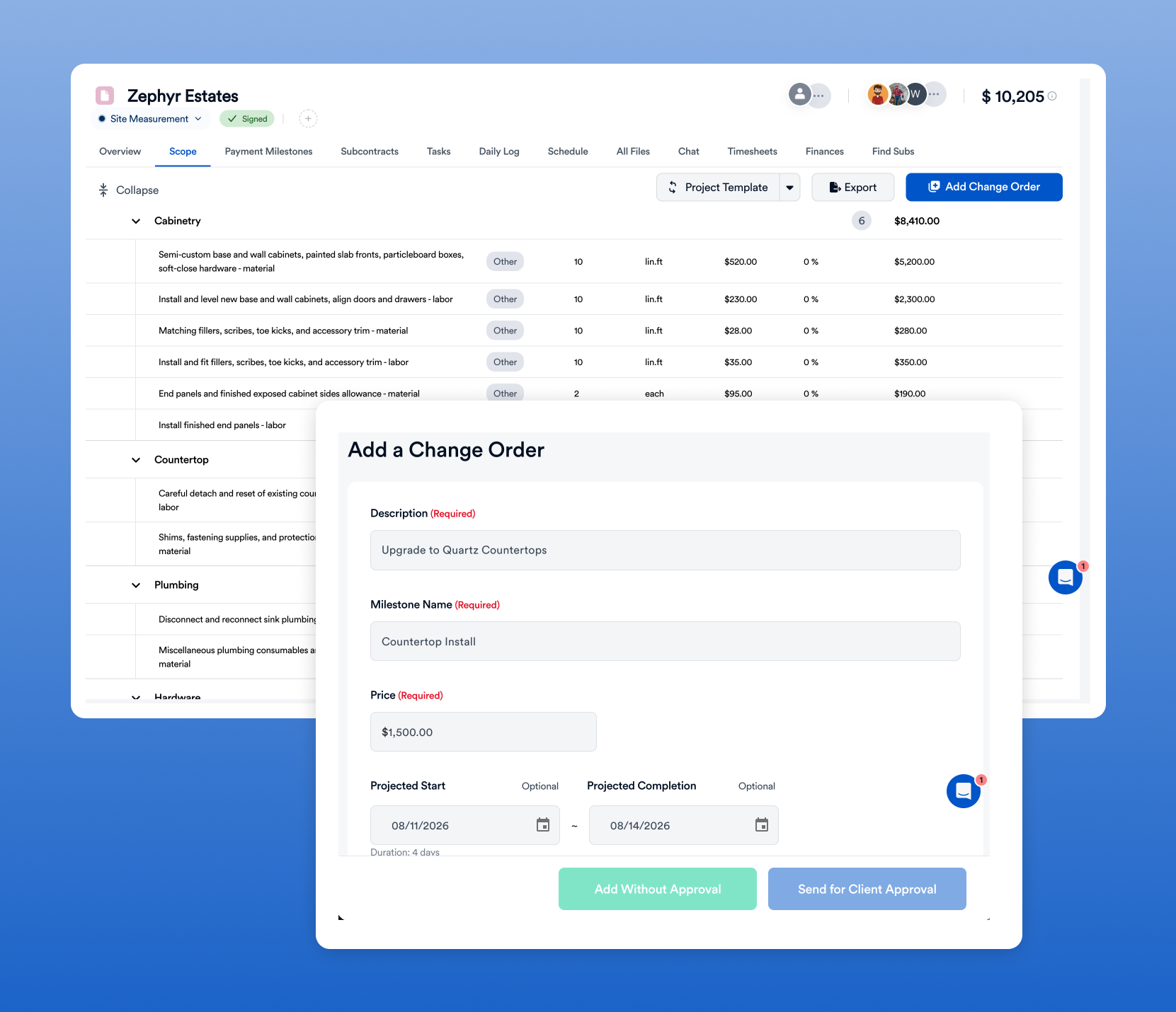
Subfloor and prep: where flooring margins go
Ask any experienced installer where jobs lose money and the answer is usually under the old floor. Prep work is hard to see at the estimate, easy to underprice, and often skipped in the paperwork when it shows up. Your software should make prep a visible, priced part of every job:
A simple contract habit makes these painless: list unit prices for common prep items (per bag of leveler, per sheet of subfloor, per door undercut) in the proposal. When the condition appears, the change order is just a quantity, the client already agreed to the price, and the crew does not have to stop and wait.
Working as a sub to GCs and builders
Many flooring installers get a large share of their work from general contractors, remodelers and builders. That changes what software has to do. You need to receive the GC's scope and schedule, send a bid in their format, track their purchase order, and invoice against it, often with retainage.
- Bid by GC: keep a client record for each GC with their preferred terms and markup.
- Schedule changes: GCs move dates often; log every change with the date it was communicated.
- Back charges: document site conditions and damage with photos at arrival so you are not blamed for another trade's mess.
- Retainage: track amounts held back per job and invoice them at closeout.
- Payment follow-up: see which GCs pay slowly and price that into your bids.
Worked example: job cost per square foot (illustrative)
All numbers are illustrative. A 1,200 sq ft LVP install in a remodel, straight lay, with leveling in the kitchen:
Two lessons from this example. First, the leveling overrun should have been a change order: it was a subfloor condition, not an estimating error, and a signed change order for $550 plus labor would have recovered most of the gap. Second, if demo of bonded tile runs long on every remodel, your demo production rate is wrong, and every future estimate needs it adjusted. You only see these patterns when every job is costed the same way.
Flooring contractor software compared
These tools are commonly evaluated by flooring businesses. We have not verified every feature or price; confirm on each vendor's site and in a demo with your own job. Prices as of [DATE].
Common pairing: a measure tool for complex floor plans plus a job management platform for everything after the measure. Check that measures can move into the estimate without retyping.
Eano Pro pros: one record from estimate to invoice; AI-assisted estimating; change orders and e-signature; time tracking by job; QuickBooks-connected job costs. Cons: it is not a dealer ERP, so showrooms with inventory still need an inventory system.
Level X Flooring: from 5–10 hours per proposal
Jason Correia owns Level X Flooring, a 5–10 person flooring company in Los Angeles. Before Eano Pro, he estimated with spreadsheets, Word documents and manual calculations. “It wasn’t just writing the estimate — it was formatting it, pricing it, organizing it. I was spending five to ten hours on a single proposal.”
He chose Eano Pro to bring scopes, proposals and pricing into one system: “Eano felt like it was built for contractors who actually run jobs. Not just accounting — real job management.” The story page reports that he saved 5–10 hours per estimate. As he puts it: “When you multiply that time savings across multiple bids per week, it’s huge.”
His next step is the operations side this article covers. The story lists his plans to expand into full project financial tracking, team time tracking and integrated invoicing and payments, with the goal of "one system from estimate to closeout." In his words: “If estimating is this efficient, I’m excited to see what happens when the whole company runs on it.”

Residential vs. commercial flooring work
Most small and mid-size installers are mainly residential with some light commercial. If commercial is growing, test plan-based takeoff and PO billing before you commit. Eano Pro's AI takeoff measures areas from plan PDFs and feeds them into the estimate.
What a flooring proposal that closes includes
- Scope by room with square footage, product, color and layout.
- Options: good/better/best product lines priced from the same measure, so the client chooses without a second visit.
- Prep and exclusions: what leveling and demo are included, plus unit prices for extra prep.
- Furniture and appliance moving: included or excluded, stated plainly.
- Schedule assumptions: delivery, acclimation and install dates.
- Payment terms and a deposit collected at signing.
- E-signature so the client can approve from a phone.
Jason Correia's 5–10 hours per proposal came largely from rewriting scopes and reformatting documents. A proposal tool that builds the client document from the estimate removes most of that work.
Where AI fits in a flooring business
AI is most useful in the parts of the job that are repetitive writing and arithmetic: drafting the scope from your notes or a walkthrough video, organizing line items by room, and writing the client email. Eano Pro's AI estimate generator drafts estimates from a description, photos or video. It does not replace your measurements, your judgment on subfloor conditions or your pricing. Treat the draft as a starting point, check quantities against your measure, and price from your own cost items.
Choosing by team size
Scheduling installs: a practical setup
- One calendar for all crews, color-coded by crew, with the job address and scope on each entry.
- Delivery and acclimation as tasks that must be complete before the install task can start.
- Prep as its own task (demo, leveling, moisture testing) so a delay shows up before install day.
- Notifications to the GC or homeowner when the install date is confirmed or moved.
- Clock-in by job so hours land on the right job for costing.
Eano Pro's construction scheduling and timesheets cover these steps, and hours roll into the job budget.
Example: one week for a three-crew installer (illustrative)
Here is what a well-run schedule looks like for a small installer with three crews. The point is that prep, delivery and acclimation appear as tasks, so a problem shows up days before install, not on install morning.
Moving your data over
You do not need to migrate years of history to get value from new software. Bring over your active clients, open estimates you expect to close, your material and labor cost items, and your proposal templates. Finish jobs already in progress in your old system. Keep the old system read-only for a few months for reference, then export what you need and close it. The goal is a clean start on new work, not a perfect archive.
Material, delivery and acclimation checklist
- Order recorded on the job with product, color, quantity (with waste) and lot number.
- Delivery date and location confirmed with the client or GC.
- Acclimation period scheduled per the manufacturer's instructions.
- Material inspected on arrival; shortages and damage logged with photos.
- Leftover boxes recorded for the client or returned for credit.
Bilingual crews and field adoption
Many flooring crews work primarily in Spanish or another language. If job notes, change orders and tasks only appear in English, crews skip the app and the office goes back to texting. Check whether the mobile app shows tasks and notes in the crew's language and whether estimates can be produced in a second language for clients. The easiest test is to give the app to one installer for a week and see what they actually use.
The five numbers to review every month
- Cost per installed sq ft by job type (LVP, tile, hardwood, carpet). Is any type consistently over estimate?
- Gross margin per job and the average across the month.
- Proposal turnaround time from measure to sent proposal. Level X's 5–10 hours per proposal is a useful reminder of what slow looks like.
- Win rate on sent proposals, by lead source.
- Unbilled change orders and open receivables, especially from GCs.
If your software cannot show these without exporting to a spreadsheet, it is not doing the job-management part of its job. Our profit margin calculator helps translate markup into margin when you set pricing targets.
Common mistakes when choosing flooring software
- Buying dealer software as an installer. You pay for inventory and POS you never use, and job management is an afterthought.
- Buying three tools for one workflow. A measure app, a quoting app and a scheduling app that do not share data means retyping on every job.
- Skipping time tracking. Without hours by job, cost per square foot is a guess.
- Ignoring the GC workflow. If half your work comes from GCs, test purchase orders, retainage and back charges.
- Deciding on a demo, not a trial. Run real jobs through the tool before committing for a year.
QuickBooks and accounting
Most flooring contractors keep QuickBooks for accounting. The question is whether job costs flow back to the job. With Eano Pro's QuickBooks integration, expenses can sync and be assigned to projects, so material invoices and sub bills show up in the job's budget-vs-actual view without a spreadsheet.
Implementation: the first 30 days
- Week 1: load material costs, labor rates by task, waste rules and two or three estimate templates (LVP whole-house, tile bath, hardwood refinish).
- Week 2: send every new estimate from the new system. Track time from measure to sent proposal.
- Week 3: schedule new jobs and have crews clock in by job on the mobile app.
- Week 4: review cost per sq ft on the first completed jobs and adjust production rates.
Questions to ask in every demo
- Is this built for installers, dealers, or both? Show me my side.
- Can I store measures by room and apply waste by material and pattern?
- Does the approved estimate become the job budget automatically?
- Can I track deliveries and acclimation as tasks before install?
- Can crews clock in by job from a phone, in their language?
- Can I see job cost per square foot by job type?
- How does QuickBooks sync work, and in which direction?
- What is the total yearly cost for my team, with add-ons and payment fees?
Bottom line
Flooring contractor software pays off when it connects the measure, estimate, schedule, delivery and job cost on one record. Decide whether you need installer or dealer software, then test your shortlist with a real job and look at cost per square foot at the end. See how Eano Pro works for flooring contractors.



.png)