

Fence Estimating Software: Turning Linear Feet, Posts, and Gates Into Accurate Bids
Fence estimating software turns two numbers, linear footage and the count of posts and gates, into a priced bid: posts, rails, pickets, concrete, hardware and labor, with your markup applied. The best tools also send the bid as a signable proposal and keep change orders on the same record, because fence jobs change on site more often than most contractors price for.
This guide shows the math a fence bid is built on, walks through an illustrative 300 ft cedar privacy fence with two gates, compares the main types of tools, and explains when a free template is enough. If you just need a starting spreadsheet, grab our free fence estimate template. If you are ready to move past spreadsheets, read on.
What fence estimating software calculates
Every fence bid rests on the same chain of calculations. Software is valuable when it runs the whole chain from one input, so changing the footage or the post spacing updates everything else:
- Linear footage by run, minus gate openings.
- Sections and posts: footage ÷ post spacing, plus end, corner and gate posts.
- Rails: rails per section × sections.
- Pickets or panels: footage ÷ picket width (plus gap), plus waste.
- Concrete and gravel per post hole, based on hole diameter and depth.
- Hardware: gate kits, brackets, fasteners.
- Labor by production rate: posts per hour, feet of infill per hour, gates.
- Extras: removal of the old fence, haul-off, permits, slope or rock allowances.
Rules of thumb from installation guides belong in your assemblies. For example, a Lowe's installation guide tells installers to "Add 4" of gravel base to the bottom of the post hole," and for rails says, "Typically you’ll need one for each 2' of post height" (Lowe's, Wood Fence Installation Tips: Installing Posts and Pickets; Lowe's sells fence materials, so treat it as a manufacturer-side source). Post depth and spacing are set by local code, frost depth and the product you install, so confirm them for every market you work in.
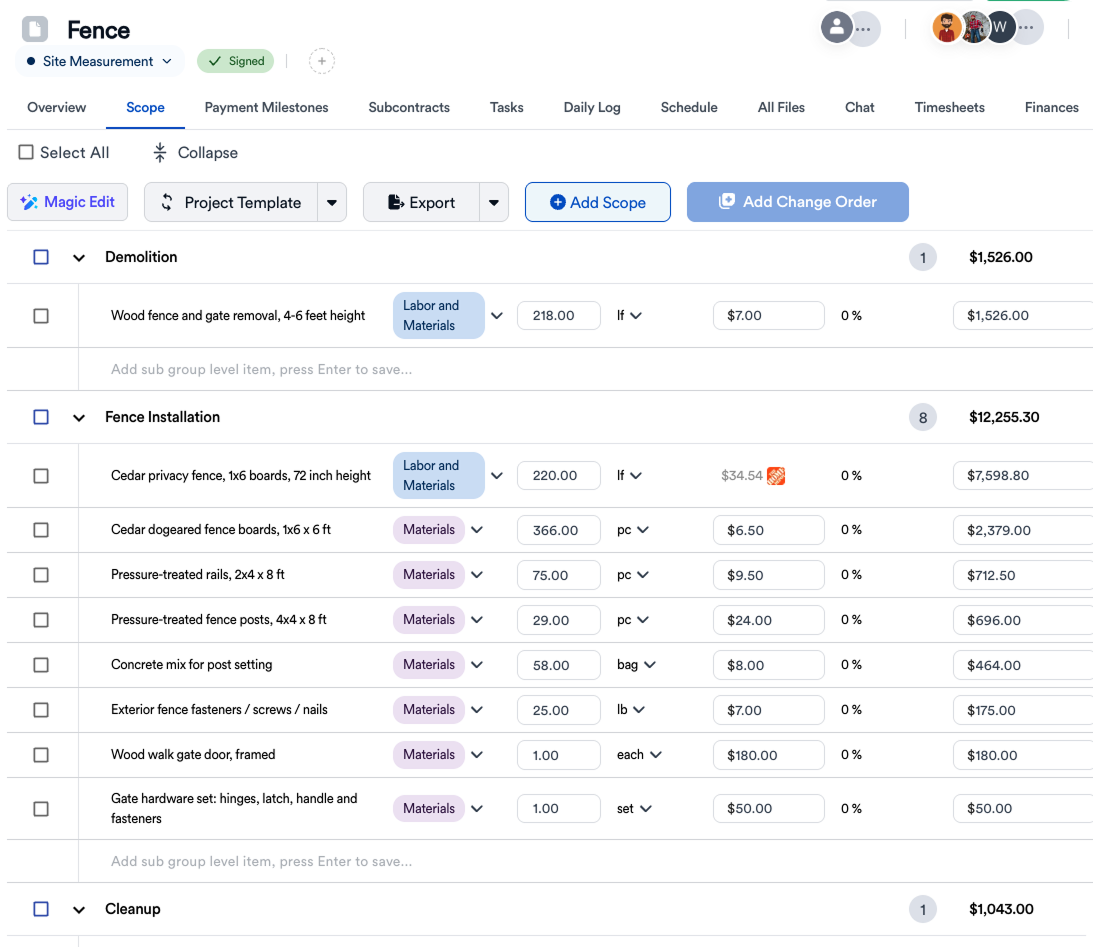
Worked example: 300 ft of 6 ft cedar privacy fence with 2 gates (illustrative)
All prices below are illustrative. Use your own supplier and labor numbers. Assumptions: 300 ft total run including two 4 ft walk gates (292 ft of fence), posts at about 8 ft on center, 38 sections, three rails per section for a 6 ft fence, 5.5 in pickets installed tight for privacy, and 10 in diameter holes 30 in deep.
How the quantities were derived:
- Posts: 38 sections need 39 posts on a continuous run, and the two gates add 2 more, for 41 posts. Four of them are heavier 6x6 gate posts.
- Rails: 38 sections × 3 rails = 114 rails.
- Pickets: 292 ft × 12 in ÷ 5.5 in = 637 pickets, plus 5% for culls and cuts = 669.
- Concrete: a 10 in × 30 in hole holds about 1.15 cu ft after subtracting the post. At about 0.375 cu ft per 50 lb bag, that is 4 bags per post.
- Labor: production rates are the biggest variable. Track your real rates by soil type, then load them into the software.
Changing one input shows why software beats a hand calculation. Switch the spacing from 8 ft to 6 ft for a windy site and you add about 12 posts, more concrete, more rails and more labor, which a spreadsheet only catches if every formula is linked correctly. In a tool with assemblies, it updates in one step. Eano Pro can also draft this kind of estimate from a typed or spoken scope with its AI estimate generator, then you price it with your own costs.
Residential vs. commercial fence bids
Residential fence companies usually win on speed and clarity: whoever sends a clean, signable proposal the same day often gets the job. Commercial fence work rewards takeoff accuracy against plans and careful exclusions.
Fence estimating tools compared
These tools come up most often in fence estimating searches. We have not verified every feature or price; confirm on each vendor's site and in a demo.
Pros of fence-specific tools: fence-style libraries and drawing tools out of the box.
Cons: you may still need separate tools for scheduling, change orders and job costing.
Pros of an estimate-to-job platform like Eano Pro: one record from bid to invoice.
Cons: you build your fence assemblies yourself during setup.
Change orders on fence jobs
Fence jobs change on site: the client moves a gate, adds a section along the side yard, or the crew hits rock on the third post. If those changes live in a text thread, they rarely get billed in full.
Mehdi Jabri runs MJ Modern Stairways in Fremont, CA, a 5–10 person company that builds staircases, railings, fences and gates. Before moving to Eano Pro, he says, “Change orders were one of the biggest headaches. Things would slip through the cracks.” Now, “With Eano, everything lives in one system — the scope, the change order, and the invoice.” He adds: “That’s where the real impact is — getting paid faster.”
- Write the change on site with photos.
- Price it from the same fence assemblies as the original bid.
- Get the client's e-signature before the crew builds it.
- Bill it on the next invoice automatically.
See how change orders work in Eano Pro.

Per-foot pricing vs. line-item bids
Many residential fence companies quote a per-foot price because homeowners understand it. In the example above, the job works out to about $47.57 per linear foot. That number is useful for a quick ballpark on the phone, but it hides the parts of the job that do not scale with footage:
- Gates cost far more per foot than fence sections because of heavier posts, hardware and labor.
- Corners and short runs add posts without adding much footage.
- Removal of the old fence and haul-off can add a meaningful amount per foot.
- Rock, roots and slopes change post-setting time more than anything else.
The practical approach: build the bid line by line in your software, then show the client a per-foot price and separate lines for gates and extras. You keep the accuracy, and the client gets a number they can compare.
Five fence estimating mistakes software should catch
- Forgetting the extra gate posts. Each gate opening needs posts on both sides, and those posts are usually heavier.
- Flat waste on every style. Shadowbox and board-on-board layouts use more pickets than a tight privacy fence. Waste should follow the style.
- Wrong concrete math. Hole diameter and depth drive bags per post. Deeper frost depths change the whole concrete line.
- No allowance for hidden conditions. Write a rock or root allowance and an exclusion into every bid.
- Change orders billed late. A moved gate or extra section should be priced and signed before it is built.
Template or software?
A template is enough if you install one or two fence styles, bid a handful of jobs a month, and one person does every estimate. Our fence estimate template covers that. Move to software when any of these is true:
- You bid more than a few fences a week, and quote speed is costing you jobs.
- More than one person estimates, and prices are drifting.
- You lose track of change orders or bill them late.
- You want to know which fence styles and crews actually make money.
- You are paying for several tools that do not talk to each other (see the hidden cost of building your own estimating system).
Setup checklist for fence estimating software
- Load your material costs by style: posts, rails, pickets or panels, concrete, hardware.
- Set your loaded labor rates and production rates (posts per hour, feet of infill per hour, gates).
- Build one assembly per fence style and height.
- Add standard extras: old fence removal, haul-off, permit, rock allowance, slope adjustment.
- Write your exclusions once: property line surveys, utility locates, HOA approval.
- Run three past jobs through the tool and compare with what they actually cost.
Bottom line
Fence estimating is simple math done many times under time pressure. Software pays off when it runs the whole chain from footage to price, sends a clean proposal the same day, and keeps change orders on the same record. See how Eano Pro works for fence contractors.



.png)