
Pool Construction Software: Running a Pool Build From Estimate to Final Draw
Pool construction software has to run a build that moves through fixed phases, from excavation to plaster, with inspections and payment draws between them. The right tool keeps the estimate, contract, phase schedule, subcontractors, change orders and draw invoices on one record, so you know where every job stands and what you are owed.
This guide covers what pool builders need from software, a phase-by-phase workflow, an illustrative draw schedule, pool-only tools vs. general construction platforms, and how one New Jersey pool builder chose after five or six demos. For day-to-day workflow tips, see our posts on managing pool projects from dig to fill and keeping crews and subs aligned.
Disclosure: Eano makes Eano Pro, one of the tools discussed here. We list where other tools fit better, and every vendor price is dated or marked for verification. Last reviewed: [DATE]. Reviewed by: [CREDENTIALED TRADE REVIEWER: name, license #, years in trade].
What pool construction software must handle
- Estimating with options: shell size and shape, finish, tile and coping, decking, equipment packages, spa, lighting and automation.
- Contracts and e-signature: the signed estimate becomes the contract with a draw schedule attached.
- Phase scheduling: excavation, steel, plumbing and electrical, shotcrete, tile and coping, deck, plaster and startup, with inspections between them.
- Subcontractor coordination: most builders sub out several phases, so subs need dates, scope and updates.
- Change orders: upgrades and site conditions (rock, water, access) priced and signed before work proceeds.
- Draw invoicing: bill each milestone as it is reached, and see what is outstanding.
- Job costing: actual costs synced from accounting and compared with the estimate per job.
Phase-by-phase workflow
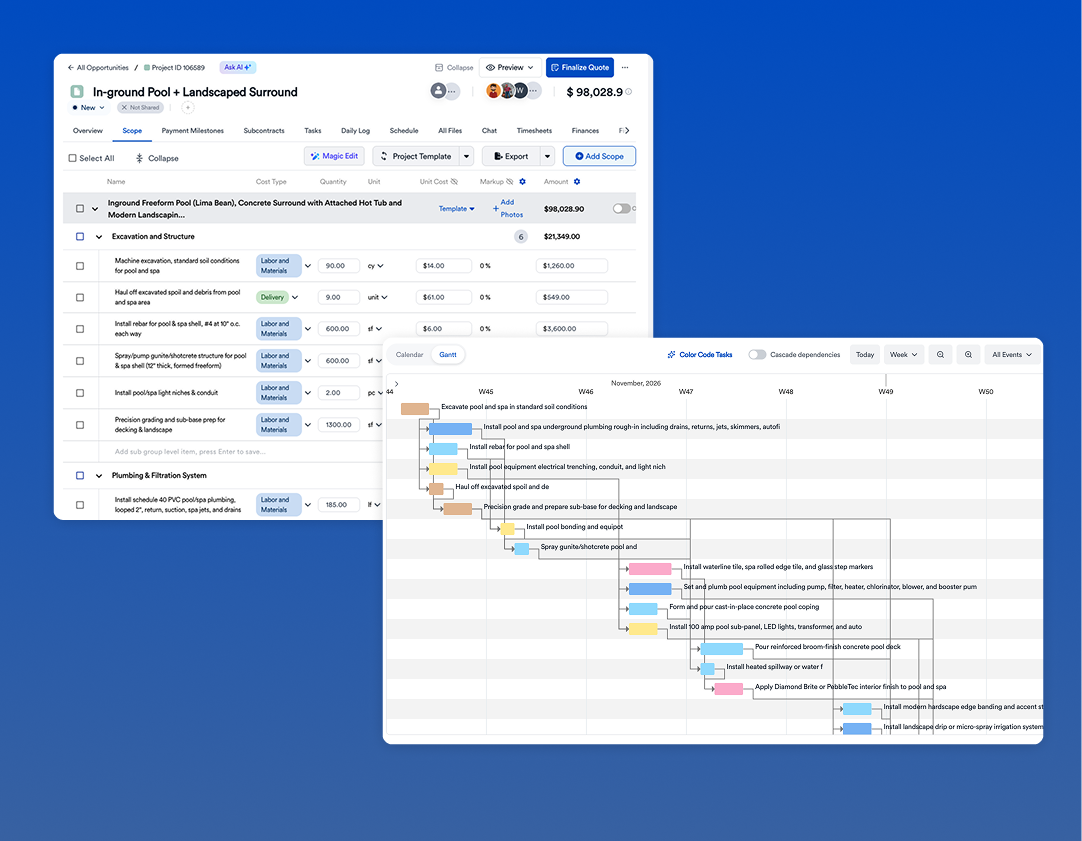
Here is how a typical in-ground concrete pool moves through the system. Phase order and inspections vary by market, so set this up to match your local process.
The point is not to track every task. It is to know, for every job, which phase it is in, what is blocking the next one, and which draw you can bill. Our post on moving pool construction from spreadsheets to modern tools covers the transition.
Estimating a pool: options without rebuilding the estimate
Pool clients rarely buy the base package. They add a spa, upgrade the interior finish, choose a larger deck or add automation. If each option means a new estimate, sales slows down and mistakes creep in. Good software keeps one estimate with optional lines the client can select on the proposal.
Every number above is illustrative. The structure is the point: one base estimate built from templates, with each upgrade as a priced, optional line. When the client selects options on the proposal, the contract, draw schedule and job budget should update with them.
Templates make this fast. According to the Good Guys Pools story, the team now generates the majority of its estimate scope from its own template library, then adjusts the scope and pricing for the job in front of it.
Draw schedules: an illustrative example
Draws keep cash moving on a build that can take weeks or months. The schedule below is illustrative for an $85,000 in-ground pool. Your percentages should follow your contract, local rules and lender requirements.
Two habits keep draws clean. First, tie each draw to a milestone the client can see, such as an inspection pass with photos, not a date. Second, bill change orders as their own line on the next draw instead of waiting for final payment. Software that generates the draw invoice from the contract schedule removes most of the follow-up calls.
Pool-only tools vs. general construction platforms
Coordinating subcontractors across phases
Most pool builders sub out at least some of steel, plumbing, electrical, shotcrete, tile and plaster. Each sub needs three things: the date, the scope, and word as soon as the prior phase passes inspection. When that lives in phone calls and texts, one late inspection result can leave a shotcrete crew idle or a site unprepared.
- Shared schedule: subs see their dates and get notified when a dependency moves.
- Scope on the job: plans, selections and change orders attached where the sub can see them.
- Photos at handoff: each crew documents its phase before the next one starts, which also supports the draw invoice.
- Sub costs on the job: sub invoices are assigned to the job so job costing stays current.
We go deeper on this in how pool builders keep crews, subs and schedules aligned.
Tools compared
These are the tools pool builders commonly evaluate. We have not verified every feature or price. Confirm on each vendor's site and in a demo. Prices as of [DATE].
Eano Pro pros: one record from estimate to draw invoice, AI-assisted estimating, QuickBooks sync. Cons: it is not a 3D pool design tool, so design-led builders may pair it with one.
Good Guys Pools: choosing after five or six demos
Good Guys Pools is a pool construction and service company in Northern New Jersey with a team of 15–45 people, including subcontractors on larger projects. Partner Dror Iakob sat through demos of five or six platforms before choosing Eano Pro (read the full Good Guys Pools story).
The problem he kept running into was specialization: “One was very good in estimation. One was very good in project management on the field. One was very good in the financial side, the QuickBooks integration.” His conclusion: “At the end of the day, you need to integrate everything together, or to find one system or two.”
He is candid about the trade-off: “It’s not 100% perfect on everything, but it’s giving the best overall answer to all those subjects I was looking for – with a relatively affordable cost.” What he values most is visibility: “The main thing is visuality: to see all the projects in one place, to know how much I was supposed to pay, how much I did pay, if my project was profitable or not profitable, where I'm standing in the project at the time.”
On estimating, the team uses AI to start and people to price: “I do use the AI estimation mainly to build the projects.” Then, “After that, I do need to adjust the prices in a lot of cases. Some are perfectly fine, correct.” According to the story page, the company has created 162 projects in Eano Pro and built more than 12,500 estimate line items.
Job costing: is each pool making money?
A pool can look profitable on the contract and lose money in the field: an extra day of excavation for rock, a second haul-off, a re-shoot, a tile sub that bills more than quoted. Job costing compares each cost bucket with the estimate while the job is still running.
The excavation overrun is the kind of cost that should become a change order or a site-condition allowance on future bids. Dror's goal of knowing "if my project was profitable or not profitable" depends on expenses landing on the right job. In Eano Pro, QuickBooks expenses can sync and be assigned to projects, so the comparison is ready without a spreadsheet.
When to switch
Pool builders are seasonal, and switching in the middle of peak season is painful. The cleanest path is to set up templates, cost items and draw schedules in the slow months, run new estimates in the new system first, and let jobs already under construction finish where they are. Moving one estimator and one project manager first, then the field team, keeps the change manageable. Good Guys Pools moved to an annual plan with eight seats six weeks after signing up, with estimating, admin, project management and field users all working in the platform, according to its story page.
What the industry data says about adoption
Pool builders are not alone in moving to software. In Houzz's 2025 survey of U.S. construction and design professionals, "Nearly three-quarters of construction businesses of all sizes (74%) report using AI regularly in at least some parts of their workflow. However, only 28% say they use it across many or all areas of their business" (Houzz, 2025 U.S. State of AI in Construction & Design; Houzz sells Houzz Pro, a competing product). The gap between using a tool for one task and running the business on it is the same gap Dror described.
The market backdrop matters too. Harvard's Joint Center for Housing Studies expects that "Year-over-year growth in renovation and repair spending is expected to slow to just 0.5 percent in the second quarter of 2027" (Harvard JCHS). With spending flattening, faster proposals and fewer billing gaps are a practical way to protect margin.
How to choose: a demo checklist
- Build one of your recent pools live in the demo, with options and an equipment package.
- Ask how the signed estimate becomes the contract and draw schedule.
- Have the vendor create a change order for an upgrade and add it to the next draw.
- Check how subs see their dates and scope.
- Check QuickBooks: which way does data flow, and can expenses be assigned to a job?
- Ask what happens to pool service work if you also do service.
- Get the total yearly price for your seat count, including payment fees.
If speeding up signatures is your main goal, see how to turn pool estimates into signed contracts faster and our in-ground pool proposal guide.
Bottom line
Pool construction software earns its keep by keeping estimating, contracts, phases, change orders and draws on one record. Pool-only tools lead on design and catalogs; general platforms lead on job costing and the full workflow. Test both with one of your own builds. See how Eano Pro works for pool builders.



.png)