

CompanyCam Alternatives: 4 Options Compared With 2026 Pricing
Last updated: October 2026. Prices checked on each vendor's website in October 2026.
The Best CompanyCam Alternatives in 2026 (Quick Answer)
The main CompanyCam alternatives for contractors are Eano Pro, Buildertrend, Jobber and Fieldwire. Which one fits depends on whether you need more than photos:
For reference, CompanyCam itself costs $63/mo for its Core plan, $129/mo for Crew (3 users included, $29 per additional user) and $199/mo for Scale, billed annually.
How we evaluated these CompanyCam alternatives
We compared each tool on what contractors actually use CompanyCam for (timestamped photos, project organization, reports and client updates), then on what they usually end up buying a second app for: estimating, proposals, scheduling, job costing and invoicing. Prices come from each vendor's own pricing page as of October 2026. Eano Pro is our product, so we've kept the other descriptions to published facts and flagged where you should confirm details with the vendor.
Construction teams rely heavily on documentation. Photos of jobsite progress, installations, and completed work help contractors communicate with clients, track project milestones, and protect themselves in disputes. Tools like CompanyCam have become popular because they make capturing and organizing jobsite photos simple and collaborative for field crews.
But as construction companies grow, many discover that photo documentation alone isn’t enough. Teams need systems that also handle estimating, scheduling, client communication, and project management—not just jobsite images.
That’s why many contractors start exploring CompanyCam alternatives that offer deeper functionality while still supporting field documentation.
In this guide, we compare four alternatives contractors commonly evaluate, with current pricing for each:
- Eano Pro
- Buildertrend
- Jobber
- Fieldwire
We’ll look at what each platform does best, where it falls short, and what type of contractor it fits best.
Why Contractors Look for CompanyCam Alternatives

CompanyCam is designed primarily as a photo documentation tool for construction teams. Crews use it to capture jobsite images that are automatically timestamped, GPS-tagged, and organized by project for easy collaboration.
This solves a real problem—keeping visual records of work and progress across multiple jobsites.
However, many contractors eventually want more than just photo capture. Common reasons for exploring alternatives include:
1. Limited Project Management
CompanyCam focuses on documentation rather than full construction management workflows.
2. No Integrated Estimating
Contractors often need software that connects photos with proposals, job costing, and budgets.
3. Fragmented Systems
Many teams end up using CompanyCam alongside separate tools for:
- Scheduling
- Estimates
- CRM
- Invoicing
4. Scaling Challenges
As companies grow, managing projects through multiple disconnected apps can slow teams down.
For many contractors, the goal becomes finding a platform that combines documentation with full construction workflows.
What CompanyCam Does Well
Before diving into alternatives, it’s worth acknowledging why CompanyCam became popular in the first place.
Photo Documentation
Every photo taken in the app is automatically:
- Time-stamped
- GPS-tagged
- Linked to a project
- Associated with the user who captured it
Cloud-Based Collaboration
Images upload instantly to the cloud so office staff can monitor jobsite progress without visiting the site.
Visual Job Records
Contractors often use the app to document:
- Installations
- Before/after work
- Insurance documentation
- Safety compliance
- Punch lists
However, the photo-first design also creates limitations, especially when contractors want deeper project coordination.
How Much Does CompanyCam Cost in 2026?
CompanyCam publishes three self-serve plans, plus an Enterprise tier priced through sales. Billed annually, they are:
CompanyCam also sells a Marketing Suite add-on for social posts and Google review management. In the last couple of years it has added invoices, a price book and proposals (for US and Canadian companies), so the line between "photo app" and "business software" is blurrier than it used to be. It still doesn't do job costing, construction scheduling with dependencies, change orders or budgets, which is where most contractors start looking at alternatives. Check CompanyCam's pricing page for current plan details.
When it makes sense to keep CompanyCam
If your crews mostly need proof-of-work photos, before-and-afters, and quick reports for clients or insurers, and you already run estimating and invoicing somewhere else, CompanyCam is hard to beat on ease of capture. It's also a common add-on: Contractor Foreman, for example, lists a CompanyCam integration. The case for switching gets stronger when you're paying for CompanyCam plus two or three other subscriptions, re-typing job details between them, and still can't see whether a job is making money.
Alternative 1: Eano Pro — A Full Construction Platform

Overview
Eano Pro is an all-in-one construction management platform designed for contractors who want to manage their entire workflow in one system—from estimates to project completion.
While CompanyCam focuses on documentation, Eano integrates documentation into broader workflows like estimating, proposals, and project management.
Key Features
- AI-assisted estimating and AI takeoffs
- Proposal generation and e-signatures
- Project scheduling and task tracking
- Client dashboards
- Crew time tracking and daily logs
- Change orders, invoicing and QuickBooks-connected job costs
- Jobsite documentation and photos shared with clients at project milestones
Best For
- Contractors who want one platform instead of multiple apps
- Teams scaling beyond simple documentation tools
- Businesses needing estimating + proposals + project tracking
.png)
Pricing
The Eano Pro plan is $159/mo billed annually ($199 month to month) and covers estimating, proposals, project management, scheduling and job costing. If you only need estimates, the Estimator plan starts at $25/mo billed annually, and Starter is $49/mo. Every plan includes personalized onboarding and training. See Eano Pro pricing for plan details.
What contractors say
Kyle Samples of Home Truths, a renovation and inspection-repair company, uploads inspection reports and photos straight into Eano Pro to build estimates:
“I like how the opportunities move through into the projects. It keeps everything organized.” — Kyle Samples, Home Truths
TG Renovation, which moved from Buildertrend, logged 131 daily logs and 571 crew clock-ins in Eano Pro over eleven months and grew from one initial user to 42 active users (read the TG Renovation story).
Why It’s a Strong CompanyCam Alternative
Instead of managing photos in one tool and projects in another, Eano connects field documentation directly to project workflows. This reduces data duplication and improves visibility across jobs. A photo of a damaged subfloor can become a line item on a change order, get approved by the client, and show up in job costs without anyone re-entering it.
Alternative 2: Buildertrend — Enterprise Construction Management

Overview
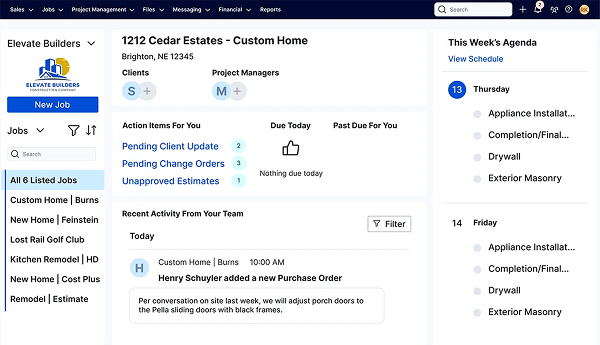
Buildertrend is one of the most widely used construction management platforms, especially among remodelers and home builders.
It includes full project management tools, making it significantly more comprehensive than documentation-only apps.
Key Features
- Detailed scheduling and Gantt charts
- Client portals
- Document management
- Financial tracking
- Subcontractor coordination
- Jobsite photo storage
Best For
- Residential builders and remodelers
- Larger construction companies
- Teams needing advanced scheduling
Considerations
Buildertrend is powerful, but it often requires significant onboarding and training, making it less ideal for smaller teams that want simple systems.
Pricing
Custom quote. Buildertrend no longer lists prices; its pricing page asks you to answer a few questions and book a call. Subscriptions include unlimited users, and Buildertrend says it is built for builders who "Oversee 5+ projects a year or handle complex, multi-phase builds." For a deeper look, see our Buildertrend competitors and alternatives guide.
Alternative 3: Jobber — Service Contractor Workflow Software

Overview
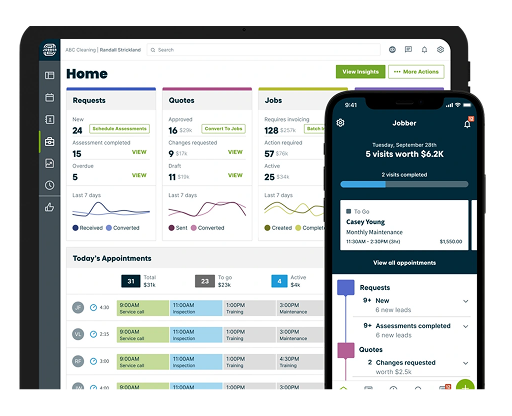
Jobber is designed primarily for service contractors rather than traditional construction firms.
It focuses on scheduling, quoting, invoicing, and customer communication.
Key Features
- Job scheduling and dispatch
- Quote creation
- Invoicing and payments
- Client communication tools
- Mobile apps for field teams
Best For
- Service trades (HVAC, landscaping, plumbing)
- Small contracting businesses
- Teams focused on recurring jobs
Considerations
Jobber offers stronger CRM and billing features than CompanyCam but lacks deep construction project management, such as dependent schedules, budgets and change orders for multi-week jobs. Note that unlimited photo and video storage is listed as a Plus-plan feature.
Pricing
Core starts at $29/mo billed annually for 1 user ($49/mo with no commitment). Connect starts at $99/mo, Grow at $149/mo and Plus at $399/mo, billed annually, with additional users at $29/mo each. There's a 14-day free trial. If Jobber is on your shortlist, see our Jobber alternatives guide.
Alternative 4: Fieldwire — Field Collaboration and Task Management

Overview
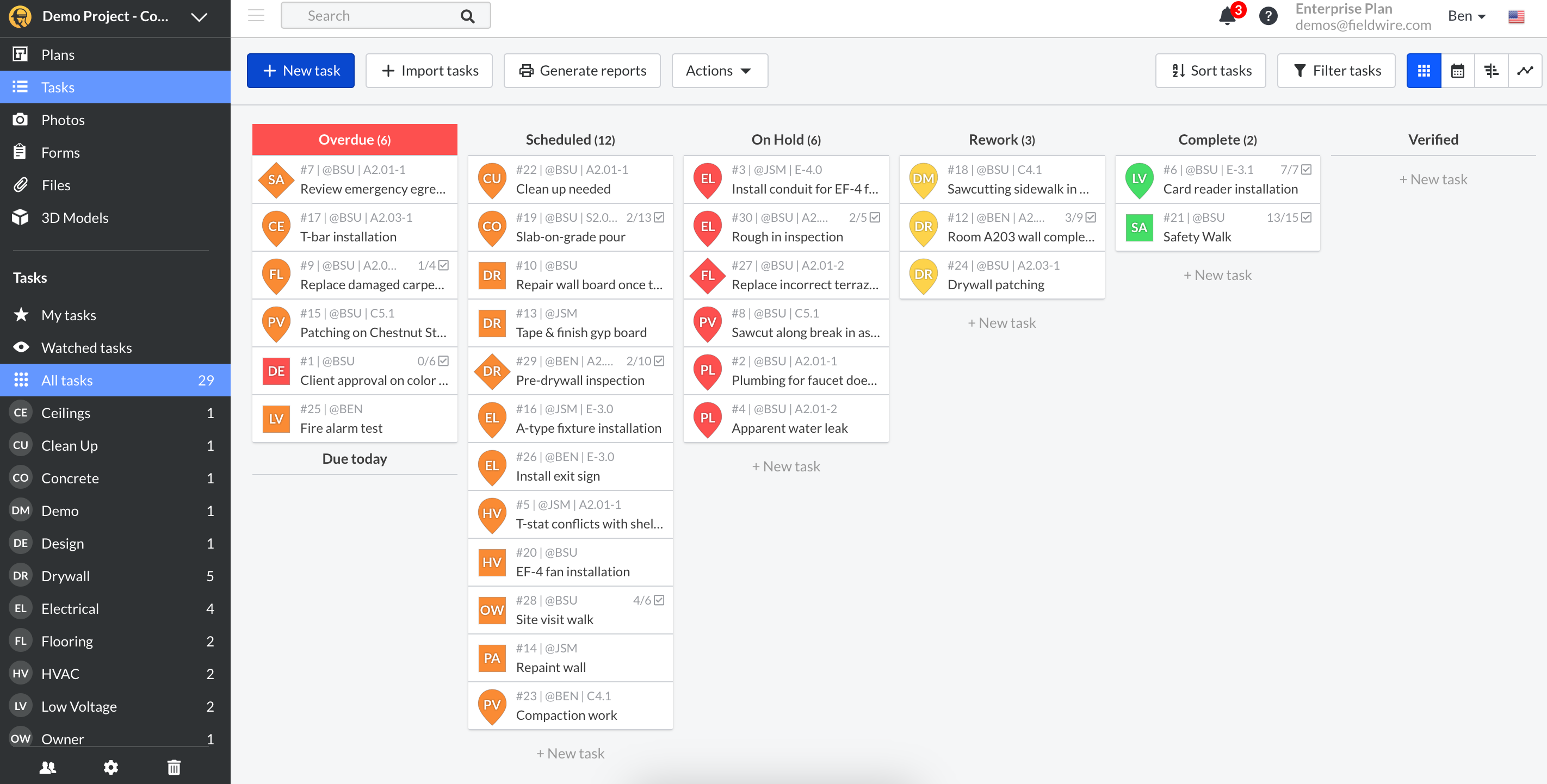
Fieldwire is a field management tool used heavily on commercial construction sites.
It focuses on task coordination, jobsite communication, and blueprint management.
Key Features
- Task assignments for field teams
- Plan viewing and markups
- Jobsite photo documentation
- Issue tracking
- Punch lists
Best For
- Larger construction sites
- Teams managing complex field coordination
- Commercial contractors
Considerations
Fieldwire excels in field collaboration but typically requires integration with other systems for estimating and financial workflows. RFIs, submittals, change orders and budgets are reserved for its Business Plus tier.
Pricing
Basic is free for up to 5 users and 3 projects. Pro is $39 per user/mo and Business is $64 per user/mo, billed annually. Business Plus is priced through sales.
How to Choose the Right CompanyCam Alternative
Every contractor’s needs are different. Before choosing software, consider:
1. Your Team Size
Small teams may prefer simpler tools, while growing companies benefit from centralized platforms.
2. Workflow Complexity
If you manage multi-phase construction projects, look for full project management capabilities.
3. Estimating Needs
Contractors who rely heavily on estimates and proposals should prioritize software that integrates those workflows.
4. Field Documentation
Photos are important—but they should connect to tasks, schedules, and project records.
5. Total Cost of Your Stack
Add up what you pay today, not just the photo app. A Crew-plan CompanyCam account ($129/mo) next to a separate quoting and invoicing tool and a scheduling app can cost more than one platform that does all three. Compare that combined number against an all-in-one plan, and count the hours spent copying job details between apps.
Switching From CompanyCam: A Simple Checklist
Lighthouse Construction & Design replaced a $1,500–$2,000/month mix of construction software with Eano Pro, and Daniel Lindsey has used most of the big names:
“I've had some pretty good software, and this tops it. I've had them all — Buildertrend, CoConstruct, I've had them all. Hands down the best for me right now.” — Daniel Lindsey, Lighthouse Construction & Design
The Bottom Line
CompanyCam remains a strong tool for photo documentation and jobsite progress tracking. But for many contractors, documentation is only one piece of the puzzle.
Modern construction businesses increasingly want software that connects:
- Estimating
- Proposals
- Project management
- Client communication
- Field documentation
Platforms like Eano Pro provide that broader workflow while still supporting the visual documentation contractors rely on. Comparing more options? See our guides to Contractor Foreman alternatives and the best construction management software for general contractors, or browse more Eano Pro success stories.
For companies looking to grow, streamline operations, and manage everything in one place, the right platform can make a huge difference in efficiency—and profitability.
Book a demo today to try it out for your crew to see the impact it can make.
CompanyCam Alternatives Compared: Features and Pricing