

Best Procore Alternatives for Residential Contractors
The best Procore alternatives for residential contractors are Eano, Buildertrend, Buildern, JobTread, and Contractor Foreman. The right choice depends less on which platform has the longest feature list and more on whether it handles the handoffs in a residential job: lead, site visit, estimate, homeowner approval, schedule, selections, change orders, purchasing, invoices, and closeout.
Procore can be a strong fit for larger commercial work. But a five- to 20-person residential GC may find its annual-construction-volume pricing, product packaging, and enterprise-oriented workflows harder to justify for remodels, custom homes, or recurring homeowner communication. Procore says its annual fee varies by the products selected and annual construction volume, rather than publishing a standard monthly rate.
Why residential GCs look for alternatives to Procore
Leaving Procore is rarely about wanting less control. More often, it is about wanting a system that matches how a residential company sells and runs work.
A residential project usually begins before the job is sold. A lead needs a response, an estimator needs site-visit notes and photos, and a proposal needs a clear scope, allowances, exclusions, and payment schedule. Once the homeowner approves, that information should become the working budget and schedule. If a kitchen selection changes after demolition or a client upgrades tile, the change should be documented, approved, reflected in the budget, and visible on the next invoice.
That chain can become cumbersome when sales, client communication, field operations, and financial tracking live in separate products. It also explains why a commercial-grade platform can feel excessive for a company whose central coordination challenge is not managing a large bid package or enterprise portfolio, but keeping homeowners, subcontractors, office staff, and field crews aligned on dozens of moving residential decisions.
There is still a place for Procore. A residential GC that regularly performs large, complex projects with formal submittals, strict document controls, multiple project stakeholders, or commercial-style billing requirements may benefit from its depth. The decision should be based on the work you actually run, not on the assumption that more software automatically means better control.
One of the biggest reasons is businesses look to switch off of Procore is the cost. The software licensing fees are often based on percentage of job cost, and you can't lie about it because it's right in the system. You'll be logging proposal, bids, and costs and invoices all inside of the platform. Larger companies even have routine financial audits. For huge commercial projects, these enterprise deals for Procore are huge where they'll take take that cut of spend and provision anyone on the project a seat.
Procore doesn't publish a price list. It charges an upfront annual fee for each product, based on your Annual Construction Volume (ACV): the total dollar value of the construction work you run through the platform (Procore). The upside is unlimited users and storage. The downside is that your bill grows with your business, whether or not you use more of the software.
In practice, contractors report paying roughly 0.1% to 0.2% of their annual construction volume. One contractor doing about $55 million a year reported paying around $55,000 annually (SubmittalLink). Another longtime customer said they started at about $500 per $1 million of volume and now pay about $1,000 per $1 million, with one renewal jumping 10.4% in a single year (r/Construction).
ACV also isn't the same as revenue. At renewal, Procore spreads each project's contract value evenly across its days and counts only the days that fall within your subscription term (Procore renewal guide). For a residential contractor doing $5 million a year, that works out to roughly $5,000 to $10,000 a year at reported rates. Smaller firms report minimum quotes of $15,000 or more. Flat-rate tools built for residential contractors, like Eano Pro at $159/mo billed annually, cost the same no matter how much work you run through them.
How the leading Procore alternatives compare
Pricing and packaging can change. Confirm the current plan, required add-ons, user rules, onboarding fees, payment-processing charges, and contract terms before deciding.
Eano: best for an integrated residential sales-to-project workflow
Eano is worth evaluating when the main problem is the break between winning work and running it. Its all-in-one construction platform is positioned around connecting marketing, sales, project management, and financial reporting in one system.
For a residential GC, the practical test is simple: can one bathroom-remodel opportunity move from inquiry to site visit, estimate, signed proposal, active schedule, client updates, invoices, and closeout without the team rebuilding the job at each step?
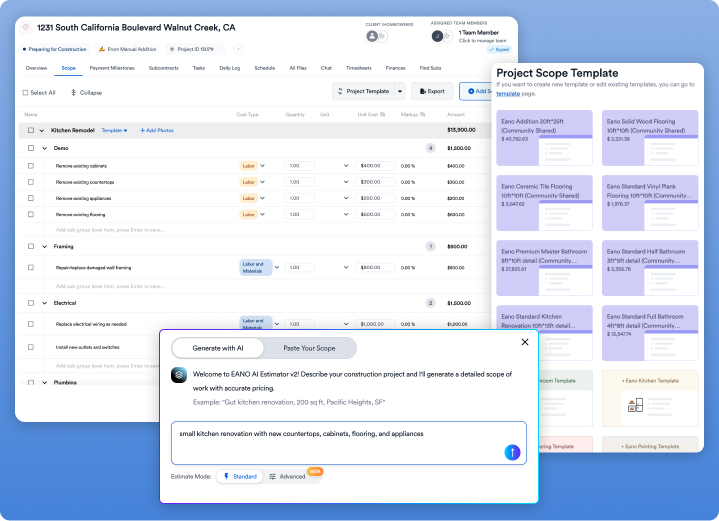
Eano’s published plans include CRM, estimates and AI Estimator, project scheduling, daily logs, task management, and other project-management features at the applicable tiers. Its Pro plan is listed at $159 per month when billed annually for two users, with additional users listed at $99 per month and workers at $15 per month. The site also lists a $20-per-signed-project charge, so a growing residential team should model total cost against its expected signed-job volume rather than looking only at the base subscription.
Eano’s Client Dashboard is particularly relevant for homeowner-facing work. Eano says clients can access quotes, milestone photos, invoices, schedules, project progress, chat, and files in one place. That can reduce the familiar residential pattern of searching text threads to find an approval or explain the next milestone. The proposal workflow also supports templates, contracts, online signing, and a client-facing place to review next steps.
Its AI Estimate can help create a starting point from a project description, but it should remain a review workflow, not an automatic pricing decision. Labor productivity, local material costs, subcontractor coverage, exclusions, and margin are still contractor judgment. The important question is whether the reviewed estimate can carry its scope and cost logic into the proposal, budget, purchasing, and job-cost view.
Buildertrend: best for established residential builders needing breadth
Buildertrend is a natural alternative for residential builders, remodelers, specialty contractors, and light-commercial firms. Its own comparison positions Buildertrend for those businesses and Procore primarily for large commercial firms managing enterprise-scale work.
It is a sensible shortlist candidate for a company that wants a mature residential platform with client, project, and financial functions under one roof. The tradeoff is that Buildertrend uses custom pricing, so a five-person remodeling company should ask for a proposal that separates required costs from optional services, implementation, user access, and features it may not use.
Buildertrend is less compelling if the team wants a highly transparent entry price or has a narrowly defined need, such as estimating and straightforward job management. It can be a better fit as project count, staff count, subcontractor coordination, and homeowner communication become more complex.
Buildern: best for published seat-based pricing
Buildern is a strong option for contractors who want to compare a defined starting price against their actual team size. Its Starter plan is listed at $225 per month billed annually for two seats and is aimed at small builders with one to five office users. Its Professional plan is listed at $360 per month billed annually for four seats and is aimed at builders managing multiple projects with five to 30 office users. Field workers, subcontractors, and vendors are listed as free, while additional office users carry monthly charges.
For residential work, its published feature set includes estimating, budgets, purchase orders, bills, invoices, schedules, selections, allowances, change orders, a client portal, and subcontractor/vendor management. That makes it especially relevant for a custom builder that needs homeowner selections and financial controls to stay connected to the job.
Before switching, ask to see the exact workflow for a signed change order. The demo should show how the approval affects the contract amount, project budget, purchase orders, schedule, homeowner portal, and invoice. A platform can have each of those features without making the handoffs clean.
JobTread: best for flexible contractor operations
JobTread is a practical option for GCs who want estimating, cost catalogs, bid requests, contracts, job costing, project tracking, and lead management in one platform. Its feature pages describe workflows for estimates, contracts and e-signatures, takeoffs, vendor bidding, lead management, and project tracking.
It is worth a close look if estimating and cost control are a daily pain point. A remodeler can test whether an estimate’s line items and cost codes become usable budget data after contract signing, then compare projected versus actual costs as material invoices and subcontractor commitments arrive.
JobTread markets a single-price approach, but a buyer should still request the current quote in writing and confirm who counts as an internal user, which integrations are included, and whether onboarding or implementation is separately priced.
Contractor Foreman: best for broad coverage on a tighter budget
Contractor Foreman can appeal to smaller residential firms that need a wide range of operational tools without buying an enterprise platform. Its published materials describe client portal access, scheduling, daily logs, estimates, expenses, purchase orders, bid management, change orders, invoicing, and job-cost-related workflows.
It deserves a demo if the immediate problem is operational discipline: crews need a schedule, office staff need better documentation, and project costs need to be tied back to the job. The critical test is usability. Ask the people who will use it every day—estimator, project manager, bookkeeper, and field lead—to run a realistic sample job, not just watch a sales walkthrough.
Compare price by total operating cost, not subscription alone
For a residential GC, the useful price comparison is a 12-month operating-cost model. Include base subscription, office users, field users, project limits, onboarding, data migration, add-ons, payment fees, e-signature charges, and the time required to keep duplicate systems current.
For example, a published $225 monthly plan that needs four paid office seats is not a $225 decision. It is a subscription, extra-seat, implementation, and workflow-fit decision. Likewise, a custom-priced platform may be reasonable if it replaces several disconnected subscriptions and the team will actually use the included processes.
This matters in a substantial residential market. The U.S. Census Bureau estimated residential construction spending at a seasonally adjusted annual rate of $882.3 billion in August 2026. For an individual contractor, that figure does not prove a software ROI. It does reinforce why residential teams should protect margin through reliable scope, approval, purchasing, and cost-tracking workflows rather than treating software as an isolated administrative expense.
What to check before switching from Procore
Run each finalist through one recently completed project: a lead that becomes a signed kitchen remodel, then receives a mid-job selection change.
Check whether the system can:
- capture site notes, photos, scope assumptions, and allowances before estimating;
- turn an approved estimate into a proposal, contract, budget, and schedule without rekeying;
- give the homeowner a clear place to approve choices, changes, invoices, and updates;
- document subcontractor commitments and purchase orders against the budget;
- show estimated versus committed versus actual costs by job;
- preserve history when a change order affects scope, schedule, and billing;
- migrate essential contacts, active jobs, cost codes, documents, and financial data from Procore;
- provide role-specific access for the office, project managers, field staff, subcontractors, and homeowners.
Do not choose based on a feature comparison grid alone. Ask each vendor to show the same job moving through the system. A residential GC needs fewer handoffs, faster approvals, and a clean trail from the original estimate to final job cost.
For broader options beyond this shortlist, see Eano’s guides to construction management software for general contractors, Buildertrend alternatives, and Contractor Foreman alternatives.



.png)