

AI Electrical Estimating Software: How Electricians Turn Plans and Panel Schedules Into Bids
AI electrical estimating software reads your plan sheets, counts devices and fixtures, measures runs, and drafts a priced estimate that you finish with your own labor units and markup. It takes most of the highlighter-and-clicker counting off an electrician's plate. It does not replace load calculations, code judgment, or seeing existing conditions in an older house.
This guide covers what AI electrical takeoff counts well, what it misses, how to build labor units and markup into the AI draft, and how to get from a plan set to a signed proposal faster.
Key takeaways
- AI takeoff is strongest on counts (receptacles, switches, fixtures, smoke/CO devices) and measurable runs on clean, to-scale plans.
- It is weakest on what plans don't show: existing wiring, panel condition, access, and load.
- Your labor units and assemblies turn AI counts into a real price. Set them up once and reuse them.
- The best tools carry the estimate into a signed proposal, not a spreadsheet export.
Why electrical estimates are uniquely tedious
A residential electrical estimate is hundreds of small decisions: every receptacle, switch, fixture, dedicated circuit, home run and panel space. A single kitchen can include a dozen device types with different labor. Plans often spread the information across floor plans, reflected ceiling plans, and a panel schedule. Missing a few devices or a dedicated appliance circuit quietly eats your margin.
Demand makes the time cost worse. BLS projects electrician employment will "grow 9 percent from 2025 to 2035, much faster than the average for all occupations," with "about 72,700 openings for electricians" each year. It links part of that growth to rising electricity demand from AI and data centers (BLS Occupational Outlook Handbook: Electricians). Hiring is hard too. In the AGC/NCCER 2025 Workforce Survey, 77% of firms that employ electricians said they are difficult to find (AGC/NCCER 2025 Workforce Survey Analysis). Every hour an owner spends counting symbols is an hour not spent running crews or closing work.
Three kinds of electrical estimating, three different tool needs
Before comparing software, decide which kind of estimating fills most of your week. The tools that win commercial bid-day races are rarely the ones that help a two-truck residential shop quote a panel swap from the driveway.
What AI electrical takeoff counts and what it misses
AI takeoff works by recognizing symbols and line patterns on the drawing. Our step-by-step explainer on how AI reads a blueprint covers the mechanics. On electrical sheets, that typically means:
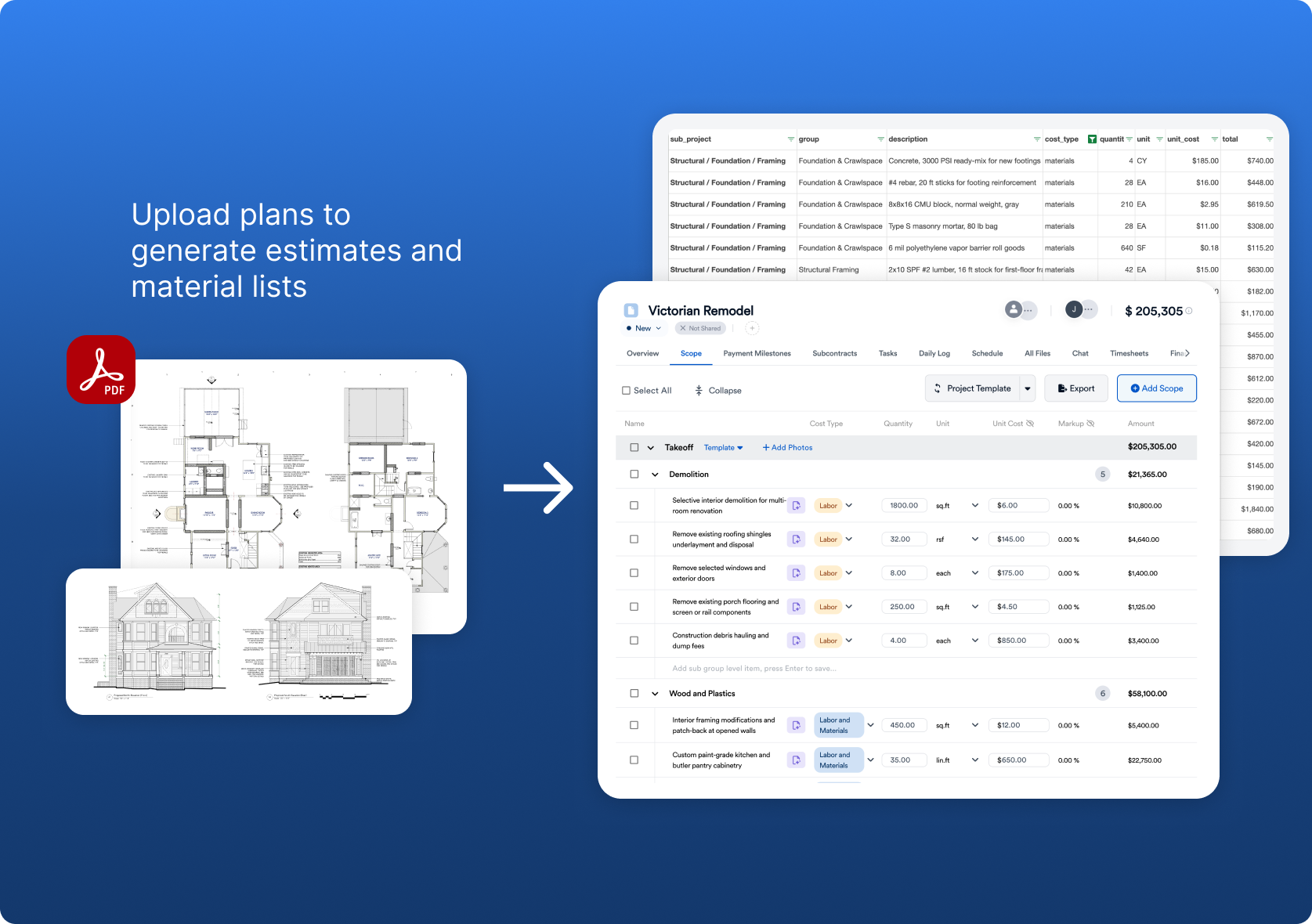
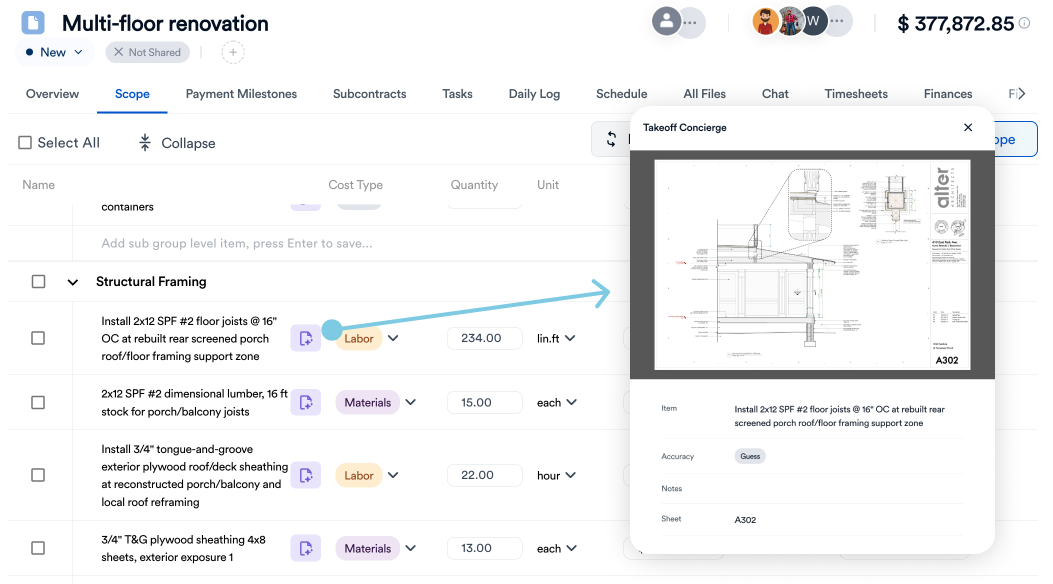
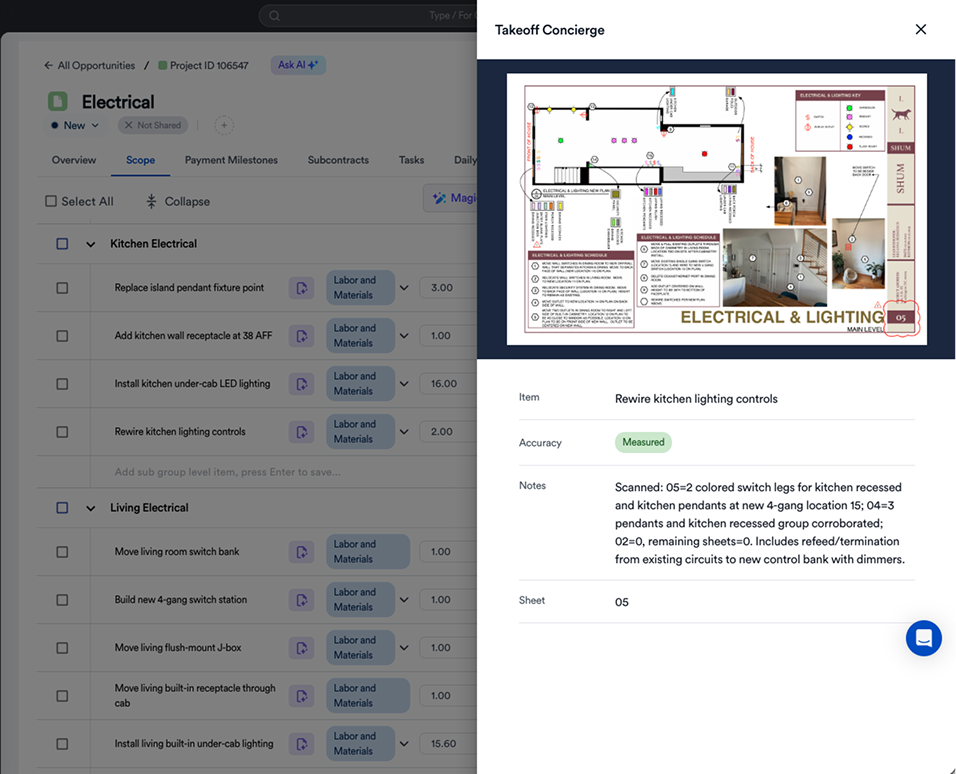
The practical rule is to let AI do the counting, then check its counts against the sheet before you price anything. Good tools show you each counted symbol on the drawing so you can spot misses quickly.
Anatomy of a residential electrical estimate
Whatever tool you use, a complete electrical estimate covers the same building blocks. Use this list to check any AI draft before you price it:
- Devices: receptacles (standard, GFCI, AFCI/dual-function, weather-resistant), switches, dimmers, smart controls.
- Lighting: recessed cans, surface fixtures, under-cabinet, exterior; note owner-supplied vs. contractor-supplied.
- Rough-in materials: boxes, cable or conduit and wire by size, connectors, staples, fire caulk.
- Distribution: panel or subpanel, breakers by type, grounding and bonding, surge protection.
- Dedicated circuits: range, dryer, HVAC, EV charger, bath, kitchen small-appliance, laundry.
- Low voltage: data, doorbell, smoke and CO (interconnected), if in scope.
- Labor: rough, trim and service labor using your own labor units and a difficulty factor for existing walls, attics or crawlspaces.
- Job costs: permit and inspection fees, utility coordination, temporary power, patching, disposal.
- Commercial terms: overhead, profit, exclusions (drywall repair, painting, utility fees) and allowances.
Our free electrical estimate template follows the same structure if you want a starting format.
Worked example: a residential rewire, three ways
Take a typical 2,400 sq ft single-family rewire with a panel upgrade. This walkthrough is illustrative, not a customer job.
1. By hand
Print the plan, highlight each device type room by room, tally on a pad, estimate home runs with a scale ruler, then type everything into a spreadsheet with your labor units. It's accurate when you're rested and careful, and slow and error-prone at 9 p.m.
2. From a template
Start from our free electrical estimate template, which lays out the line structure: devices, fixtures, circuits, panel/service, permits and disposal. You still count by hand, but you're less likely to forget a category.
3. With AI takeoff
Upload the plan set to AI takeoff software, review the device and fixture counts it returns, then map them to your assemblies (for example, "standard duplex receptacle, new work, with box and wire allowance"). Add what the plans can't show, such as service upgrade scope, permit, patching and any existing-condition allowances, and the draft is ready to price.
The time savings come from the counting and transcription. Judgment stays with you: circuit layout, panel capacity, and what you'll find behind the plaster.
How accurate is AI electrical takeoff?
Accuracy depends on the task. One vendor, Boon, publishes its numbers by task rather than as one blended figure: "electrical device detection sits at F1 0.64 (mAP@50 0.81) on the full detection pipeline, our hardest problem, while the fixture-and-conduit takeoff floor is 0.90 on real customer plan sets" (Boon, AI electrical takeoff software; these are the vendor's own published figures). Read that plainly: counting devices on electrical sheets is still the hard part, so every AI count needs a review pass.
Run your own accuracy test before you buy:
- Pick two finished jobs with drawings you know well: one clean vector PDF and one scanned or marked-up set.
- Run both through each tool without correcting anything.
- Compare device, fixture and circuit counts with your final as-built counts, line by line.
- Record misses (symbols not counted), false positives (things counted that are not devices) and duplicates across sheets.
- Time how long it takes to fix the counts. That number, not the raw accuracy figure, is what you are buying.
Where AI takeoff most often goes wrong on electrical plans
- Custom or house symbols that are not in the sheet legend.
- Devices shown on both a power plan and a lighting plan, counted twice.
- Low-resolution scans where similar symbols blur together (GFCI vs. standard receptacle).
- Notes such as "typical of 6" or "provide at each unit" that multiply quantities without showing them.
- Revisions issued as clouds on later sheets.
- Anything not drawn: utility requirements, service upgrades and code-driven changes found at inspection.
For a step-by-step look at how plan-reading AI works, see how AI takeoff software reads a blueprint.
Building labor units and markup into the AI estimate
Counts alone don't make a price. Electricians usually price one of two ways:
- Per device or per opening: each device type carries a labor unit (hours) plus material. This is fast and consistent on new work.
- Per hour: better for service calls and remodels with unknown conditions. Pair it with an allowance for surprises.
Either way, set your labor units and burdened rates once as reusable assemblies, then apply your overhead and profit. Our labor markup calculator helps you check that your rates cover overhead. Reusable templates are where most of the time savings come from. Mark Kullberg of Gordon A. Kullberg & Son, an Eano Pro customer (general contracting and engineering, not electrical), cut estimating time by 60% with structured scope templates:
“We’re not reinventing the wheel every time. That’s where the time savings really come from.” — Mark Kullberg, Gordon A. Kullberg & Son
Keep code-driven items, such as protection devices or dedicated circuits required by the code your jurisdiction has adopted, as separate, visible line items so the client understands why they're there. The National Electrical Code is published by NFPA as NFPA 70. Always price to the edition and local amendments your inspector enforces.
A quick labor-unit example (illustrative)
Labor units are hours per item, adjusted for conditions. The units below are hypothetical, chosen only to show the math. Use your own historical units.
At an illustrative loaded labor cost of $85 per hour, those 42 hours are $3,570 of labor before overhead and profit. AI can count the 42 receptacles in seconds. It cannot know that ten of them are going into finished plaster walls, which is why the condition factor stays a human decision. Our labor markup calculator helps check that your markup covers overhead.
Service and repair work: estimating from photos and reports
Many residential electrical jobs never have plans: panel swaps, inspection repairs, EV charger installs. For these, the faster input is photos, a short video, or an inspection report uploaded straight into the estimate. Kyle Samples of Home Truths, an Eano Pro customer who does renovations and inspection repairs (not a dedicated electrical contractor), describes that workflow:
“I can take a home inspection report, upload pictures, and estimate it out.” — Kyle Samples, Home Truths

Worked example: quoting a 200A panel upgrade (illustrative)
Service work rarely starts with drawings. Here is how a typical panel upgrade quote comes together from a site visit. All quantities and prices are hypothetical.
With an AI tool, the electrician records a two-minute video of the existing panel, meter and route, then speaks the scope: "200 amp upgrade, replace meter base, new grounding, label all circuits." The tool drafts the line items; the electrician confirms breaker count against the existing panel, checks the utility's requirements, adjusts labor for access, and sends a proposal with options for a surge protector and a whole-home generator inlet.
Electrical estimating software by category
The market splits into four groups. Most residential electricians end up combining two of them, or choosing one platform that covers the full job.
Product capabilities change quickly, so confirm current features with each vendor. If you bid both electrical and general remodel work, see our overview of Eano for electrical contractors.
What Eano Pro customers say about faster estimating
Jason Correia of Level X Flooring describes the before picture many trades share: “It wasn’t just writing the estimate — it was formatting it, pricing it, organizing it. I was spending five to ten hours on a single proposal.” Gerardo Alas of Dilosa Home Service now starts from documents: “Now, I don’t have to type everything from scratch. I just drop the PDF into Eano Pro, and it generates the scope for me.”
Ismael Mora of IM Contracting uses written scopes: “All my estimates go through your system now. I even learned I can just paste the full scope text and Eano breaks it down automatically. That alone saved me a ton of time.”
The time math for a small electrical shop (illustrative)
Say an owner-estimator writes eight quotes a week at about 2.5 hours each: 20 hours a week. If AI drafting and templates cut that to 1 hour per quote, the shop gets back 12 hours a week, roughly 600 hours a year. At an illustrative $85 billable rate, that is about $51,000 of field time if even part of those hours go back to billable work. The real gain usually shows up as faster responses and more quotes sent, which only pays off if the numbers in those quotes are right.
Choosing AI electrical estimating software: checklist
- Does it show counted symbols on the drawing so you can verify them?
- Can you load your labor units, assemblies and material pricing?
- Does it handle no-plan jobs (photos, video, voice) as well as PDFs?
- Can it produce good/better/best options, such as standard vs. upgraded fixtures?
- Does the estimate become a signed proposal, schedule and invoice without retyping?
- What does it cost per estimator per year, and which tools does it replace?
For how takeoff, estimating and job management fit together, see AI takeoff vs. AI estimating vs. AI construction management.
Step by step: from plan upload to signed proposal
- Upload the plan set, or record the walkthrough video and photos.
- Set the scale and legend, and confirm which sheets are electrical.
- Run the AI count, then review devices sheet by sheet against the drawings.
- Apply assemblies and labor units, with condition factors for remodel areas.
- Add job costs: permits, utility work, temporary power, patching and disposal.
- Apply overhead and profit, then compare the total with a similar past job.
- Build options (surge protection, EV charger, smart lighting) so the client can choose.
- Send for e-signature and turn the signed estimate into the job budget and schedule.

Panel schedules, specs and notes: the parts AI reads least reliably
Device counts are only half of an electrical takeoff. The panel schedule, the fixture schedule and the general notes often change the price more than an extra dozen receptacles. When you review an AI takeoff, check these items one by one:
- Panel schedule: confirm circuit count, breaker types (standard, AFCI, GFCI, dual-function) and any spaces the owner wants left for future loads.
- Fixture schedule: match every fixture tag to a type and note who supplies it. A missing "by owner" note can add thousands to a quote.
- General notes: look for requirements such as tamper-resistant devices, interconnected smoke and CO alarms, or specific wiring methods.
- Specifications: on larger jobs, specs can require materials or testing that the drawings never show.
- Code changes by jurisdiction: local amendments to the National Electrical Code vary, so confirm what your inspector enforces.
A good workflow treats AI as the first reader and the estimator as the second. Some tools flag low-confidence items for review; if yours does not, build the review into your checklist.
Material pricing: keep the AI on your numbers
Wire, conduit and gear prices move, and a quote that was right in March can lose money in June. Three habits keep AI-drafted estimates honest:
- Price from your own cost items first. Load your supplier pricing and make sure the tool uses it before any built-in catalog.
- Set a validity window. Write "pricing valid for 30 days" (or whatever you can hold) on the proposal.
- Flag volatile items. For large wire or gear orders, get a supplier quote and note the quote date on the estimate.
Five mistakes electricians make when adopting AI estimating
- Trusting the first count. Accept quantities only after a sheet-by-sheet review.
- Using national labor units. Your crew's real hours are the most valuable data you own; load them.
- Skipping the old-job test. Re-estimate finished jobs first so you know where the tool is weak.
- Leaving exclusions out. AI drafts what is in scope; you must write what is not, such as patching, painting and utility fees.
- Keeping the estimate in a separate system. If the price has to be retyped into a proposal, budget and invoice, errors come back in.
If your crew or customers speak Spanish, a multilingual AI estimating workflow can draft the same scope in both languages so nothing is lost in translation.
Worked example: kitchen remodel electrical from a walkthrough video (illustrative)
A general contractor asks for an electrical price on a kitchen remodel. There are no electrical drawings, only a layout sketch. The electrician walks the room with the homeowner and records a four-minute video, narrating as they go: "Six new recessed cans on two dimmers, under-cabinet lights, island gets two receptacles, dedicated circuits for dishwasher, disposal, microwave and the new induction range, relocate the fridge outlet."
From that narration and footage, an AI estimating tool can draft a scope like this (quantities hypothetical):
- Recessed LED fixtures, remodel type: 6, with 2 dimmers.
- Under-cabinet lighting: 14 linear feet with driver and switch.
- Countertop receptacles (GFCI protected): 5, including 2 at the island.
- Dedicated circuits: dishwasher, disposal, microwave, 240V range.
- Refrigerator receptacle relocation: 1.
- Panel review: confirm space and capacity for the new 240V circuit.
The electrician then does what the AI cannot: checks whether the existing panel can take the range circuit, decides how to fish wire through finished walls, adds a difficulty factor for the plaster ceiling, and writes "drywall patching by GC" as an exclusion. The draft took minutes; the judgment took another twenty. That split is typical, and it is what good AI estimating should feel like.
Offer options instead of one number
Electrical work has natural upgrade paths, and a proposal with options often closes faster than a single price. Build them as separate line groups the client can accept or decline:
See how option-based quotes are structured in our construction quote template with options.
From estimate to signed proposal
On a remodel, electrical is often one trade inside a bigger job, and the handoff between estimating, the client and the field is where details slip. Tanya Sandoval's team at In Him Construction, an Eano Pro customer running multi-trade residential and commercial work, put it this way:
“Everything being in one place makes a big difference — especially when you’re managing different parts of a job.” — In Him Construction
If you run an electrical business, see how Eano Pro supports electrical contractor software workflows from takeoff to invoice. Upload your next electrical plan set to Eano Pro AI Takeoff and check the counts against your own.



.png)