
What is construction project management software?
If you have ever tried to keep a construction job on track using text messages, spreadsheets, scattered notes, and a few too many phone calls, you already know the problem: construction work is built in the field, but managed across a mess of moving parts. That is where construction management software comes in.
At its core, construction project management software is a digital system that helps contractors plan, organize, track, and communicate every part of a job. It can bring together schedules, budgets, documents, change orders, photos, client updates, and team communication in one place. Instead of chasing down the latest version of a permit or wondering whether a client approved a finish selection, teams can see what is happening now and what needs attention next.
This matters more than ever because construction is a coordination-heavy business. According to the U.S. Bureau of Labor Statistics, construction employment is projected to grow in the coming years, which means more projects, more competition, and more pressure to stay organized. When you are managing multiple crews, trades, clients, and deadlines, the difference between a smooth project and a stressful one often comes down to how well you manage information.
Construction project management software is not just about being “more digital.” It is about reducing mistakes, saving time, and making it easier for everyone involved to stay aligned. For general contractors, remodelers, and builders, that can be the difference between finishing a job profitably and losing hours to avoidable confusion.
What construction project management software actually does
Different platforms offer different features, but most construction project management software is built around a few core tasks.
First, it helps with scheduling. Construction timelines shift constantly, and one delayed inspection or late material delivery can affect everything downstream. Software gives teams a central place to update timelines, assign tasks, and see what is coming next.
Second, it helps with communication. A lot of jobsite issues happen because someone did not get the memo, or the memo got buried in a text thread. Project management software creates a cleaner paper trail for conversations, updates, approvals, and notes.
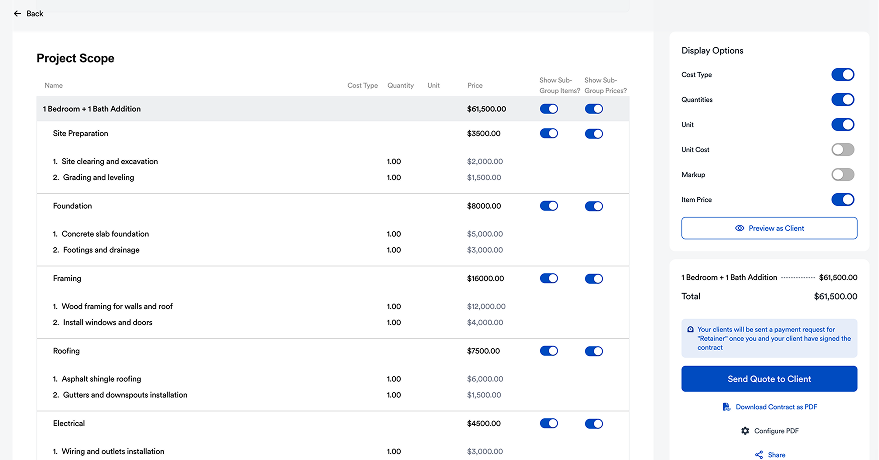
Third, it helps with documentation. Plans, permits, photos, change orders, invoices, and punch lists all need to live somewhere. Software keeps that information organized so you are not digging through email at 7 p.m. trying to find one attachment.
Fourth, it helps with cost control. Even small projects can drift off budget when change orders, material costs, and labor hours are not tracked carefully. A strong system helps you keep an eye on the financial side while the work is underway.
Finally, it helps with accountability. When everyone knows who owns the next step, projects tend to move with less friction. That is true whether you are handling a kitchen remodel, a full home renovation, or a broader portfolio of jobs.
Why contractors are using it more often
Construction has always been a relationship business, but the operational side has changed. Clients expect faster updates. Teams expect clearer direction. And contractors are under pressure to do more with less wasted time.
Software helps make that possible. It reduces the amount of manual follow-up required to keep things moving. It also helps companies look more professional. When a homeowner gets timely updates, clear next steps, and consistent communication, trust builds quickly. That can improve the overall client experience and cut down on tension later in the project.
There is also a scalability angle. If you are managing one job, a few spreadsheets might work. But once you start handling multiple jobs at once, the cracks show. A dedicated platform gives you a repeatable process you can use across projects instead of reinventing the wheel each time.
What to look for in the right platform
Not all systems are built the same. If you are evaluating options, focus on the features that will actually save time in your day-to-day work.
Look for a platform that is easy to use. If your team needs a long training period just to get basic tasks done, adoption will be slow. The best software should feel practical, not complicated.
Look for strong communication tools. You want one place to keep project updates, messages, approvals, and files. If your software still sends you back to email for every decision, it is not really solving the problem.
Look for scheduling and task tracking. You should be able to see what is due, what is delayed, and what is dependent on another step finishing first.
Look for document organization. Plans, photos, invoices, and permits should be easy to upload and find later. A clean file structure saves a surprising amount of time.
Look for flexibility. Every contractor has a slightly different workflow. Your software should support the way your business runs, not force you into a rigid system that slows everyone down.
Where Eano Pro fits in
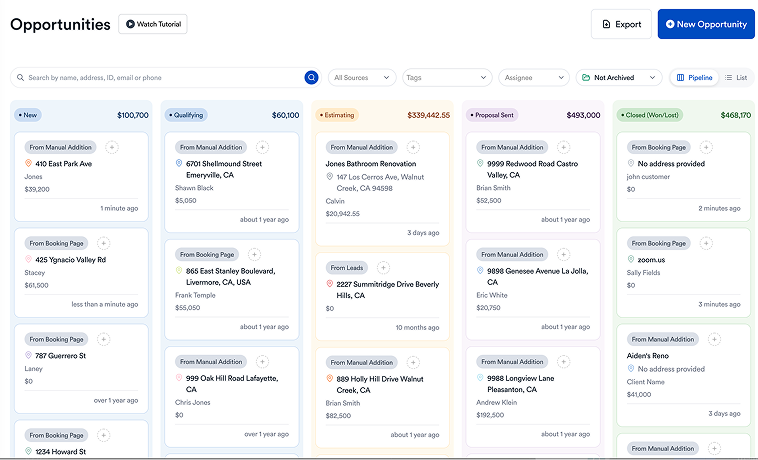
Eano Pro is built to help general contractors manage projects with less back-and-forth and more clarity. If you have ever wished for a simpler way to stay on top of client communication, job progress, and the details that tend to get lost in the shuffle, Eano Pro can help create that structure.
For contractors who want a better process without adding extra complexity, Eano Pro offers a practical way to keep projects moving. It supports a more organized workflow, helps reduce communication gaps, and makes it easier to present a professional experience to clients from start to finish.
If you are comparing tools and want a deeper look at how different solutions stack up, this overview of construction management software can be a helpful starting point.
The real value of Eano Pro is not just that it stores information. It helps you run jobs more cleanly. That means fewer missed details, less scrambling, and a better chance of keeping every part of the project aligned. For contractors who are trying to grow without losing control of the day-to-day, that can be a major advantage.
How software improves the client experience
A lot of contractors think of project management software as an internal tool, but clients feel the impact too. When you have a system in place, clients are more likely to get timely updates, see clear progress, and understand what is happening next.
That matters because construction can already be stressful for homeowners and property owners. They are making decisions about budget, design, timing, and disruption to their daily lives. When communication is messy, anxiety goes up fast. When communication is organized, clients feel more confident and the project tends to go more smoothly.
Good software helps create that calm. It gives you a way to document approvals, share progress, and keep a consistent record of what has been promised. That protects both your team and your client.
Is it worth the investment?
For many contractors, yes. The return on construction project management software often shows up in smaller ways at first: fewer missed messages, faster decisions, and less time spent searching for files. Over time, those small gains add up to real efficiency.
There is also a profitability angle. When teams communicate better and track work more carefully, they are less likely to absorb avoidable delays or rework. That can have a meaningful effect on margins, especially on projects where every day and every change order matters.
The key is choosing software that your team will actually use. A tool only helps if it becomes part of the workflow. That is why simplicity matters. Contractors are busy. The best systems respect that reality.
The bottom line
Construction project management software exists to solve a very old problem in a better way: keeping a complicated job organized without drowning in paperwork and follow-up. It helps contractors plan work, communicate clearly, track progress, manage documents, and protect budgets.
For general contractors who want less chaos and more consistency, the right platform can make a real difference. Eano Pro is designed to support that kind of workflow, helping you keep projects organized and clients informed without turning your day into a juggling act.
If your business is growing, or if your jobs have simply become too complicated to manage by memory and text threads alone, it may be time to bring structure to the process. The right software does not replace your expertise. It helps you use it more effectively.