
Construction & Maintenance Daily Logs: Best Practices for Service Contractors
Service Work Creates a Different Documentation Problem
On a traditional construction project, there's usually a defined beginning and end. Crews mobilize, work progresses through a sequence of phases, the project reaches substantial completion, and eventually everyone moves on.
Maintenance work isn't always that clean, where a technician might visit the same property five times in a year. One crew makes a temporary repair, another returns to diagnose the underlying problem, and a third comes back months later when the customer reports that something isn't working again.
Now someone has to answer:
What happened during the first visit?
If that information lives in a technician's notebook, a text message, an invoice description, or someone's memory, finding the answer can be surprisingly difficult.
A construction and maintenance daily log creates a chronological history of that work so your team can see what happened before, what was done today, and what needs to happen next.
That makes daily logs useful not just for general contractors, but for HVAC, plumbing, electrical, landscaping, property maintenance, restoration, facilities, warranty, and other service-oriented construction businesses.
What Is a Construction & Maintenance Daily Log?
A construction and maintenance daily log records the work, conditions, people, materials, equipment, and significant events associated with a job or property on a particular day.
For project-based contractors, the emphasis is usually on construction progress.
For maintenance contractors, the emphasis shifts toward service history.
A useful maintenance log might tell you:
- Why the technician was dispatched
- What condition they found
- What diagnostic work was performed
- What was repaired or replaced
- Which materials or parts were used
- How long the work took
- Whether the repair was temporary or permanent
- What the technician recommended next
- Whether another visit is required
- What the area looked like before and after the work
Over time, those entries become a running history of the property, equipment, or system being maintained.
Why Better Field Documentation Matters
It can be tempting to view daily logging as administrative overhead, especially for service businesses trying to fit several jobs into one day.
But poor information has a measurable cost in construction.
Research from PlanGrid and FMI found that miscommunication and poor project data accounted for 48% of rework on U.S. construction jobsites. The same study estimated that poor communication and poor project data represented a potential $31.3 billion in annual costs to the U.S. construction industry.
The study also found construction professionals spent 35% of their time—more than 14 hours per week—on non-optimal activities, including searching for project information, resolving conflicts, and dealing with mistakes and rework.
Maintenance businesses can experience the same problem on a smaller scale.
A technician arrives without knowing what the previous technician found. The office has to call the field to understand an old invoice. Someone repeats diagnostic work because previous findings weren't recorded. A customer questions whether a problem is new or related to an earlier repair.
Good daily logs reduce the amount of detective work required to understand what's already happened.
Construction Daily Logs vs. Maintenance Daily Logs
Construction and maintenance logs share many of the same fundamentals, but they're usually trying to answer different questions.
For contractors doing both construction and service work, your daily logging system should accommodate both types of information rather than forcing every job into exactly the same format.
What Service Contractors Should Record Each Day
The most useful construction and maintenance daily logs aren't necessarily the longest. They're the ones that consistently capture information someone may need later.
Here are the areas worth standardizing.
1. Property and Service Information
Every entry should clearly identify where the work occurred.
Include information such as:
- Customer or property name
- Address
- Date
- Technician or crew
- Arrival and departure times
- Work order or project number
- Type of service performed
If you maintain a large property, also identify the exact location: building, unit, floor, room, equipment number, or other relevant area.
"Repaired leak" isn't particularly useful if the property has 40 units and six months have passed.
2. Reason for the Visit
Record why the technician was sent to the site.
For example:
Homeowner reported intermittent water staining on kitchen ceiling after heavy rain.
This establishes the condition as it was reported before the technician began investigating it.
For preventive maintenance, identify the scheduled service:
Quarterly HVAC inspection and filter replacement for units RTU-1 through RTU-4.
That gives future technicians immediate context.
3. Conditions Found Upon Arrival
This is one of the most valuable parts of a maintenance log.
Record what your crew observed before performing the repair.
That could include:
- Visible damage
- Equipment condition
- Error codes
- Leaks
- Temperature readings
- Water intrusion
- Electrical readings
- Unusual sounds
- Wear
- Customer-reported symptoms
Whenever possible, attach photos.
The American Institute of Architects notes that site photography can be used to document overall progress, significant construction progress, and deviations from contract documents. Its guidance also recommends photographing deviations from enough angles to clearly show the condition.
That same principle works well for service contractors: document what you found before changing it.
4. Work Performed
Describe what your crew actually did.
Avoid:
Fixed HVAC.
Instead:
Inspected upstairs air handler after homeowner reported weak airflow. Found heavily restricted return filter and partially closed supply damper. Replaced filter, adjusted damper, and tested airflow at affected bedrooms.
Someone reviewing that log later can understand both the problem and the response.
5. Parts and Materials Used
Record significant parts and materials installed during the visit.
Depending on your trade, that might include:
- Valves
- Filters
- Breakers
- Wiring
- Pipe fittings
- Refrigerant
- Lumber
- Fasteners
- Paint
- Roofing materials
- Sealants
Include quantities, model numbers, serial numbers, or other identifiers when they're important for warranty or future service.
This becomes particularly useful when the next technician needs to determine exactly what was installed.
6. Labor and Crew Information
Document who performed the work and how much time was spent onsite.
This can help with:
- Billing
- Payroll
- Job costing
- Productivity analysis
- Warranty questions
- Estimating future work
For larger maintenance contracts, it can also help you understand which properties or assets consistently consume more labor than expected.
7. Equipment and Asset Information
When servicing equipment, identify the actual asset.
Instead of:
Serviced rooftop unit.
Record:
RTU-3, Trane model [model], serial [serial].
For recurring maintenance, that creates a service history for the individual asset rather than simply the property.
Over time, you may be able to see that one piece of equipment is requiring substantially more attention than others.
8. Photos Before, During, and After Work
Maintenance work is particularly well suited to photo documentation because technicians often encounter conditions the office or customer never sees.
Useful photos include:
- Existing conditions
- Damage
- Equipment labels
- Serial numbers
- Failed components
- Hidden conditions
- Work in progress
- Replacement parts
- Completed repairs
Photos become even more useful when they're attached to the corresponding log instead of sitting in a technician's camera roll.
As AIA guidance puts it:
“Each photo should be shot for a specific purpose, usually to support specific points in the field report narratives.”
That's a useful rule for contractors too. Take photos that help tell the story of what happened rather than taking dozens of images with no explanation.
9. Customer Conversations and Approvals
Service work often generates decisions while the technician is already onsite.
A technician might tell a customer:
- A repair can be made today.
- A replacement is recommended.
- Additional work is required.
- The existing condition isn't included in the original scope.
- Another trade needs to be involved.
Record important conversations and approvals.
For example:
Explained deteriorated shutoff valve to homeowner. Customer approved replacement while wall was open. Office notified to prepare additional work documentation.
The daily log doesn't replace a formal change order or authorization process, but it provides context for how the additional work originated.
10. Work That Could Not Be Completed
An incomplete service visit can be just as important to document as a successful one.
Record why work stopped.
Common reasons include:
- Part unavailable
- Customer unavailable
- Area inaccessible
- Additional authorization required
- Unsafe conditions
- Another trade required
- Utility shutdown required
- Weather
- Equipment unavailable
Then record the next action.
Replacement motor required. Model confirmed and office notified to order. Unit remains offline. Return visit required after part arrives.
Now the office doesn't have to call the technician the following morning just to determine what needs to happen next.
Use Daily Logs to Identify Recurring Problems
This is where maintenance logs become much more valuable than individual service notes.
One service call tells you what happened today.
A history of service calls can reveal patterns.
Imagine a property has repeated water intrusion complaints:
January: Ceiling stain reported. Area dried and monitored.
March: Staining returned after heavy rain. Exterior sealant deterioration observed.
May: Water intrusion reported again. Further inspection identifies flashing issue.
Looking at any one visit in isolation might make the problem appear minor.
Looking at the complete maintenance history makes the pattern obvious.
This can help contractors identify:
- Equipment nearing replacement
- Repeat callbacks
- Recurring leaks
- Chronic drainage issues
- Persistent electrical problems
- Frequent tenant damage
- Warranty trends
- Materials that repeatedly fail
Your daily logs stop being simple records and start becoming useful operational data.
Create a Clear Difference Between "Completed" and "Needs Follow-Up"
One of the easiest ways to improve maintenance logging is to make the outcome obvious.
Every entry should answer:
Is this work finished?
Consider using consistent statuses such as:
- Completed
- Temporary repair completed
- Monitoring required
- Parts required
- Customer approval required
- Return visit scheduled
- Referred to another trade
This prevents an important follow-up from disappearing inside a paragraph of notes.
For example, compare:
Checked leak. Caulked around window. Might need to come back.
with:
Status: Monitoring required. Removed failed exterior sealant and resealed lower window perimeter. No active moisture observed after testing. Homeowner instructed to monitor during next rain. Return inspection recommended if staining reappears.
The second entry tells the next person exactly where things stand.
Keep Logs Factual, Not Emotional
Daily logs can become part of customer conversations, warranty investigations, insurance claims, or legal disputes.
Write them accordingly.
Avoid:
Homeowner complained again about the same stupid issue.
Record:
Homeowner reported that staining above the kitchen window returned following overnight rain.
Similarly, don't speculate when you don't know the cause.
Instead of:
Roofer installed flashing incorrectly.
write:
Visible gap observed between flashing and siding at northwest corner. Additional inspection required to determine source of water intrusion.
Record what you know. Separate observations from conclusions.
Don't Reconstruct Service History From Memory
The value of a daily log drops quickly when technicians wait days to complete it.
A service technician may visit several properties in one day. By Friday afternoon, Monday's details are competing with a dozen other jobs.
Construction reporting guidance consistently emphasizes timely documentation. ProjectManager recommends that daily reports be completed at the end of every workday rather than intermittently, while also stressing the importance of maintaining records that can actually be found later.
The best workflow is to capture information while the technician is onsite and finalize the log before moving on or shortly afterward.
Standardize What Everyone Records
If one technician writes three paragraphs and another writes "done," you don't really have a documentation system.
You have individual habits.
Create a consistent structure your entire field team follows.
For example:
Reason for visit → Conditions found → Work performed → Materials used → Photos → Customer communication → Status → Next action
Standardization makes logs faster to complete because technicians don't have to decide what to write every time.
It also makes them easier for the office to review.
A standardized construction daily log template can be a good starting point for contractors still using paper forms or spreadsheets.
Don't Make Daily Logs So Complicated That Nobody Uses Them
There's a tradeoff between thorough documentation and field adoption.
Ask a technician to complete a 40-field report after every two-hour service call and you'll probably get incomplete reports.
Ask for five vague notes and you won't have enough information when something goes wrong.
The goal is to capture the minimum information necessary to reconstruct the job later.
That generally means documenting:
- Why you were there.
- What you found.
- What you did.
- What evidence you captured.
- What happens next.
Add more detail when the situation warrants it.
A routine filter change doesn't need the same documentation as a major leak investigation or disputed warranty repair.
Use Daily Logs as a Communication Tool
A good maintenance log shouldn't disappear into an archive after it's submitted.
The office can use daily logs to understand what's happening across active jobs without constantly interrupting field crews.
Indeed describes construction daily reports as a way for project managers and other stakeholders to track jobsite events and communicate with people who can't physically be at the site.
For a service contractor, that means the project manager or office team can quickly see:
- What was completed
- What wasn't completed
- Why a second visit is needed
- Whether parts need to be ordered
- Whether the customer requested additional work
- Whether a quote or change order needs to be prepared
- Whether an issue needs escalation
The log becomes part of the handoff between the field and office. For old-school contractors, you might here the term 'construction log book'.
Why Photos Need Context
Taking lots of photos isn't the same as maintaining good documentation.
A photo without a project, date, location, or explanation can become difficult to interpret months later.
Imagine finding this photo six months after the job:
IMG_8472.jpg
It shows a pipe behind a wall.
Which property was it?
Which room?
Was the photo taken before or after the repair?
What are we supposed to notice?
This is why photos and daily logs work so well together. The photo provides visual evidence while the log explains what you're looking at.

Organized construction progress documentation creates a history teams can rely on when questions surface later. As Matterport describes the value of this approach:
“Treat construction progress documentation as a box to check, and it becomes busywork... Treat it as a risk prevention exercise, and every capture becomes an investment.”
For service contractors, that distinction matters. You're not documenting work simply because someone said you should. You're creating information your company may actually need again.
Paper Logs vs. Digital Maintenance Logs
A paper construction and maintenance daily log can work well for a small operation.
As service volume increases, however, paper and spreadsheets become harder to manage.
The advantage isn't simply eliminating paper. It's making the information usable after it's been collected.
For a deeper look at how construction companies can build an effective logging process, see our complete guide to construction daily logs.
How Eano Pro Helps Contractors Keep Better Daily Logs
For contractors managing multiple jobs, the challenge isn't usually understanding that documentation matters. It's getting field information captured consistently without creating more administrative work.
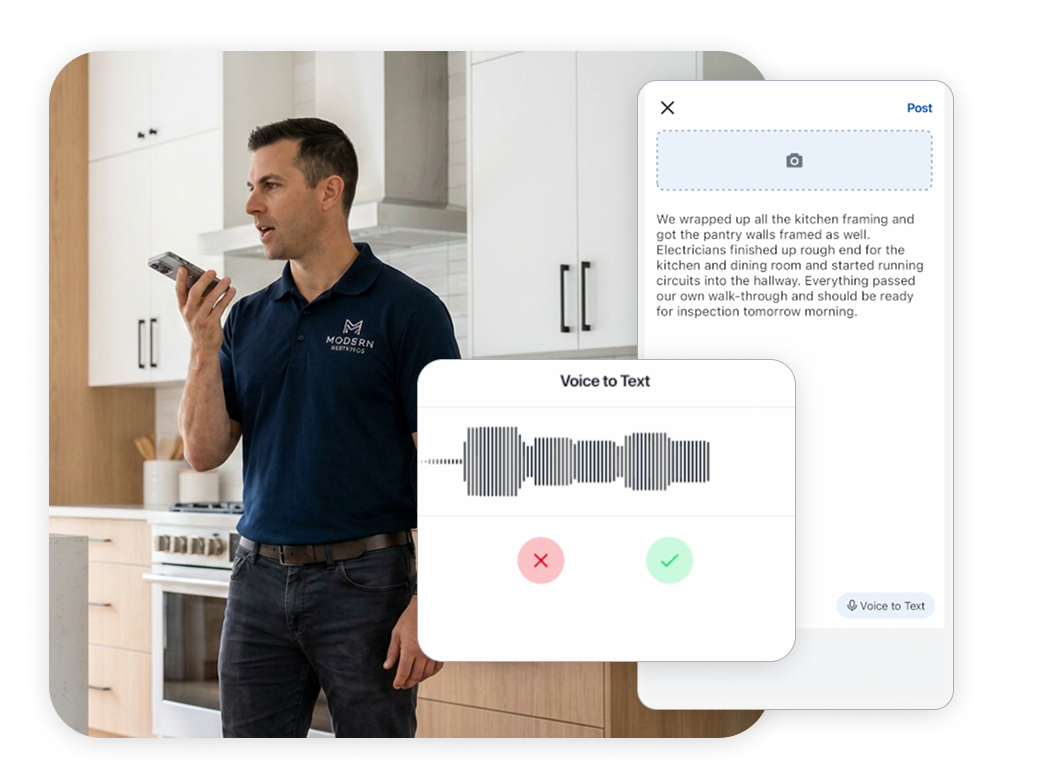
Eano Pro's construction daily log software brings daily logs into the project workflow so field and office teams aren't piecing together job history from notebooks, text messages, photo galleries, and spreadsheets.
Contractors can use Eano Pro to:
- Create daily logs from the field
- Record project updates while they're fresh
- Add jobsite photos directly to logs
- Capture audio when speaking an update is faster than typing
- Keep records organized with the corresponding project
- Give office teams better visibility into field activity
That becomes especially useful for recurring service and maintenance work.
When a technician returns to a property, previous work doesn't have to be a mystery. The project history provides context about what happened before.
.png)
Construction & Maintenance Daily Log Checklist
Before closing a service visit or workday, make sure your log captures:
- Property and service location
- Date and technician
- Arrival and departure times
- Reason for visit
- Initial conditions
- Work performed
- Parts and materials used
- Equipment serviced
- Photos
- Customer conversations
- Additional work requested
- Problems or delays
- Current status
- Follow-up required
- Recommended next action
You don't necessarily need every field for every job. The goal is to create a consistent record that another person can understand without calling the technician who performed the work.
Build a Service History, Not Just a Stack of Reports
The real value of construction and maintenance daily logs appears over time.
Today's entry might simply document a repair. Six months from now, it could explain why the same component failed again, prove what condition existed before your crew arrived, show when a customer approved additional work, or help a new technician understand everything that's already been tried.
That's why the best service contractors don't treat daily logs as paperwork. They treat them as part of the project's memory.
If you're establishing a logging process, start with a construction daily log template to standardize what your team records.
If you're ready to keep field updates, photos, and project history together, explore Eano Pro's construction daily log software for a more organized way to document work as it happens. Not ready for professional construction log software? Try our free log template.