
Construction Daily Log Software: How to Choose One Your Crew Will Actually Use
Every contractor knows they should keep daily logs. Far fewer have a log for every day of every job when something goes wrong. The gap is rarely discipline. It is that the log takes too long to write at the end of a long day, so it gets skipped, shortened or written from memory a week later.
Construction daily log software is supposed to close that gap. This guide is a buyer's guide: what a daily log must capture to hold up when there is a dispute, the features that decide whether your crew actually uses the app, and a checklist for comparing tools. If you want the basics of what to write in a log, start with our complete guide to construction daily logs. If you are deciding between paper and digital, see the construction daily log book.
Disclosure: Eano makes Eano Pro, which includes daily log software. Quotes from attorneys and publications are linked to their sources. This article is not legal advice.
Key takeaways
- Logs win and lose disputes. Construction attorneys say daily reports are among the first records they review.
- Completeness matters more than polish: date, weather, crew by name, subs, equipment, deliveries, work performed, issues and the author.
- Adoption is the real test. Mobile, voice, photos, templates, offline mode and AI cleanup decide whether logs get written.
- Connected beats standalone: logs should sit on the same job as timesheets, schedule and client updates.
What daily log software does
At its simplest, daily log software replaces the notebook or the end-of-day text thread. A crew lead opens the app on site, fills in a short template, adds photos, and saves. The log is stamped with the date, stored on the job, and visible to the office right away.
Good software adds three things paper can't. First, structure: a template that prompts for the same fields every day. Second, retrieval: every log for a job, sorted by date, searchable, and exportable when an attorney, lender or homeowner asks. Third, speed: voice entry, photo capture and AI writing help so a complete log takes minutes instead of half an hour.
Why logs matter when something goes wrong
Most days, a daily log feels like paperwork. It matters on the day there is a dispute about a delay, a change, a defect or a payment. Construction attorneys are consistent on this point.
McDonald Hopkins, a law firm with a construction litigation practice, writes in "Daily reports can make or break your next claim":
"The dailies are one of the first things we look for when evaluating issues and events that occurred on the project. They truly tell the story of how the project progressed, and good daily reports can make or break a case." — McDonald Hopkins LLC
In Construction Dive's "The Dotted Line" (March 2020), Joseph Devereux III of Sandberg Phoenix said: "In any construction dispute, the party with contemporaneous and complete records always has a leg up on the party who didn't make documenting its work a priority." James Carney of Carlton Fields added: "Good, detailed contemporaneous documentation of a project is a contractor's best friend, whether to support an affirmative claim or to defend a claim."
Two words repeat: contemporaneous and complete. A log written the same day, with every required field, is the goal. That is exactly what software should make easy.
The fields a daily log must capture
McDonald Hopkins lists what a daily report should contain. Use it as the baseline for any template you set up in software:
| Field | What to record | Why it matters |
|---|---|---|
| Date, time and weather | Conditions at start and during the day | Delays often trace back to weather and site conditions |
| Employees on site | By name, or at minimum number and trade | Proves who was there and how many hours were worked |
| Subcontractors and their equipment | Which subs were on site and what they brought | Avoids disputes over whether a sub showed up |
| Equipment | Used that day, and anything idle | Supports delay and standby claims |
| Materials delivered | What arrived and when | Shows when work could start, and late deliveries |
| Work performed | Brief description by area or phase | The story of progress |
| Issues that affected the work | Rain shutdowns, owner-directed stops, late deliveries | The heart of most delay claims |
| Author | Name of the person who prepared it | Makes the record credible |
| Photos | Before, during and after; problem areas | Shows what words can't |
McDonald Hopkins also recommends keeping digital copies, organized and named by date, because organized records "reduce the amount of time your attorney spends trying to find the right documents." Software does that automatically.
Adoption features: what gets your crew to fill it out
A log template with every field above is useless if the crew skips it. When you evaluate software, spend most of your time on the features that make logging fast for the person on site.
Mobile first, and offline
The log gets written on a phone, on site. If the app is slow, needs a laptop, or fails when the signal drops, it won't be used. Look for offline mode that stores logs and syncs when back in range.
Voice entry
Talking is faster than typing with gloves on. Speech-to-text lets a crew lead record a quick memo that becomes the log.
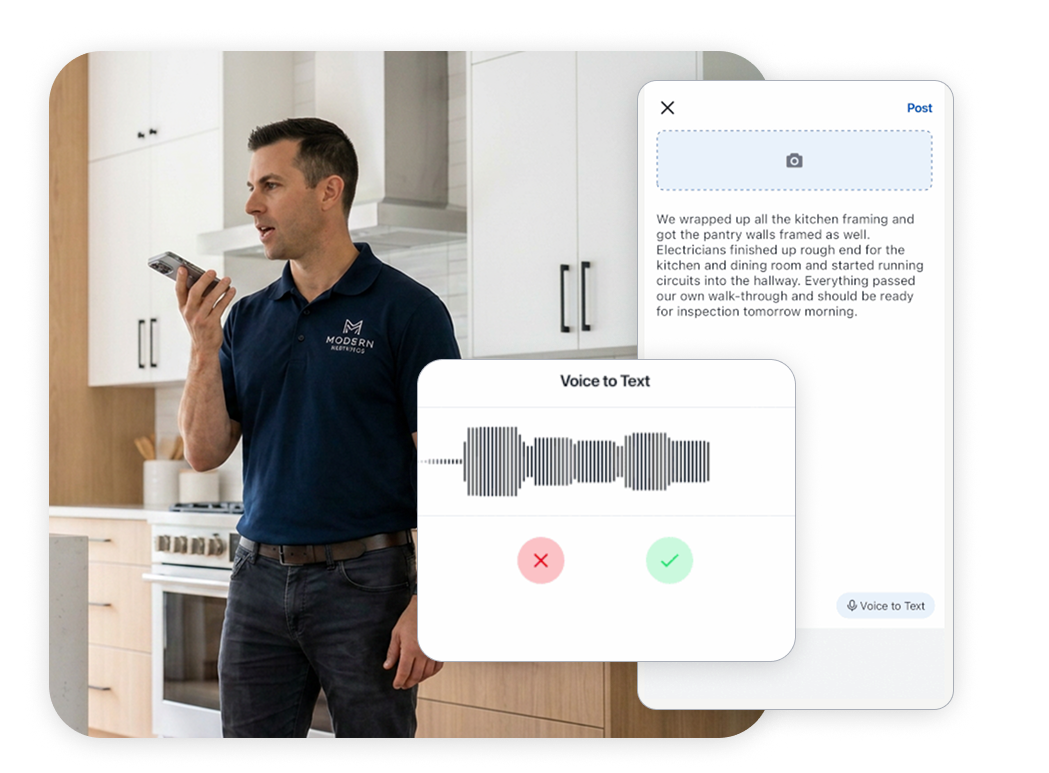
Photo and video capture
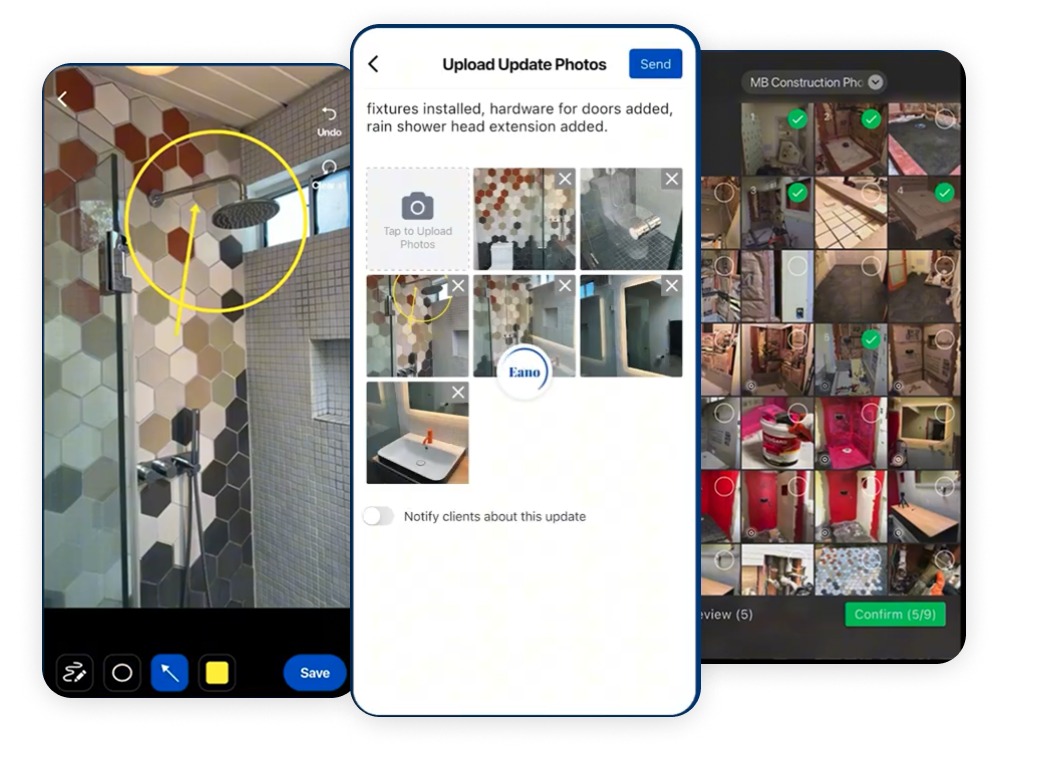
Photos are the most persuasive part of a log, and the easiest to capture. The app should take photos from the camera or camera roll, attach them to the day's log, and let you annotate them.
Templates
A standard template means every site manager captures the same fields. Keep it short: the required fields above, plus anything specific to your trade.
AI cleanup
The biggest excuse for skipping logs is that writing them well takes time. AI that rewrites rough field notes into a clear, professional log removes that excuse, and makes logs readable for homeowners and attorneys alike.

Connected vs. standalone daily log apps
Standalone log apps can work, but a log is more useful when it sits on the same job record as everything else:
- Timesheets. Crew hours clocked to the job back up who was on site. IM Contracting described the problem before connecting them: "My guys forgot to clock out, and I had to fix hours manually." See Eano timesheets.
- Schedule and tasks. Logs that reference the schedule make delays visible as they happen.
- Photos. Logs and job site photos should share one library, tagged by job and date.
- Change orders. When a log records owner-directed extra work, that should lead to a change order, not a memory.
- Client updates. Sharing a log with the homeowner keeps them informed without a separate email.
Creative Construction 360 described what they were looking for as "one system to manage estimates, photos, receipts, logs, and communication for all teams in real time" (success story). That is the connected approach.
Comparison checklist
| Question | Good answer |
|---|---|
| Can a crew lead complete a log on a phone in under five minutes? | Yes, with a short template |
| Does it work offline? | Stores logs and syncs when back in range |
| Voice-to-text? | Yes, built in |
| Photo and video capture with annotation? | Yes, unlimited, attached to the log |
| AI help writing the log? | Rewrites rough notes into a clear log |
| Custom templates? | Yes, per trade or job type |
| Are logs dated, stored by job and exportable? | Yes, with reports for lenders, owners or attorneys |
| Shareable with clients? | One-step sharing, no extra app for the client |
| Connected to timesheets, schedule and change orders? | Same job record |
| What does it cost per user? | Check the vendor's current pricing page |
Run a one-week trial with your least tech-friendly crew lead. If they are writing logs by Friday, the tool passes.
Rolling out daily logs in the first two weeks
- Pick one template and keep it short. Start with the required fields in the table above. Add trade-specific fields only after the crew is logging every day.
- Name who writes the log on each job. One person per site per day. Shared responsibility usually means nobody does it.
- Set a time. The last 10 minutes on site works better than "tonight." A log written on site, the same day, is the contemporaneous record attorneys value.
- Show the crew lead the voice and photo features first. If they can talk for 30 seconds and snap three photos, the log is done.
- Review logs weekly in the office. Look for missing days and thin entries, and give feedback quickly.
- Share a log with the homeowner early. Clients who see progress updates call less, and the crew sees that the logs are read.
After two weeks, check the count: is there a log for every day someone was on site? If not, find out which step is getting in the way and simplify it.
What homeowners see
On residential jobs, the homeowner is often the most frequent reader of your logs. A clear daily or weekly update, with photos, answers "what happened today?" before they ask. It also creates a shared record if there is a disagreement later about when something was done or who approved a change. With a client portal, updates, photos and approvals sit in one place the client can open from a phone, instead of being scattered across texts and email.
Keep client-facing logs factual and professional. AI cleanup helps here: the crew's shorthand ("rain, sent guys home 10am, tile no-show") becomes a clear note the homeowner understands, while the original detail stays on the record.
Where Eano Pro fits
Eano's daily log software was built around the adoption features above: unlimited photos and video with annotation, voice updates with speech-to-text, customizable templates, AI writing that turns rough notes into polished logs, AI daily logs from an end-of-day walkthrough video, offline mode, one-click client sharing, reports from logs for investors or banks, and a WhatsApp integration so workers can send photos and drawings that sync into the log. Logs live on the same job as timesheets, schedules, change orders and the client portal.
If you only need a simple log and nothing else, a standalone app may be enough. If you want the log to connect to the rest of the job, that is where an all-in-one platform earns its place. See how the pieces connect on the all-in-one platform page.
Bottom line
The best daily log software is the one your crew uses every day. Make sure it captures the fields attorneys look for, then judge it on speed: mobile, offline, voice, photos, templates and AI cleanup. Connect it to timesheets and change orders so the log becomes part of the job, not a separate chore. When a dispute comes, complete, contemporaneous logs are the record you will be glad you kept.
Try Eano daily logs free · or see the daily logs feature.