
Construction Estimating Software for Small Business Owners Who Don’t Have Time to Waste
You're not just building projects — you're running a business, and every hour spent wrestling with an estimate is an hour that doesn't come back. For a small construction company, the margin for error on a bid is thinner than it is for a firm with a dedicated estimating department.
This guide focuses on one problem: how a small construction company can reduce estimating time without giving up accuracy. If you're still comparing tools, our broader guide to construction estimating software for small businesses covers the selection side. Here we look at where the hours actually go, what to fix first, and how to tell whether software is paying for itself.
Why Accurate Estimates Matter More Than Ever
Margins are tight, labor is expensive, and material prices can move between when a bid goes out and when a job starts. When the numbers are off — even by a small percentage on a large line item — it comes straight out of profit, because there's rarely a buffer built in to absorb it. Reliable estimating isn't a nice-to-have for a small shop; it's closer to a survival requirement.
How Eano Pro Simplifies the Workflow
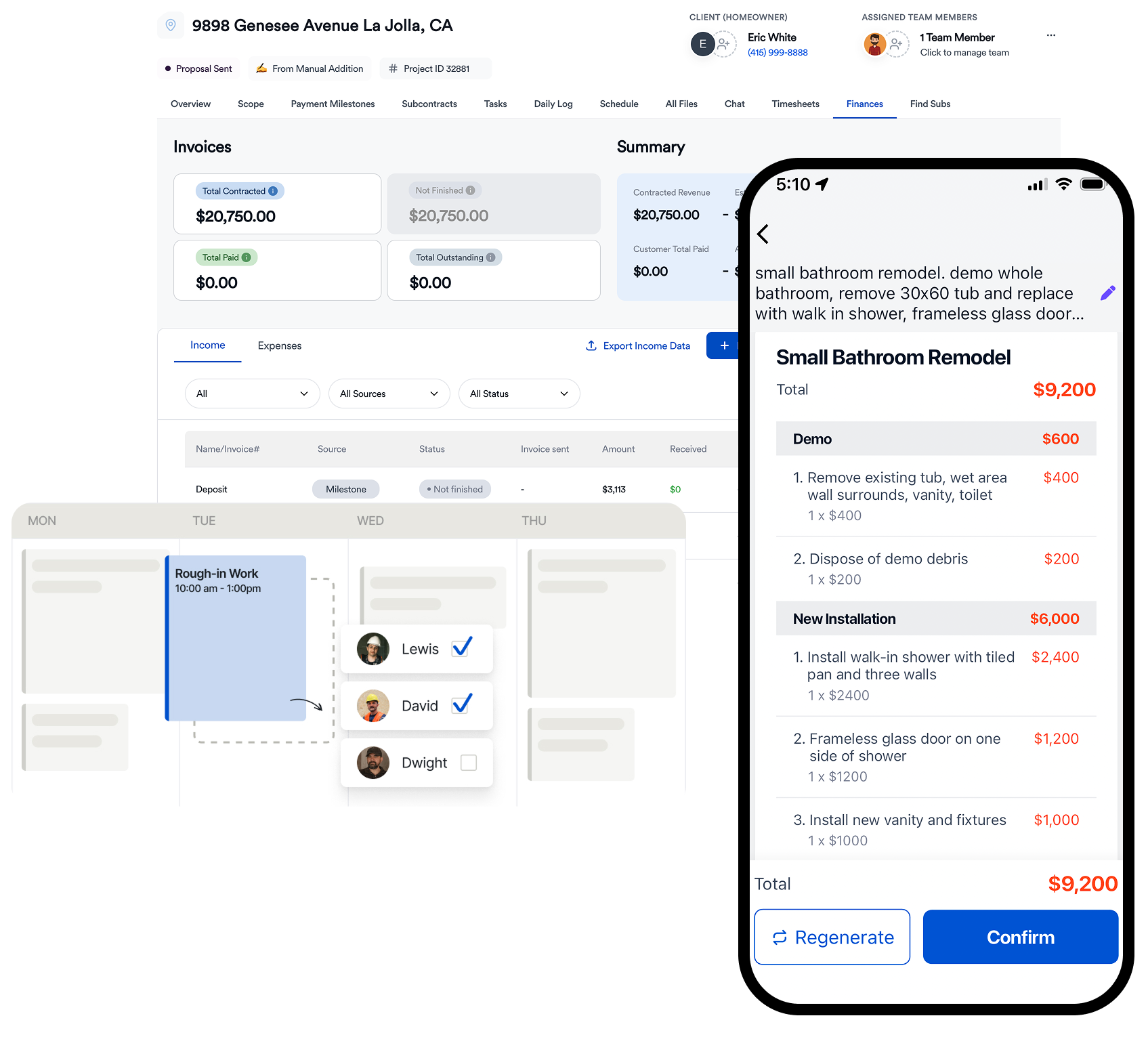
Instead of juggling spreadsheets, outdated templates, or manual calculations redone from scratch each time, project details go into one system and come out as a professional estimate — without the double-checking that eats up an evening. In practice that means real-time cost and update tracking so a price change doesn't slip through unnoticed, fewer of the small entry mistakes that quietly erode margin, and a proposal that reads as polished to a client comparing bids, not cobbled together the night before.
Where Small Construction Companies Lose Estimating Time
Before changing tools, figure out which part of your estimating process is slowest. For most small shops, the time goes to a handful of repeat tasks rather than the math itself:
| Time sink | Why it happens | What to change first |
|---|---|---|
| Rebuilding estimates from scratch | No standard starting point for common job types | Create a template for each job type you bid often (bath, kitchen, ADU, roof, deck) |
| Hunting for current prices | Material and labor costs live in old files, texts, and supplier emails | Keep one cost list and update it on a set schedule |
| Measuring plans by hand | Takeoff is done with a scale ruler or re-measured on every revision | Move to digital or AI-assisted takeoff so quantities go straight into the estimate |
| Re-checking markup | Markup is typed in by hand on each line or each job | Set markup rules once and apply them the same way every time |
| Formatting the proposal | The estimate is copied into Word or a PDF template | Generate the client proposal directly from the estimate |
| Chasing revisions | Scope changes mean editing several files | Keep one current version of the estimate that everyone works from |
Pick the one or two rows that cost you the most each week and fix those first. You don't need to change everything at once.
What "Built for Small Business" Actually Means
Most estimating platforms on the market were designed for firms with an IT department or a dedicated estimator — features scaled for a company that isn't yours. What a small team actually needs is simpler: log in, build the estimate, get back to the job. No training manual, no add-ons that never get used.
Tools that try to do everything tend to slow down the person who just needs to send a bid before lunch. Eano Pro is built around speed, clarity, and reliability specifically, rather than a feature checklist aimed at a bigger customer.
The Real Cost of a Small Estimating Error
Estimating mistakes don't have to be dramatic to hurt. Imagine a $100,000 remodeling project expected to produce a 20% gross profit. If labor, materials, or subcontractor costs are underestimated by just $5,000, a quarter of that expected gross profit is already gone.
That's what makes estimating accuracy particularly important for smaller contractors. You don't need to completely miss a room or forget a subcontractor for a bid to become a bad job. Several smaller misses — outdated material pricing, underestimated labor hours, forgotten disposal costs, or inconsistent markup — can add up quickly.
The goal isn't to predict every dollar perfectly. It's to create a repeatable estimating process that makes those misses easier to spot before a client signs the proposal.
Worked Example: Markup vs. Margin on a Small Job
A related error shows up when markup and margin get mixed up. Say your total job cost is $40,000 and you add a 20% markup:
| Line | Amount |
|---|---|
| Job cost (labor, materials, subs, overhead) | $40,000 |
| 20% markup on cost | $8,000 |
| Price to client | $48,000 |
| Gross margin ($8,000 ÷ $48,000) | About 16.7%, not 20% |
If your target was a 20% margin, you would need to price the job at $50,000 ($40,000 ÷ 0.80). That $2,000 gap is the kind of miss that's easy to make by hand and easy to prevent when the rule is set once in your estimating software. For a fuller breakdown, see markup vs. margin for contractors.
Where the Time Actually Gets Saved
The practical wins are specific: bids go out faster, so a slower-moving competitor doesn't win the job on response time alone; pricing and scope errors get caught before they're sent rather than after a client questions them; and an estimate can be adjusted the same day prices or scope change, instead of requiring a full rebuild. Taken together, that's fewer late nights spent reconciling numbers and more projects actually moving forward.
| Estimating task | Manual / spreadsheet workflow | With estimating software |
|---|---|---|
| Starting a new estimate | Copy an old file or start from scratch | Start from a reusable template |
| Updating labor/material costs | Find and replace numbers manually | Update stored costs for reuse |
| Applying markup | Calculate or enter it manually | Apply consistent markup rules |
| Creating a takeoff | Measure plans and transfer quantities | Use digital or AI-assisted takeoffs |
| Revising scope | Edit multiple rows and recalculate | Update scope and recalculate |
| Sending the proposal | Export, format, attach, and email | Generate a client-ready proposal |
| Working away from the office | Find the right file or version | Access the current estimate online |
What's Actually Under the Hood
The features that matter for a small shop aren't flashy — they're the ones that remove daily friction: a cost database that reflects current market pricing instead of a number typed in six months ago, templates built for residential, remodel, or light commercial work specifically, markup and margin calculations applied consistently instead of by memory, and integration with whatever project management tool the rest of the job already runs on.
None of that is a bell or whistle. Each one is a direct answer to a specific place small-shop estimates tend to go wrong. If spreadsheets are still the daily tool, construction estimating software built for small business is worth a look — not to replace judgment, but to remove the busywork around it.
What Changes for a Small Team
Teams that switch tend to notice the same things: less second-guessing on a submitted bid, fewer mistakes caught after the fact instead of before, and faster approvals because the numbers are easier to trust at a glance. This isn't about matching a larger competitor's headcount — it's about making the estimating process as solid as the actual work being built.
Pre-send checklist: before sending an estimate, check:
- Are all major scope items accounted for?
- Are labor rates current?
- Have material prices changed since your last similar project?
- Are subcontractor costs confirmed or reasonably current?
- Is overhead included?
- Is markup applied consistently?
- Are allowances clearly identified?
- Does the scope explain what's included and excluded?
- Did you account for permits, disposal, delivery, and other easily forgotten costs?
- Can the client understand the estimate without calling you for an explanation?
For a full list of what belongs in a client-ready estimate, see what every contractor should include in an estimate.
A Simple Weekly Estimating Routine for Small Teams
Software helps most when it supports a consistent routine. A lightweight version that works for a one- to five-person shop:
- Monday: Review open bids and set a send-by date for each one.
- Before each walkthrough: Open the matching job-type template so you capture the right measurements and photos on site.
- Same or next day: Build the takeoff and estimate from the template, then run the pre-send checklist below.
- Monthly: Update labor rates and the material prices you use most.
- After each completed job: Compare estimated vs. actual costs and adjust the template where you were off. Our guide to job costing for residential contractors walks through how to do this.
How to Tell If Estimating Software Is Paying Off
Track these for the first few months after switching, and compare them with your numbers before:
- Average time from walkthrough to proposal sent
- Number of bids sent per month
- Number of revisions requested by clients because something was unclear or missing
- Estimated vs. actual cost on completed jobs
- Win rate on bids sent
If turnaround and estimate accuracy aren't improving, look at the process before blaming the tool. Often the template or the cost list needs work. If you're still in spreadsheets, start with the one time sink from the table above that costs you the most each week.
See Eano Pro in Action
Ready to take the guesswork out of estimating? Book a demo and see how much time it could save on the next bid: Schedule a demo here.