
Landscape Contractor Software (2026): How Design-Build Landscapers Choose a System That Covers Estimating to Invoicing
The right landscape contractor software depends on how you make money. A design-build or installation company needs estimating, proposals, change orders, scheduling and job costing on one record. A recurring maintenance company needs routing, recurring visits and fast invoicing. Most roundups mix the two, which is why so many landscapers buy a tool that fits half their business.
This guide splits the decision by business model, gives you a decision table by crew size, walks through a sample estimate for a 600 sq ft paver patio with planting, and lists the questions to ask in every demo. If you run hardscape and planting installs, start with our landscape contractor software overview, and keep reading for how to compare it with the alternatives.
Key takeaways
- Pick by business model first. Install and design-build work is project-based. Maintenance work is route-based. Few tools are equally strong at both.
- Estimating is where install companies win or lose margin. Hardscape quantities, base depth, waste and equipment time have to be priced from your own numbers.
- One record from estimate to invoice. If the signed estimate does not become the job budget, change-order baseline and invoice schedule, you will retype it.
- Switch in the off-season if you can. If you have to switch mid-season, move new jobs first and leave active jobs where they are.
What landscape contractor software actually does
At its simplest, landscape software replaces the stack most companies build by accident: a spreadsheet for estimates, a Word template for proposals, a paper or whiteboard schedule, a group text for crews, and QuickBooks for invoices. A full system connects those steps so information is entered once:
- Lead and site visit: capture the contact, address, photos, measurements and the client's wish list.
- Estimate: turn quantities into priced line items for materials, labor, equipment, disposal and markup.
- Proposal and contract: send a branded proposal with options (for example, standard pavers vs. premium), payment terms and e-signature.
- Schedule: put the job on the calendar with crew assignments, material deliveries and equipment.
- Job costing: track actual hours, materials and subcontractor costs against the estimate while the job runs.
- Change orders: price and approve scope changes (an extra seat wall, a drainage fix) before the work happens.
- Invoice and payment: bill deposits, progress payments and final payment from the same record.
Each handoff is a chance to lose money. A patio that was estimated at 4 inches of base and built at 6 inches is a margin problem that only shows up if someone compares the estimate to the actual job. That is why the "one record" test matters more than any individual feature. We cover the stack question in more depth in how to build a simple tech stack for a landscape business.

The market: steady demand, seasonal crunch
Demand for landscape work is not slowing. The U.S. Bureau of Labor Statistics projects that "Overall employment of grounds maintenance workers is projected to grow 5 percent from 2025 to 2035, faster than the average for all occupations," with "About 162,500 openings for grounds maintenance workers are projected each year, on average, over the decade." BLS also notes the median hourly wage for the group was $19.27 in May 2025 and that "Some jobs are seasonal" (BLS Occupational Outlook Handbook: Grounds Maintenance Workers).
Two things follow for software. First, the labor market is tight and turnover is real, so the tool has to be simple enough for a new crew lead to use on a phone in the first week. Second, the season compresses your sales and production into a few months. A tool that saves 30 minutes per estimate saves the most in March and April, when you are pricing ten jobs a week and running crews at the same time.
Homeowner spending on outdoor projects also tracks the broader remodeling cycle. Harvard's Joint Center for Housing Studies expects that "Year-over-year growth in renovation and repair spending is expected to slow to just 0.5 percent in the second quarter of 2027" (Harvard JCHS, Remodeling Spending Poised for Further Slowdown). In a flatter market, the companies that respond fastest with a clear, accurate proposal tend to win the jobs that are out there.
Design-build vs. maintenance: why one tool rarely fits both
The single biggest mistake we see is a design-build company choosing a tool built for lawn-care routes, or a maintenance company buying a construction platform. Here is how the two models differ in what they need from software:
If more than about 70% of your revenue is one model, buy for that model and accept a workaround for the rest. If you are closer to 50/50, ask every vendor to show both workflows on the same account, with your data, before you sign. Many companies that run both end up with one system for install projects and a route tool for maintenance, connected through QuickBooks.
Decision table: which type of tool fits your company
This table reflects how the tool categories are generally positioned. It is a starting point for your shortlist, not a ranking.
Comparison: commonly shortlisted landscape software
These are the names that come up most often in landscape software searches. Features and prices change frequently. Every price below is marked for verification, and you should confirm each feature claim in a live demo with your own job.
Tool-by-tool: what to look for
Eano Pro
Fits: design-build and install companies that want estimates, proposals, contracts, schedules, change orders and job costing on one record. Eano Pro drafts estimates from a typed scope, photos or a walkthrough video with its AI estimate generator, then lets you price with your own cost items and markup. Signed estimates carry into the schedule and change orders.
Pros: one record from estimate to invoice; AI drafting; e-signature; QuickBooks sync. Cons: it is a general residential construction platform, not a route-optimization tool, so maintenance-heavy companies will want a dedicated route tool alongside it.
LMN
Fits: landscape companies that want landscape-specific estimating and budgeting. Ask in the demo: how the estimate becomes a schedule and a job-cost report, and what the onboarding takes.
Aspire
Fits: larger and commercial landscape operations with multiple branches and contract maintenance. Ask in the demo: implementation length, minimum seats and whether a small design-build team would use most of it.
Jobber
Fits: service and maintenance businesses that need quoting, scheduling and invoicing for many short visits. Ask in the demo: how it handles a multi-week hardscape project with phases, subcontractors and change orders.
Service Autopilot and Yardbook
Fits: route-based lawn and maintenance companies, from solo operators up. Ask in the demo: whether install projects can be estimated and job-costed in the same account, or whether you would need a second tool.
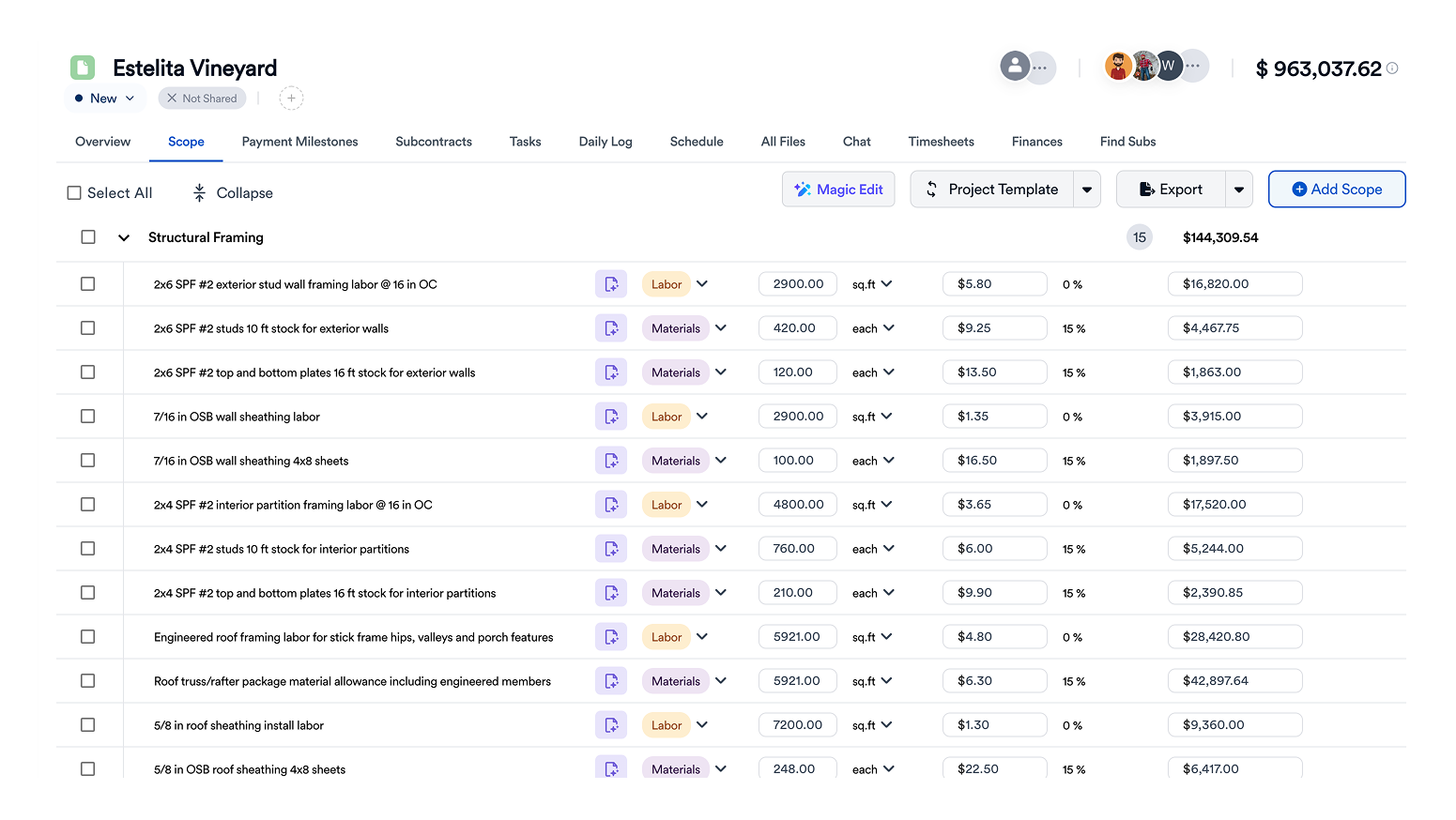
Worked example: 600 sq ft paver patio with planting (illustrative)
The numbers below are illustrative. They show how a good estimate is structured, not what you should charge. Use your own supplier prices, labor rates and markup. The job: a 20 x 30 ft (600 sq ft) concrete paver patio on a compacted base, a 40 ft border of planting beds with 12 shrubs and mulch, and haul-off of the excavated soil.
A few checks that catch the most common landscape estimating errors:
- Base depth drives cost. Going from 4 to 6 inches of base on 600 sq ft adds roughly 3.7 cu yd of material, plus excavation and haul-off for the extra depth.
- Waste depends on the pattern. A straight running bond might need 5% extra, while a herringbone or curved layout with many cuts can need more. Price waste by pattern, not as a flat default.
- Haul-off is real money. Excavated soil swells when loosened, so the truck volume is larger than the hole volume.
- Loaded labor rate, not wage. Your hourly cost includes payroll taxes, insurance, workers' comp and non-billable time.
- Check the margin, not just the markup. A 35% markup is about a 26% gross margin. Our profit margin calculator converts between the two.
For more on the mistakes that sink landscape bids, see the most common estimating mistakes in landscape construction.
Estimating hardscape and softscape: what to check in a demo
Every vendor demo will show a clean estimate. Bring this patio job (or one of your own) and ask the vendor to build it live. Watch for these things:
- Assemblies: can you build a "paver patio per sq ft" assembly that automatically adds base, sand, edge restraint, polymeric sand and labor when you enter the area?
- Your costs first: does the tool use your cost items and labor rates, or a generic price list you cannot override?
- Options in one proposal: can the client choose between two paver lines, or add a seat wall, without you building a second estimate?
- Takeoff: can you measure areas from a site plan or aerial image, and can you check every quantity against the source? See how AI takeoff works on plans.
- Plant lists: can you add plants by count and size quickly, with installed pricing?
- Equipment: can skid steer, mini-excavator and plate compactor time be priced separately from labor?
- After the sale: does the approved estimate become the job budget and change-order baseline automatically?

Scheduling crews, equipment and deliveries
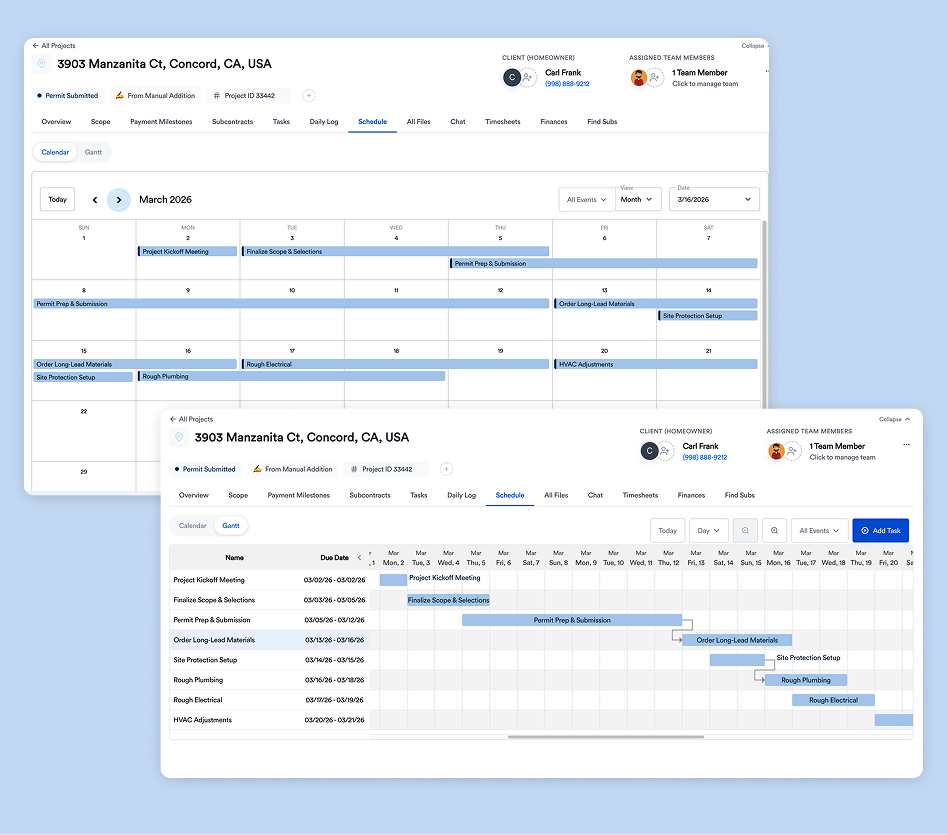
Install work stacks dependencies: you cannot set pavers before the base is compacted, and you cannot plant before irrigation is roughed in. Good landscape software should let you schedule by phase, assign crews and equipment, and see when material deliveries land. When weather pushes a phase, the following tasks should move with it.
Look for a mobile view crews will actually open. If your crew leads still text photos to the office, the software should make it easier, not harder. We cover how to keep jobs on track in why landscape projects fall behind schedule and how to manage multiple landscape jobs at once.
Change orders: where landscape margin leaks
Landscape jobs change on site constantly. The client adds a fire pit, the excavation hits a buried root mass, or drainage needs a French drain that was not in the original scope. If those changes are agreed verbally and billed at the end (or not at all), margin disappears.
The fix is simple and needs software that makes it fast:
- Write the change on site, from the phone, with photos.
- Price it from the same cost items you used in the estimate.
- Get the client's e-signature before the work happens.
- Add it to the job budget and the next invoice automatically.
Contractors in other trades describe the same problem. Mehdi Jabri of MJ Modern Stairways, which builds railings, fences and gates, put it this way: “Change orders were one of the biggest headaches. Things would slip through the cracks.” See how change orders work in Eano Pro.
Job costing: knowing which jobs made money
Many landscape companies only learn whether a job was profitable when the accountant closes the year. Job costing brings that forward. Every hour, material receipt and subcontractor bill is assigned to a job and compared with the estimate while the job is still running.
Patterns across jobs matter more than any single job. If every patio runs 8% over on labor, your production rate is wrong, and every future bid inherits the error. Our guide to job costing for residential contractors walks through the full method.
Pricing: how to compare total cost
Landscape software prices vary widely by user count, features and whether estimating, scheduling and payments are included or add-ons. Do not compare sticker prices. Compare total yearly cost and what it replaces:
One small-team example from a related trade: Lighthouse Construction & Design, a Tallahassee builder, said of its old stack, “It started $1,500, $2,000 a month just in programs. And it gets crazy.” Its story page lists its starting Eano Pro plan at $588/year (see the Lighthouse story). Your numbers will differ, but the exercise of adding up every subscription is worth doing.
How to switch software mid-season
The best time to switch is the off-season. If you cannot wait, switch in a way that does not disrupt jobs already running:
- Week 1: set up. Load your cost items, labor rates, markup, and two or three estimate templates (patio, planting refresh, retaining wall).
- Week 2: new estimates only. Price every new lead in the new tool. Leave active jobs where they are.
- Week 3: new jobs. Jobs sold in the new tool are scheduled and job-costed there. Train crew leads on the mobile app with one job each.
- Week 4 onward: let the old system run out. As old jobs finish, close them in the old system. Do not migrate half-finished jobs.
- End of season: review. Compare estimate vs. actual on every job sold in the new system and update your production rates.
Keep the change small for the crew: one app, one login, one place to clock in and upload photos. Office-side complexity is fine. Field-side complexity kills adoption.
Client communication: proposals, options and updates
Landscape clients buy with their eyes. A proposal that shows the layout, the paver color, the plant list and a clear payment schedule closes faster than a one-line price on a PDF. Look for software that lets you attach photos and drawings, offer good/better/best options, and collect a deposit with the signature.
After the sale, the same record should keep the client informed: start date, weather delays, change orders waiting for approval, and the next invoice. A client dashboard replaces a lot of "when are you starting?" phone calls in peak season. See how a proposal with options and e-signature is built.
- Good / better / best: standard concrete pavers, a premium paver line, or natural stone, each priced from the same takeoff.
- Optional add-ons: seat wall, low-voltage lighting, drip irrigation for new beds, each with its own line and checkbox.
- Deposit terms: deposit on signature, progress payment at base completion, final on walkthrough.
- Exclusions: utility locates, permit fees, unforeseen rock or roots, and irrigation repairs outside the work area.
Mobile and field use: the adoption test
Software that the office loves and the crews ignore is a tax, not a tool. Before you buy, give the mobile app to your least tech-friendly crew lead for one week and ask them to do four things: clock in and out, see tomorrow's job and address, add five photos to a job, and mark a task complete. If any of those takes more than a minute, expect your field data to be incomplete, and your job costing will be wrong as a result.
Bilingual crews add another requirement. If your foremen work in Spanish, check whether tasks, notes and change orders can be read in their language. Time tracking matters too: a timesheet that ties hours to a job and a phase is what makes estimate-vs-actual reporting possible.
Checklist: questions to ask every vendor
- Is the tool built for install projects, maintenance routes, or both? Show me both with my data.
- Can I load my own cost items, labor rates, equipment rates and markup?
- Can I build assemblies (patio per sq ft, wall per face ft)?
- Can a client choose between options inside one proposal and e-sign it?
- Does the signed estimate become the schedule, budget and change-order baseline without retyping?
- How do crews clock in and add photos from the field?
- Does it sync with QuickBooks, and in which direction?
- What is the total yearly cost for my team size, including add-ons and payment fees?
- Can I export all my data if I leave?
Bottom line
Choose by business model first, then test estimating with one of your own jobs. For install and design-build companies, the right tool turns a site visit into a priced, signed estimate and carries that estimate through scheduling, change orders, job costing and invoicing. If that is your business, see how Eano Pro works for landscape contractors and build your next patio estimate in it.



.png)