
Estimating Software for Construction in 2026: Best Free Options, AI Features, and What to Choose
What Is Construction Estimating Software?
Construction estimating software helps contractors calculate project costs accurately before bidding. It automates quantity takeoffs, applies material and labor rates, breaks down costs by line item, and generates professional proposals ready to send to clients.
The core value is the same whether you're working on residential renovations or commercial builds: fewer manual errors, faster turnaround, and bids that reflect actual project scope. Modern platforms also include collaboration tools, mobile access, and integrations with accounting and project management systems—capabilities that spreadsheets simply can't match.
According to the Construction Industry Institute, projects with structured estimating processes see up to 25% fewer cost overruns than those relying on informal methods. The National Association of Home Builders (NAHB) similarly reports that accurate pre-bid cost modeling is one of the strongest predictors of project profitability for residential contractors.
Why Contractors Are Moving Away from Spreadsheets
Spreadsheets still work for simple jobs. But as project volume grows and competition tightens, they become a liability rather than an asset. Three problems come up consistently:
Errors That Erase Your Margin
Every material price and labor rate in a spreadsheet is entered manually. One outdated rate, one forgotten line item, one misplaced decimal—and the profit on that job disappears. Contractors using spreadsheets underbid projects by an average of 12% due to missed items alone.
Time You Can't Get Back
A typical residential estimate takes 4–8 hours in Excel. That's time away from selling, managing jobs, and running your business. Estimating software cuts that time by 50–70% through automation and reusable templates.
No Shared Source of Truth
When multiple people work from the same spreadsheet, version problems follow quickly. Which file is current? Who updated the concrete quantity? There's rarely a clean answer. Estimating software gives your team version control, a change history, and role-based access so everyone works from the same data.
Benefits of Free Construction Estimating Software
Switching from spreadsheets delivers immediate, practical improvements across your bidding process:
| Benefit | Impact |
|---|---|
| Faster Bid Preparation | Cut estimate creation time by 50–70%, allowing teams to respond to more opportunities and turn bids around faster. |
| Fewer Errors | Automated calculations reduce manual mistakes and improve consistency across estimates. |
| Professional Proposals | Generate client-ready bid documents that improve credibility and create a more polished buying experience. |
| Cost Visibility | See detailed labor, material, equipment, and subcontractor costs before committing to a price. |
| Scalability | Handle more bids and project opportunities without needing to add administrative staff. |
| No Upfront Cost | Test and validate workflows before investing in a paid platform or expanding usage across your team. |
For small contractors especially, free tools remove the barrier to entry. You get professional-grade capabilities and can evaluate fit before committing to a subscription.
Ready to see how Eano Pro fits your workflow? Book a free demo → — a 20-minute walkthrough with no obligation.
Key Features to Look for in Free Construction Estimating Software
Not all free tools are built equal. Here's what actually matters when evaluating your options:
Essential Features
- Quantity takeoff tools — digital measurement from PDFs or uploaded blueprints
- Cost database — current material and labor pricing built in
- Template library — pre-built estimates for common project types
- Export options — PDF, Excel, or CSV output for client bids
- Usable interface — minimal training required to get started
Features Worth Having
- Cloud storage — access estimates from any device
- Mobile app — review and update estimates from the job site
- Bid proposal templates — professional formatting for client-facing documents
- Multi-user access — collaboration without version conflicts
- Integration support — connect to accounting or project management tools
Advanced Capabilities
- AI-powered takeoffs — automated quantity extraction from drawings
- Historical cost tracking — learn from past project data
- Change order management — track scope changes mid-project
- Bid workflow automation — send bids, track responses, follow up
AI construction estimating software is becoming standard even in free tiers. Tools that use machine learning to suggest quantities and flag missing items signal a platform investing in long-term value for contractors.
Best Free Construction Estimating Software Options in 2026
Based on features, ease of use, and real contractor feedback, these are the free options worth evaluating this year:
Looking for free templates and calculators beyond software? Browse our free contractor toolkit.
1. Eano Pro (Free Trial) — Best for Contractors Who Want More Than Just Estimating
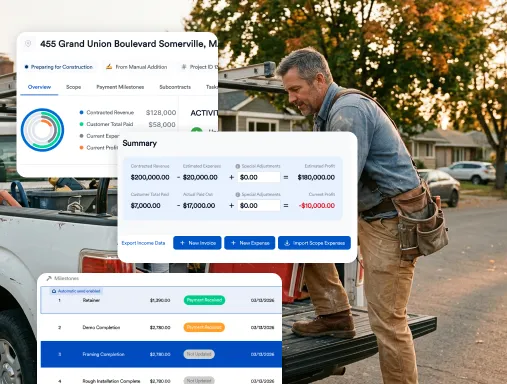
Eano Pro takes a different approach than standalone estimating tools. It connects estimating directly to proposals, project management, client communication, and job costing—so the work you put into a bid doesn't disappear when you win the job.
- Digital quantity takeoffs from uploaded PDFs
- One-click estimate-to-proposal conversion
- Real-time job costing tracked against estimates
- Mobile app for field access and updates
Why It Stands Out: Most estimating tools stop at the bid. Eano Pro treats the estimate as the starting point for managing the entire project. For contractors who want to stop re-entering data across multiple systems, that continuity is the real value.
Learn how Eano Pro connects estimating to your full construction workflow →
Also see: Best Construction Management Software for General Contractors in 2026
2. Stack Estimating (Limited Free Plan) — Best for Commercial Takeoffs
Stack provides solid digital takeoff tools with a limited free version for small or occasional projects. It's useful for commercial contractors who need precise measurement tools but don't require full project management.
- Cloud-based takeoffs with color-coded measurement layers
- Custom cost database support
- Bid assembly creation
Free Tier Limits: 1 active project, basic takeoff tools only
3. CoConstruct (30-Day Trial) — Best for Residential Builders Evaluating Premium Features
CoConstruct offers a full-featured 30-day trial well suited to residential contractors who want to test premium capabilities before buying. It's not permanently free, but the trial is long enough to evaluate fit properly.
- Client and selection management
- Change order tracking
- Budget vs. actual cost tracking with integrated scheduling
4. JobBag (Free Version) — Best for Solo Operators
JobBag's free version covers basic estimating and job costing for independent contractors and handymen. It's functional and simple—a good fit for solo operators who don't need team collaboration or cloud access.
- Simple estimate templates and material cost tracking
- Print-ready proposals
Free Tier Limits: Limited templates, no cloud sync
5. ProEst (Free Demo) — Best for Mid-Sized Contractors Exploring Enterprise Tools
ProEst offers a comprehensive demo and limited free access to test enterprise-grade features. Useful as a benchmark if you're outgrowing smaller tools and considering a step up.
- Detailed cost databases
- QuickBooks integration
- Collaborative estimating workflows
6. Clear Estimate (Free Templates) — Best for Excel-Familiar Users
Clear Estimate provides free downloadable templates built on Excel with professional structure and automated calculations. It's a practical upgrade from a blank spreadsheet, though it lacks cloud features or real-time collaboration.
- Industry-standard templates with automatic calculations
- Professional proposal formatting
7. BuilderTREND (14-Day Trial) — Best for Residential All-in-One
BuilderTREND wraps estimating inside a full contractor project management suite. The 14-day trial is short, but it's enough to evaluate whether the all-in-one model fits your workflow.
- Estimate-to-budget conversion and client selection tracking
- Schedule integration and mobile access
Limitation: Not permanently free — trial access only
Limitations of Free Construction Estimating Software
Free tools are a smart starting point, but they come with real constraints that affect growing businesses:
Project and User Caps: Most free tiers limit you to 1–5 active projects or 2–3 users. Once your volume grows, those limits force workarounds that cost more time than they save.
Restricted Features: Advanced capabilities—AI takeoffs, historical cost analysis, multi-project dashboards—are almost always locked behind paid plans. You get the basics, not the competitive tools.
Limited Support: Free users typically receive community support or extended response times. On tight bid deadlines, waiting 48 hours for help isn't workable.
Proposal Branding: Some free versions add their own branding to bid documents, which undercuts the professional image you're trying to build with clients.
Integration Gaps: Free tools rarely connect directly to accounting platforms like QuickBooks or project management systems. Data moves manually between tools, which introduces errors and wastes time.
Data Portability: Some platforms make it difficult to export or migrate your data when you upgrade. Always review the terms of service before storing sensitive bid pricing or client records.
Free software works well for testing, smaller operations, or occasional bids. Most contractors outgrow free tools within 6–18 months as project volume and team size increase.
When to Upgrade to Paid Construction Estimating Software
These signals typically indicate it's time to move to a paid plan:
- Your bid close rate is below 30% despite competitive pricing — your estimates may lack precision or polish
- Each estimate consistently takes more than 10 hours — productivity gains from paid software often cover the subscription cost quickly
- You're managing more than 5 active projects and hitting free tier limits regularly
- Your team has grown beyond 3 users and collaboration is getting difficult
- You're consistently underbidding jobs and absorbing change orders post-award
- You're manually moving data between estimating, accounting, and project management systems
Paid construction estimating software typically runs $50–$150/month for small contractors and $200–$500/month for mid-sized operations. ROI usually arrives within 3–6 months through faster estimates, fewer errors, and better win rates.
Not sure which plan fits your operation? Schedule a free 20-minute consultation with an Eano Pro specialist → — no sales pressure, just answers.
How AI Is Changing Construction Estimating
AI construction estimating software is moving from a premium feature to a standard expectation. Here's where it makes the biggest practical difference:
Automated Quantity Takeoffs
Traditional takeoffs require manually measuring every element from drawings—walls, windows, flooring, electrical. AI tools analyze the same drawings and extract quantities automatically, with accuracy rates above 95%. A set of residential blueprints that used to take 3–4 hours to measure can be processed in under two minutes.
The McKinsey Global Institute has identified AI-driven quantity estimation as one of the highest-value automation opportunities in the construction sector, with the potential to reduce pre-construction labor costs by up to 30%.
Predictive Cost Suggestions
Machine learning models analyze your historical project data alongside current market rates to suggest realistic costs. If your labor rate for concrete work is running 20% below market, the AI flags it before submission—preventing the underbid that erodes margin.
Anomaly Detection
AI scans estimates for inconsistencies: unusually low material costs, missing line items, labor hours that don't align with project scope. Catching these before the bid goes out significantly reduces post-award change orders and disputes.
| AI Feature | Free Tools | Paid Tools |
|---|---|---|
| Basic Quantity Detection | Limited | Full |
| Automated Takeoffs | Not Available | Included |
| Cost Prediction | Not Available | Included |
| Anomaly Detection | Not Available | Included |
| Historical Learning | Not Available | Included |
The most powerful AI capabilities remain in paid tiers for now. That gap is narrowing, but contractors who need AI-driven takeoffs and cost prediction will need to move to a paid plan.
How Estimating Connects to Project Management and Operations
Most contractors treat estimating as a standalone step: build the bid, win the job, then start over in a different system. That approach creates more work and more risk than most people realize.
The Cost of Disconnected Tools
When estimating software doesn't connect to project management, winning a bid triggers a manual re-entry cycle. The estimate data gets copied—imperfectly—into your scheduling tool, your accounting platform, and your budget tracker. That double-entry wastes 3–5 hours per project and breaks the connection between what you bid and what you actually spend.
The result: cost overruns that show up too late to correct, budgets that don't match reality, and no reliable data to improve future estimates.
What Integration Actually Looks Like
When estimating and project management share the same platform, winning a bid becomes the starting point for execution rather than a reason to rebuild everything from scratch. The estimate becomes the project budget. Line items become tasks. Material orders link to cost codes. Actual costs track against the original estimate in real time.
Contractors using integrated systems report 40% faster job setup after winning bids, 25% better cost control during execution, and 30% more accurate future estimates from accumulated historical data.
Related reading: Best Construction Management Software for General Contractors →
How Eano Pro Helps Contractors Work More Efficiently
Eano Pro was built for construction firms that need practical, connected tools—not more software to manage. Instead of treating estimating as a standalone function, Eano Pro positions it as the foundation of your entire project workflow.
The Difference in Practice
| Traditional Estimating Software | Eano Pro Connected Workflow |
|---|---|
| Creates estimates, stops there | Estimates connect directly to scheduling, job costing, project management, and client communication. |
| Manual re-entry for each project | One-click estimate-to-project conversion with no duplicate data entry. |
| No field access to estimate data | Mobile app gives field teams real-time access to project, estimate, and job information. |
| Cost data stays isolated | Live budget vs. actual tracking across all projects with centralized reporting. |
| Limited team collaboration | Role-based access for estimators, project managers, office staff, and field crews. |
Before and After Eano Pro
Before: Estimate in a spreadsheet → win the bid → manually rebuild the budget in a separate system → schedule crew with another tool → track costs in accounting software → hope everything lines up at month end.
With Eano Pro: Create the estimate → win the bid → click Convert to Project → schedules, budgets, and assignments populate automatically → field updates flow in real time → accounting integrates without manual transfer. Explore Eano Pro's estimating features
Who Eano Pro Is Built For
- General contractors and remodelers managing 5 or more active jobs
- Residential and light commercial builders ready to move past spreadsheets
- Teams spending too many hours moving data between disconnected tools
- Operations managers who need visibility across all jobs, not just estimates
The Bottom Line
Free construction estimating software is a genuine improvement over spreadsheets for most contractors. The right tool saves time on every bid, reduces the errors that quietly kill margin, and produces proposals that look like they came from a serious operation.
But the contractors who pull ahead aren't just estimating faster. They're connecting their estimates to everything that comes next — project setup, scheduling, cost tracking, and client communication. That's where integrated platforms like Eano Pro create an advantage that standalone tools can't match.
Start with a free tier, validate the workflow, and upgrade when your business outgrows the limits. When that happens, you'll already know what you need.