
AI Scheduling for Construction Projects: Can It Build a Schedule From Scope?
AI scheduling for construction can turn a written scope into a usable first-pass construction schedule: a list of activities, likely trade sequence, durations to review, and dependencies that show what must finish before the next phase can start. It cannot reliably know a particular electrician's availability, a municipality's inspection backlog, the actual lead time on the selected cabinets, or the conditions behind a wall. A project manager still has to turn the draft into a buildable commitment.
For a residential GC running several remodels at once, that distinction matters. The useful outcome is not an automatically generated calendar. It is a faster starting point that lets the PM spend more time validating constraints, coordinating subs, and communicating a schedule the field can actually follow.
What an AI-built schedule should produce
An AI construction scheduling tool begins with the information already created in preconstruction: a written scope, estimate categories, proposal inclusions, plans, selections, and target start or completion dates. It converts that information into a work breakdown structure, then proposes a logical order and links predecessor and successor tasks.
For a kitchen remodel, a reasonable draft might include site protection and demolition; framing; rough plumbing, electrical, and HVAC; rough inspection; drywall; cabinet fabrication lead time; cabinets; countertops; finishes; punch list; and final inspection. A useful draft also makes the handoffs visible. Drywall begins only after the rough trades are complete, inspected, and ready for close-in.
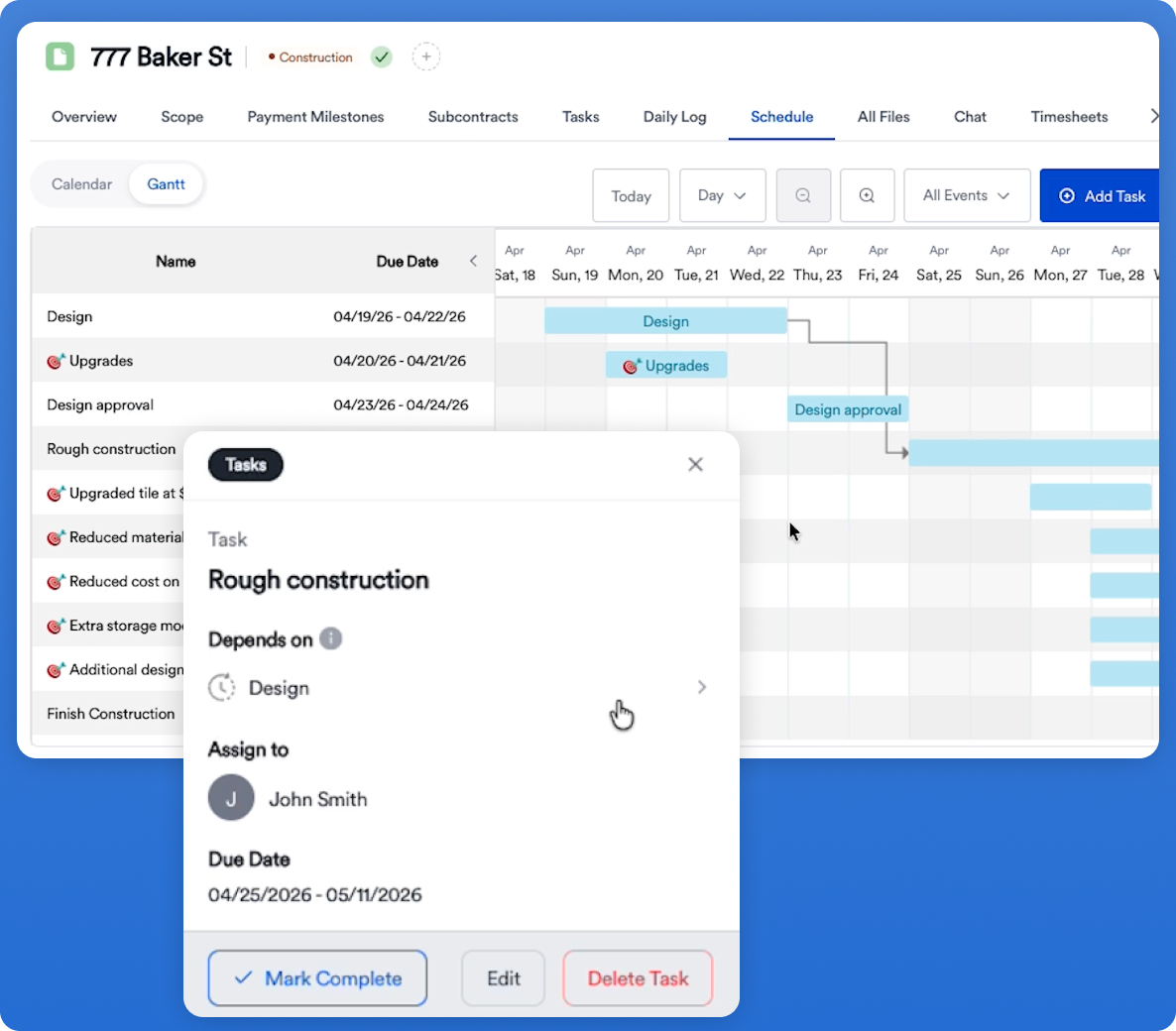
That's where AI helps. It can turn a scope that says “relocate sink, add island lighting, install new cabinets and flooring” into a schedule the PM can interrogate instead of a blank Gantt chart. Eano’s construction scheduling software states that it can create a schedule from scope, sequence work, and link task dependencies. Its schedule can then be viewed in a Gantt chart and adjusted by the team.
The draft is only as sound as its inputs. If the scope omits temporary kitchen arrangements, asbestos testing, engineer turnaround, owner-furnished appliances, or cabinet lead time, an AI system has no dependable basis for planning them. Treat schedule generation as a planning pass, not an approval to skip preconstruction.
A residential remodel example: where the AI helps, and where it gets corrected
Consider a GC planning a 10-by-14-foot kitchen remodel in an occupied home. The signed scope includes demolition, a partial wall removal, new cabinets, engineered stone countertops, flooring, and upgraded lighting. The estimator has already organized the cost side into demolition, carpentry, plumbing, electrical, cabinetry, tops, flooring, paint, and closeout.
An AI draft may create a sensible backbone: mobilize, protect the home, demolish, frame, complete rough trades, pass inspection, close walls, install cabinets, template countertops, complete finishes, and close out. It may also place electrical rough-in before drywall and countertop templating after cabinet installation. That saves the PM from building every row and link by hand.
But a first draft commonly needs corrections such as these:
The owner or PM should review the schedule. Start with the homeowner milestone, work backward through the critical path, and test each prerequisite.
The National Association of Home Builders and Home Builders Institute reported in 2025 that skilled-labor shortages added an average of 1.98 months to construction time in the single-family sector, with smaller builders seeing even greater delays. That study’s findings do not mean every remodel should receive two months of float. They do show why “we’ll find a crew when the job is ready” is not a schedule strategy. Name the responsible trade, ready-to-start condition, and decision date for each critical constraint.
How AI can surface gaps and conflicts
AI can flag planning issues by comparing the scope with an expected sequence and stated dependencies. It may reveal that a finish task has no predecessor, a task precedes a required inspection, or multiple activities appear to need the same space. In a connected system, it can also prompt the PM to consider a pending change order or unapproved selection.
Those prompts are useful because scheduling failures often happen at handoffs. A cabinet order changes to a custom finish; purchasing does not reach the PM; countertop templating stays on the old date; the homeowner still expects the original completion week. The conflict exists before it appears on a timeline.
Evaluate AI on whether its suggestions are explainable and reviewable. The PM needs to see the activity, predecessor, duration, assumption, and impact of a change. A 2023 study that used ChatGPT to generate a schedule for a simple construction project found the output could form a coherent, logical schedule, while also concluding that the technology had limitations and needed further development before widespread adoption. The research supports a practical view: use generative AI for the first draft and the questions it raises, not as the authority on field conditions.
Some conflicts also require human judgment because they involve safety and control of the jobsite. OSHA says employers on multiemployer worksites should coordinate work planning and scheduling to identify and resolve concerns that could affect safety or health. OSHA’s communication and coordination guidance is a useful reminder that a schedule cannot be optimized only for speed. The PM has to decide whether overlapping trades create access, dust, fall, electrical, or material-handling exposure, and sequence the work accordingly.
What the human review must cover
Before releasing an AI-built schedule to subcontractors or the homeowner, review five areas.
Scope completeness and exclusions
Match every estimate line and proposal inclusion to a schedule activity, including mobilization, protection, cleanup, punch, warranty walk, and closeout. Then list exclusions and owner responsibilities separately. This prevents a scope item from quietly disappearing between the estimate and the schedule.
Real production, availability, and lead times
AI can propose duration ranges; it does not know that your tile setter is booked through the 18th, that the flooring crew requires a dry, climate-controlled house, or that the customer has not chosen the faucet. Replace generic dates with confirmed commitments and add a decision deadline for every owner selection or procurement item on the critical path.
Dependencies and work-area readiness
Ask a simple question for each task: “What must be true before this crew can do productive work?” Rough electrical may require framing to be complete, and the panel location confirmed. Flooring may require drywall dust to be finished, moisture conditions acceptable, and appliances out of the work area. That test catches more than a generic “finish-to-start” link.
Commercial and client commitments
A schedule affects more than labor. It informs draw timing, purchasing, progress billing, client expectations, and change-order decisions. When a signed change adds a beam, for example, the PM should add design and permit activities if required, update the affected dependencies, identify the completion-date impact, and communicate the revised plan before sending a crew to a blocked jobsite.
Safety and site constraints
Review occupied-home access, delivery windows, utility shutoffs, dust containment, storage, and trade overlap. The schedule is not a substitute for a site-specific safety plan, but it should not create avoidable conflicts with one.
Updating the schedule when the job changes
AI is most useful after the schedule is live if it reduces the clerical work of understanding a change. The PM should still initiate and approve the change based on facts from the jobsite.
Take a late cabinet delivery. First, update the cabinet task with the confirmed date rather than merely moving the final completion milestone. Next, review dependent activities: installation, countertop templating, fabrication, finishes, punch, and move-back. Then identify work that can proceed safely without rework. Finally, notify affected parties of the revised schedule.
On Eano’s scheduling page, linked dependencies are intended to make downstream schedule changes ripple through the project, while drag-and-drop updates change the timeline. Its task and schedule management tools also describe assigning responsibilities, due dates, calendar and Gantt views, and real-time progress tracking. Those capabilities matter when a PM has several jobs because each reschedule needs an owner, a current view, and a visible next step, not a corrected spreadsheet that stays in one person’s inbox.
The broader payoff comes when the schedule is connected to the rest of construction management. Scope and estimate information shape the initial plan; approved proposals and change orders revise it; task completion and daily field updates test it; purchasing and job costs explain whether the recovery plan is financially sensible; the client receives a clear explanation of what changed. This connected workflow is the stronger reason to evaluate AI construction software, rather than shopping for a schedule generator in isolation.
For a deeper view of the visual planning layer, see Eano’s guide to how Gantt charts improve construction scheduling. Teams comparing purpose-built tools with general project platforms can also review construction scheduling software versus generic project management.
How to evaluate AI construction scheduling software
During a demo or trial, use a real but non-sensitive completed scope. Ask the vendor to create a schedule, then test it with a real-world change: move an inspection, delay a long-lead material, or add a change order. Evaluate the system on the following questions:
- Can the team edit tasks, durations, predecessors, and assignments without rebuilding the project?
- Does the schedule show why a date moved and which downstream tasks are affected?
- Can the PM view work across active jobs without losing the detail of the individual job?
- Does the schedule connect to the approved scope, change orders, task updates, and client communication?
- Can the office and field team access the same current version?
The best result is a schedule the superintendent, subcontractor, office, and homeowner can understand, with a PM who remains accountable for the decisions behind it.



.png)