Commercial vs. Residential Construction Estimating Software: Do You Need Different Tools?
If you're a general contractor who works across both residential and commercial projects — or a residential GC who's been asked to bid a small commercial job for the first time — you've probably wondered whether the estimating software you use for one side of your business actually works for the other. And if you're shopping for a platform right now, you're asking a smarter version of that question: does the tool you're evaluating understand the difference between what residential work requires and what commercial work requires, or does it treat them as the same problem with different dollar amounts?
They're not the same problem. The client dynamics are different. The proposal format is different. The approval process, the change order frequency, the cost structure, the compliance requirements — all different. And the software that handles one well doesn't always handle the other at the same level.
This article breaks down exactly where residential and commercial estimating diverge, what each type of work actually needs from construction estimating software, and how to think about the tool decision if your business touches both.
Where Residential and Commercial Estimating Actually Diverge
Most contractors who've worked both sides already know this intuitively. But it's worth making the differences explicit, because they map directly to what the software needs to do.
The Client Is a Different Person With Different Expectations
In residential construction, your client is a homeowner. They're emotionally invested in the project, they don't read construction documents the way a developer or facilities manager does, and they're making decisions based on trust and relationship as much as price. Your proposal needs to speak to them in plain language, present scope in a way they can follow, and handle allowance-heavy estimates without creating confusion or disputes when selections change.
In commercial construction, your client is typically an owner's representative, a developer, a property manager, or a facilities team — someone who reads contracts and scope documents for a living. They want specificity, division-structured line items, and a number they can hold you to. The proposal format that closes deals in residential (warm, narrative, visually professional) is the wrong tool for a commercial bid review meeting.
Your estimating software needs to support both output formats — or at minimum, the one that matches your primary market.
The Estimate Structure Is Different
Residential estimates are typically organized by trade: framing, roofing, plumbing, electrical, finishes. Commercial estimates follow CSI MasterFormat divisions — Division 03 for concrete, Division 09 for finishes, Division 26 for electrical, and so on. That structure isn't arbitrary; it's the universal language of commercial construction document management and subcontractor bid coordination.
If you're bidding commercial work and your estimate doesn't map to MasterFormat, you're going to spend significant time reformatting before the bid goes out — or you'll submit something that signals to the owner's rep that you're not a commercial contractor.
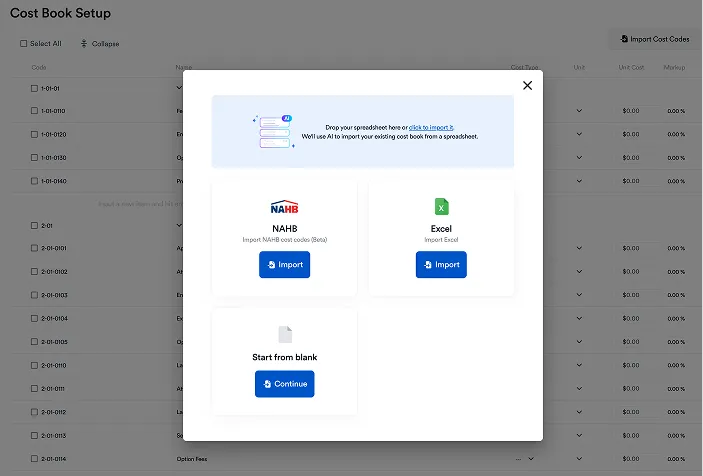
Residential estimating platforms organize by trade. Commercial estimating platforms organize by CSI division. Some residential-focused platforms — including Eano — allow both, which matters for GCs whose work crosses the line.
Allowances vs. Hard Bids
Residential estimates are, by nature, allowance-heavy. The tile hasn't been selected yet. The appliance package is TBD. The lighting fixtures will be chosen during design development. Allowances are how you produce a credible total cost number before those selections are made — and managing those allowances through the project lifecycle, including automatic change orders when clients select above the budget, is a core residential estimating function.
Commercial work is generally a hard bid environment. The drawings are issued for bid with specifications attached. You're pricing what's on the documents, not estimating what might be selected later. Allowances exist in commercial work, but they're the exception, not the structural backbone of the estimate.
Software built for residential handles allowance management as a primary workflow. Software built for commercial may not include it at all — or treats it as an afterthought.
Change Order Frequency and Client Dynamics
According to the American Institute of Architects, residential remodeling generates more scope changes per project than virtually any other construction category. Homeowners change their minds. The wall that was supposed to stay comes down. The kitchen scope expands. Each change needs a documented approval before work proceeds — not because you're being difficult, but because undocumented change orders are how residential contractors lose margin on projects they should have made money on.
Commercial change orders go through a different process: formal RFI and change order request workflows, often with the owner's rep, architect, and construction manager all in the approval chain. The change order is more formal, the timeline is longer, and the documentation requirements are more structured.
Residential estimating software needs fast, client-friendly digital change order approval. Commercial estimating software needs formal CO documentation with multi-party approval chains. These are genuinely different tools — though platforms designed for residential GCs often handle the simpler commercial CO process without issue.
Compliance, Prevailing Wage, and Certified Payroll
Most residential work doesn't touch prevailing wage requirements. Most public commercial work does. If you're bidding publicly funded commercial construction — schools, municipal buildings, government facilities — your estimating process needs to account for prevailing wage rates by trade classification, and your payroll system needs to produce certified payroll reports.
This is a hard line in software selection. Residential-focused platforms don't typically include certified payroll functionality. If commercial work with prevailing wage compliance is a meaningful part of your business, that requirement narrows your platform options significantly — or requires a separate payroll tool.
What Residential Construction Estimating Software Is Actually Built For
Purpose-built residential construction estimating software is designed around the specific rhythm of residential project delivery — not as a scaled-down version of commercial tools, but as a system built from the ground up for the way residential GCs and remodelers actually work.
The core capabilities that matter:
AI Quantity Takeoff for Residential Plan Sets. A custom home plan set — architectural, structural, MEP — is dense. Manual takeoff on a full residential build takes eight to twelve hours. AI-powered takeoff reads uploaded drawings, measures quantities by trade, and generates line items in a fraction of that time. The estimator reviews and adjusts rather than measuring from scratch. At a loaded cost of $80/hour, the difference between a 10-hour manual takeoff and a 90-minute AI-assisted takeoff is roughly $680 per estimate in recovered labor — before accounting for the additional bids that capacity allows you to pursue.
Allowance Management as a First-Class Workflow. Not a line item, not a placeholder — a tracked budget that triggers a change order automatically when a client's selection exceeds the allowance. The client approves the cost difference digitally before anything is ordered. The project budget updates in real time. This is the workflow that prevents the disputes that residential contractors dread, according to research from the Construction Financial Management Association.
Homeowner-Facing Proposal Format. The proposal a residential client receives isn't a bid document — it's a selling tool and a scope agreement. It needs to be readable by someone who isn't a contractor, structured around what the homeowner cares about, and formatted to reflect the quality of your business. Residential estimating software produces this output. Commercial estimating software produces bid tabs.
Client Portal. A homeowner portal that gives clients visibility into approved scope, pending changes, and current budget status reduces inbound communication volume and builds the trust that generates referrals. This is a residential-specific feature with no commercial equivalent at the same level.
Fast Change Order Workflow. When the homeowner wants to add a wet bar to the basement scope on a Thursday afternoon, you need to price it, send it for approval, and get a signature before the framing crew finds out Monday morning. That's a 48-hour change order cycle. Residential estimating software is built for this. Commercial software is built for a two-week CO approval process.
What Commercial Estimating Software Is Built For — And Where It Falls Short for Residential Work
Commercial estimating platforms are built around CSI MasterFormat division structure, subcontractor bid management, GMP and cost-plus contract types, and compliance-heavy documentation requirements. For pure commercial GCs, they're the right tool.
For residential GCs — or for GCs whose book of business is primarily residential with occasional commercial overlap — they create friction:
The estimate structure doesn't match how residential subcontractors quote work. The proposal output isn't appropriate for homeowner clients. Allowance management doesn't exist as a structured workflow. The change order process is too formal for the pace of residential decision-making. And the client portal, if it exists, isn't built around the homeowner relationship.
Using a commercial estimating platform for residential work is workable — the same way using a commercial truck to drive to the grocery store is workable. It gets you there. It's just the wrong tool for the context, and you feel it every time.
GCs Who Work Both: What the Tool Decision Actually Looks Like
If your business is 80% residential and 20% commercial — or if the commercial work you do is smaller-scale, light commercial, or tenant improvement — a residential-focused platform that handles both output formats is almost always the better choice. The tool is optimized for where the volume is, and the occasional commercial bid doesn't require a dedicated commercial estimating platform.
If you're running genuine commercial GC work — public bid, multi-trade coordination, prevailing wage compliance, formal architect/CM approval chains — you likely need a commercial estimating platform for that work, and a separate residential tool if residential is also part of the business. That's not inefficient; it's the right tool for each context.
The middle ground — residential-first platforms that support light commercial work without requiring a full commercial toolset — is where platforms like Eano's all-in-one live. If the majority of your revenue is residential, and the commercial work you see is smaller-scale or doesn't carry prevailing wage requirements, a purpose-built residential platform handles both without the overhead of a commercial system.
Side-by-Side: What Each Type of Work Needs From Estimating Software
The AI Takeoff Advantage Applies to Both — But Plays Differently
One area where the commercial vs. residential distinction matters less than people expect: AI-powered quantity takeoff delivers substantial value on both sides, though the specific application differs.
In residential work, AI takeoff's value is primarily about time compression on plan sets that are dense but structured — architectural sheets, structural drawings, MEP layouts on custom homes and additions. A takeoff that takes eight hours manually takes ninety minutes with AI review. At volume, that's the operational difference between an estimating team that can handle eight bids a month and one that can handle twenty-five.
In commercial work, the plan sets are larger and the CSI structure requires trade-specific quantity generation by division. AI takeoff on a commercial project handles the measurement work, but the estimator still needs to apply commercial subcontractor pricing and division structure. The time savings are real; the process is different.
What both have in common: AI takeoff removes the bottleneck that keeps residential and commercial contractors from responding to opportunities faster. The GC who gets back with a credible preliminary number within 24 to 48 hours of receiving drawings wins more bids regardless of whether the client is a homeowner or a facilities director.
See Quick Tour of Eano Pro's AI Estimating – Saving hours of manual work
The Bottom Line: Different Contexts, Different Tools — But Know Which One Is Yours
The commercial vs. residential distinction in estimating software isn't a marketing distinction — it reflects genuinely different client dynamics, document structures, change management workflows, and compliance requirements. Using the wrong tool for the dominant side of your business creates friction on every estimate, every proposal, and every change order for as long as you use it.
For residential GCs and remodelers — including those who pick up light commercial work — a purpose-built residential platform with AI takeoff, allowance management, homeowner-facing proposals, and a fast change order workflow is the right answer. The commercial work that falls within residential workflow norms fits the platform. The commercial work that doesn't is a small enough portion of most residential GC businesses that it doesn't drive the software decision.
If your business is primarily residential, book a demo with Eano to see how AI takeoff, allowance management, and a connected change order workflow operate on the kind of projects you actually run — not a generic demo, but a walkthrough of your project type with your estimate structure.
If you're still evaluating where to start, Eano's free residential estimating template is available to download without an account — a structured, trade-organized starting point before you're ready for a platform commitment.