
Next-Generation Construction Management Software: Features, Benefits, and How to Choose One
Next-generation construction management software brings estimating, takeoffs, CRM, proposals, scheduling, project management, financials, and AI-assisted workflows into one connected system. Unlike older tools that mainly digitize individual tasks, newer platforms are designed to connect information across the entire project lifecycle, from the first lead through closeout.
For residential general contractors, the value is not simply having more features. The right platform should reduce duplicate data entry, give the team one source of project information, automate repetitive work, and help owners and operations leads make decisions using current project data.
This guide explains what next-generation construction management software is, which features matter most, what benefits it can deliver, and how to evaluate a platform before choosing one.
What is next-generation construction management software?
Next-generation construction management software is a cloud-based system that connects the major workflows involved in running construction projects instead of treating each workflow as a separate application.
Traditional construction software often focuses on a specific function, such as scheduling, estimating, accounting, or customer management. A next-generation construction management platform connects these functions so information can move from one stage of the job to the next.
For example, information entered during the sales process can flow into the proposal and project setup. Once a project is won, the same project information can support scheduling, communication, documentation, budgeting, and financial tracking.
The distinction is important for residential GCs because construction management is not one task. It is a chain of related decisions involving leads, estimates, contracts, labor, materials, schedules, clients, subcontractors, change orders, payments, and project performance.
What makes construction management software “next-generation”?
The term does not simply mean that software is newer. A platform can have a modern interface and still operate like a collection of disconnected tools.
Next-generation construction management software typically has four characteristics:
- Connected workflows: Data moves between sales, estimating, project management, scheduling, and financial workflows.
- Automation: Repetitive administrative work can be handled automatically rather than manually.
- AI-assisted workflows: AI can support tasks such as estimating, takeoffs, document analysis, and other repetitive processes.
- Centralized project data: Teams can work from a shared source of information rather than maintaining separate spreadsheets, emails, and applications.
The goal is a connected operating system for the construction business, not simply a larger collection of features.
What features should next-generation construction management software include?
The exact feature set varies by platform, but residential general contractors should evaluate the following capabilities as a connected system rather than as isolated checkboxes.
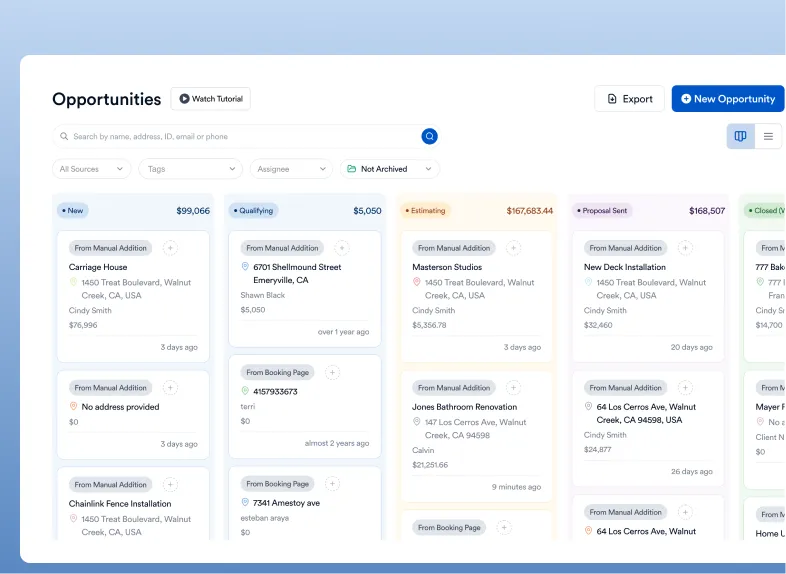
1. CRM and lead management
A construction management platform should help contractors manage prospects before they become projects.
Useful CRM capabilities include:
- Lead capture and organization
- Lead status tracking
- Contact management
- Follow-up reminders
- Sales pipeline visibility
- Customer and project history
The important question is what happens after a lead becomes a customer. Ideally, information collected during sales should not need to be entered again when the project moves into estimating or production.
2. Estimating and proposals
Estimating remains a critical part of the preconstruction workflow, but next-generation software connects estimating with the rest of the business.
A contractor should be able to move from project information to an estimate, proposal, and eventually a live project without rebuilding the same information multiple times.
Look for capabilities such as:
- Estimate creation
- Cost and scope organization
- Proposal generation
- Reusable templates
- Estimate-to-project workflows
- Change order support
- Margin and profitability visibility
AI can also assist with estimating and related document workflows. However, contractors should evaluate whether AI outputs can be reviewed and corrected rather than treated as automatically accurate.
For a deeper look at AI capabilities, see What Are the Key AI Features in Construction Management Software?
3. AI-assisted takeoffs and document analysis
AI is becoming part of construction management software, but it should solve specific workflow problems rather than exist as a marketing label.
For example, AI-assisted tools can help contractors process construction documents, identify relevant information, or accelerate repetitive estimating and takeoff tasks.
The key evaluation question is not simply, “Does the software have AI?”
Instead, ask:
- What task does the AI perform?
- What information does it use?
- Can a human review the result?
- Can users correct mistakes?
- Does the output connect to the rest of the project workflow?
AI should reduce manual work while keeping the contractor in control of important decisions.
Contractors comparing AI-enabled platforms can also review Eano’s guide to AI construction management software to understand where AI can fit into estimating, document review, and project workflows.
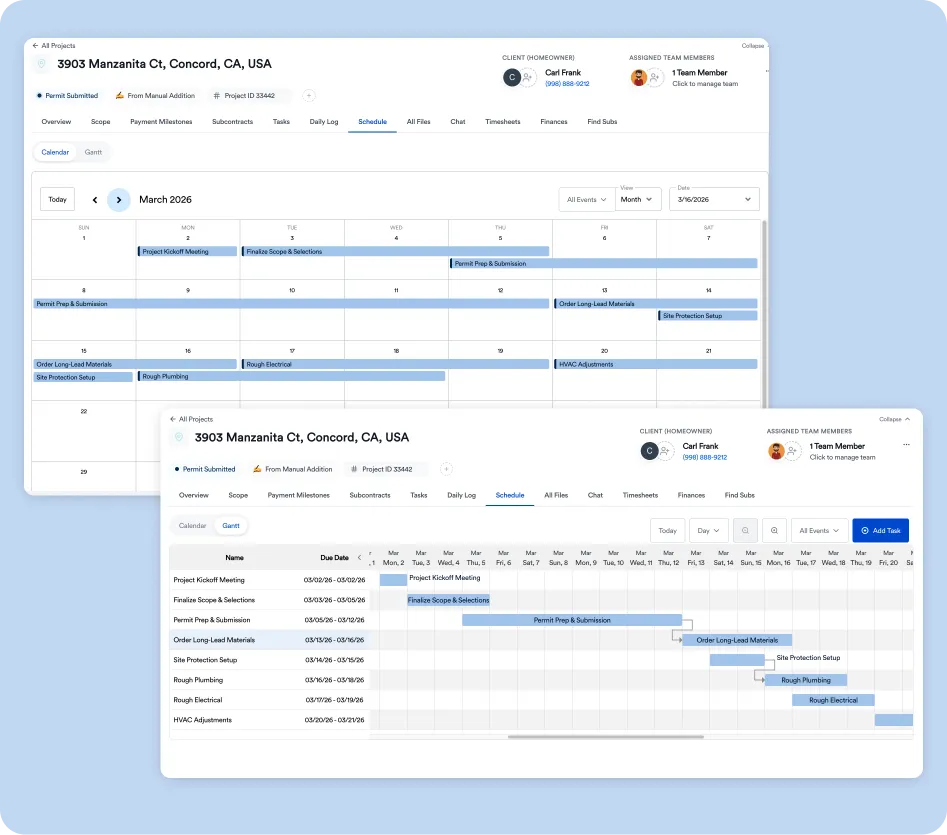
4. Scheduling and project management
Once a project is sold, scheduling and production management become central to execution.
Core capabilities may include:
- Project schedules
- Task management
- Milestones
- Assignments
- Dependencies
- Project status tracking
- Subcontractor coordination
- Client communication
- Project documentation
The advantage of an integrated platform is that scheduling does not have to exist separately from the project budget, customer information, documents, or financial data.
5. Communication and collaboration
Residential construction involves owners, clients, subcontractors, suppliers, employees, and other stakeholders.
A modern platform should give the team a structured place to communicate about the project instead of relying entirely on disconnected email threads and text messages.
Useful capabilities can include:
- Project messaging
- Client communication
- Internal notes
- File and photo sharing
- Activity history
- Notifications
- Task assignments
The goal is not to eliminate every other communication channel. It is to make important project information easier to find and associate with the correct job.
6. Financial and project cost management
Construction management software should connect operational activity with financial performance.
Depending on the platform, financial capabilities may include:
- Project budgets
- Cost tracking
- Invoices
- Payments
- Change orders
- Purchase orders
- Profitability reporting
- Financial dashboards
For an owner-operator, this connection can be particularly important. A schedule that looks healthy does not necessarily mean a project is financially healthy.
The software should make it easier to see both sides of project performance: Are we on schedule, and are we making the expected margin?
7. Reporting and dashboards
Next-generation software should turn project data into information that helps people make decisions.
Useful reporting may cover:
- Project status
- Budget versus actual costs
- Sales pipeline
- Schedule performance
- Revenue
- Profitability
- Outstanding tasks
- Customer activity
The best reporting is actionable. If a dashboard shows that a project is falling behind, the system should make it relatively easy to identify the tasks, costs, or responsibilities behind the problem.
8. Integrations and data accessibility
No construction company operates entirely inside one application.
Before selecting software, determine whether the platform connects with the other systems the company already uses or expects to use.
Consider:
- Accounting software
- Payment systems
- Document storage
- Calendars
- Communication tools
- Business intelligence platforms
- APIs or other data connections
Integrations matter because replacing one disconnected workflow with another does not solve the underlying problem.
What are the benefits of next-generation construction management software?
The primary benefit is not the number of features. It is the reduction of friction between workflows.
When project information is centralized and connected, contractors can spend less time moving information between spreadsheets, applications, emails, and documents.
Fewer disconnected workflows
A contractor may otherwise maintain separate systems for leads, estimates, schedules, project communication, documents, and accounting.
Each handoff creates an opportunity for duplicated work or inconsistent information.
A connected construction management platform reduces the number of places where important project information has to be maintained.
Less manual administrative work
Automation can handle repetitive actions such as notifications, data transfers, document generation, and routine follow-ups.
AI can extend this further by assisting with tasks that previously required manual review or data entry.
The practical benefit is time recovered for higher-value work such as client management, project oversight, and business development.
Better visibility across projects
Owners and operations leads need to know what is happening across multiple jobs without opening several unrelated systems.
Centralized dashboards can provide a common view of project status, costs, schedules, and sales activity.
That visibility can make it easier to identify problems earlier instead of discovering them after a deadline or financial milestone has already been missed.
Better continuity from sales to production
One common source of inefficiency is the handoff between sales and operations.
If project information has to be recreated after a contract is signed, important details can be lost or entered differently.
An integrated system keeps the project history connected as it moves from lead to estimate, proposal, contract, and production.
More consistent processes
Templates, automation, standardized workflows, and centralized information can help a growing contractor create repeatable processes.
That matters when a company moves beyond an owner managing every detail personally.
Instead of relying entirely on individual memory, the software can provide a consistent structure for how work gets handled.
How should a residential GC choose next-generation construction management software?
Start with the company's workflow, not the software's feature list.
A platform can have dozens of capabilities and still be a poor fit if those capabilities do not match how the company sells, estimates, builds, communicates, and manages money.
Use these questions to evaluate each platform.
Step 1: Map your current workflow
Before scheduling software demos, document how a project currently moves through the company.
Start with:
Lead → Sales → Estimate → Proposal → Contract → Scheduling → Production → Change Orders → Billing → Closeout
Then identify which software, spreadsheet, document, or communication channel is used at every step.
This reveals where the actual problems are.
Step 2: Identify the biggest sources of friction
Do not try to solve every process problem at once.
Look for repeated data entry, manual status updates, scattered documents, unclear responsibilities, missed follow-ups, and poor visibility into project financials.
The best software purchase usually addresses the most expensive or time-consuming workflow problems first.
Step 3: Test the handoffs
During a demo, do not evaluate features in isolation.
Ask the vendor to demonstrate an actual workflow.
For example:
Can a new lead become a customer, become a project, receive an estimate and proposal, and move into scheduling without recreating the same information?
This is often more revealing than asking whether the platform has CRM, estimating, scheduling, and project management features separately.
For a side-by-side view of options, see Eano’s guide to the best construction management software for general contractors.
Step 4: Test the AI instead of taking the label at face value
If AI is part of the platform, ask for a demonstration using a realistic construction workflow.
Find out what the system can automate, what requires human review, how errors are handled, and whether AI-generated information becomes usable project data.
AI should be evaluated as part of the workflow, not as a standalone feature.
The NIST AI Risk Management Framework is a useful external reference for evaluating AI reliability, transparency, security, privacy, and other trust considerations in AI-enabled systems.
Step 5: Calculate the total cost of ownership
The subscription price is only one part of the cost.
Consider:
- Software fees
- Implementation
- Training
- Data migration
- Integrations
- Additional users
- Add-on modules
- Payment processing
- Internal time spent managing the system
A cheaper platform may not be cheaper if it requires several additional tools to reproduce the workflow of a more integrated system.
Step 6: Evaluate security and operational risk
Construction management platforms can contain sensitive business information, customer details, project documents, financial information, and other operational data.
Ask vendors about authentication, permissions, backups, data ownership, data retention, and security practices.
For companies using AI features, also ask how business data is handled by AI systems and what controls exist around access and privacy.
Security should be part of software selection from the beginning, not an afterthought.
For a broader starting point on cybersecurity risk management, contractors can also consult the NIST Cybersecurity Framework.
What is the difference between traditional and next-generation construction management software?
The biggest difference is how the software connects information and workflows.
This does not mean every older platform is ineffective or every newer platform is better.
The more useful distinction is whether the software reduces fragmentation and helps the contractor manage the business as a connected system.
Is next-generation construction management software worth it for a small or midsize GC?
It can be, particularly when the company's existing processes are becoming difficult to manage across spreadsheets and disconnected applications.
The strongest case for adopting new software is usually operational rather than technological.
If an owner spends significant time tracking project information manually, moving data between systems, chasing updates, or trying to understand project performance from scattered sources, an integrated platform may address a real business problem.
However, software should not be purchased simply because it includes AI or has a long feature list.
The platform needs to fit the contractor's workflow, team size, project types, budget, and ability to implement new processes.
For a more detailed breakdown of the business value, see 10 Benefits of Construction Management Software.
What should contractors look for in the next generation of construction software?
The most important trend is the movement from software that stores information toward software that helps manage workflows.
That means future-ready construction management platforms will increasingly be judged by how well they connect data, automate repetitive work, assist users with AI, and turn project information into useful decisions.
For residential GCs, the practical test is simple:
Does the software help the team run the entire business more effectively, or does it simply give them another place to enter information?
A next-generation platform should make the answer clear.