
How Construction Management Software Improves Scheduling and Crew Productivity
If you’ve ever had a crew show up ready to work… and then leave an hour later because they couldn’t actually start, you already understand how fragile scheduling can be.
It’s rarely because someone completely messed up. More often, it’s a timing issue. One trade ran long. Materials didn’t show up. A dependency got missed. Nobody updated the schedule in a way that actually reached everyone.
And just like that, you’ve got lost time, frustrated crews, and a project that’s starting to drift.
Scheduling in construction isn’t just about putting dates on a calendar. It’s about keeping momentum—and when that momentum breaks, it’s expensive.
Why Scheduling Gets Messy So Fast
On paper, most schedules look clean. You map out phases, assign crews, line up subcontractors, and everything flows from one step to the next.
But jobs don’t happen on paper.
Things change constantly. Weather shifts. Inspections get delayed. A crew runs into something unexpected. A delivery shows up late—or not at all. Even small changes ripple through the rest of the schedule.
The real issue isn’t that plans change. It’s that updates don’t always make it to the people who need them in time.
So you end up with crews working off different versions of the schedule. One team thinks they’re up next. Another team is still finishing. And someone else is waiting on materials that haven’t arrived yet.
No single mistake—just misalignment.
Where Productivity Actually Gets Lost
Most contractors think of productivity in terms of how fast work gets done. But a lot of lost productivity has nothing to do with speed—it comes from interruptions.
Think about how much time gets lost to:
- Crews waiting for access to start work
- Subs showing up before the job is ready
- Teams getting pulled off one job to fix issues on another
- Constant rescheduling and coordination
Individually, these don’t seem like major problems. But over the course of a project—or multiple projects—they add up quickly.
One lost half-day here, another there… and suddenly your timeline is stretched, your labor costs are higher than expected, and everything feels harder than it should.
Why “Just Keep Everyone Updated” Doesn’t Work
A lot of teams try to fix scheduling issues by pushing more updates.
Send a text. Make a call. Let everyone know what changed.
The problem is, that only works if:
- Everyone sees the update
- Everyone interprets it the same way
- No additional changes happen after
In reality, updates get missed, misunderstood, or overtaken by new changes. Reducing miscommunication in construction is key. And then you’re back to the same problem—just with more messages involved.
Scheduling doesn’t break because people don’t care. It breaks because it’s hard to keep everyone aligned in real time without a system that supports it.
At a certain point, trying to manage this through calls, texts, and spreadsheets just doesn’t scale. This is where having a centralized system starts to make a real difference, which is exactly what construction management software is designed to solve.
What Better Scheduling Actually Looks Like
Better scheduling isn't about building a perfect timeline that never changes—because every contractor knows that's unrealistic. Inspections get delayed, weather interrupts work, materials arrive late, and clients change their minds. A schedule only provides value if it can adapt to those changes without creating confusion for everyone involved.
An effective construction schedule gives every stakeholder a clear understanding of what's happening today, what's happening next week, and what needs to happen before the next phase can begin. Instead of relying on phone calls or morning meetings to keep everyone aligned, the schedule becomes the central source of truth for the project.
That means:
- Everyone can see what’s happening now and what’s coming next.
- Changes are reflected immediately instead of hours or days later.
- Dependencies are clearly defined so crews don't begin work out of sequence.
- Field teams, subcontractors, and office staff all work from the same schedule.
Modern scheduling also extends beyond simply assigning dates. Project managers can better forecast labor requirements, coordinate equipment, and plan material deliveries before they become bottlenecks. Identifying the project's critical path helps teams understand which tasks directly affect the completion date and which activities have flexibility if unexpected delays occur.
Many contractors rely on Gantt charts to visualize these relationships. A Gantt chart makes it easier to communicate how every phase—from site prep and framing to finishes and final inspections—fits together. Rather than seeing individual tasks in isolation, everyone understands how one delay can impact the rest of the project.
When scheduling becomes visual, connected, and easy to update, it stops being something that's reviewed once a week and becomes a tool the entire team actually uses every day.
How This Impacts Crew Productivity
Construction crews do their best work when they can focus on building—not waiting for answers.
Poor scheduling often creates hidden downtime that's difficult to measure. A crew may arrive on-site only to discover another trade hasn't finished. Equipment may be sitting idle because materials haven't arrived. Subcontractors may be rescheduled multiple times because no one communicated a change in priorities. Individually these delays seem minor, but across dozens of projects they become a significant drain on profitability.
When scheduling improves, productivity follows naturally.
Crews arrive knowing exactly what work has been completed, what they're responsible for that day, and what comes next. Project managers spend less time answering status questions because the information is already available. Subcontractors have greater confidence in the schedule, making them more likely to prioritize your projects and arrive when expected.
Better scheduling also improves resource allocation. Instead of accidentally overloading one crew while another waits for work, managers can distribute labor more evenly across multiple projects. This helps reduce overtime, minimize downtime, and keep projects progressing at a consistent pace.
The result isn't necessarily that people work harder—it’s that they spend far less time waiting, reacting, and recovering from avoidable scheduling mistakes.
The Role of Dependencies (and Why They Get Overlooked)
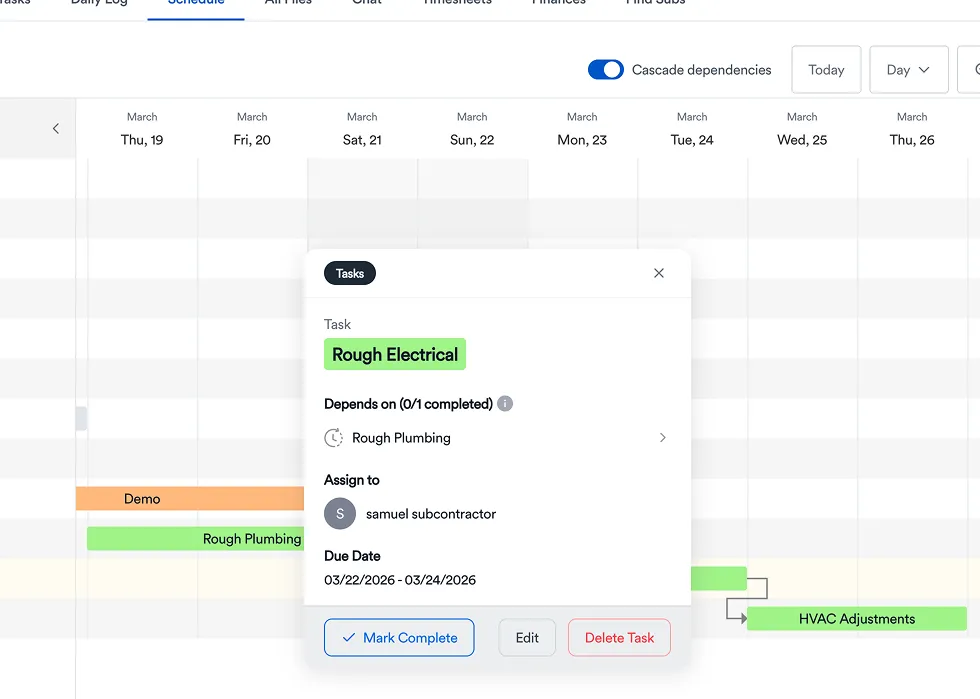
One of the most overlooked aspects of construction scheduling is properly managing task dependencies.
Every phase of a project depends on another task being completed first. Excavation must finish before foundations begin. Framing must be completed before electrical and plumbing rough-ins. Drywall can't go up until inspections have passed. Flooring, cabinetry, painting, and trim all rely on work completed earlier in the project.
When those relationships aren't documented, the schedule quickly becomes little more than a list of dates.
As soon as one activity slips—even by a day—it can affect multiple trades downstream. Without visible dependencies, project managers often don't realize the impact until subcontractors begin arriving at jobsites that aren't ready. That creates unnecessary travel, scheduling conflicts, and frustration for everyone involved.
Modern construction scheduling software automatically connects these dependent activities. When one milestone changes, project managers can immediately see which future tasks are affected and adjust the schedule before crews are impacted.
This visibility helps prevent bottlenecks, protects the critical path, and keeps projects moving in the proper sequence instead of constantly reacting to unexpected conflicts.
A Scenario That Plays Out All the Time
Imagine a contractor managing eight remodeling projects across town.
The schedule technically exists, but it's spread across Outlook calendars, text messages, handwritten notes, and whatever the project manager happens to remember from this morning's meeting.
Everything seems manageable until an electrical inspection fails on one project.
The drywall crew is already scheduled for tomorrow.
Painting was booked for next week.
The flooring subcontractor has another project immediately afterward.
Because no one sees how those tasks connect, each trade has to be contacted individually. Some can adjust. Others can't. The project manager spends half the afternoon making phone calls instead of managing the job, while several crews lose productive hours waiting for work that isn't ready.
Now imagine that same project using a centralized scheduling platform.
The failed inspection updates the schedule. Dependent activities automatically shift. Everyone sees the revised timeline, understands why it changed, and can adjust before arriving on-site.
The project still experiences a delay—but it doesn't create unnecessary confusion, wasted labor, or missed communication. Over dozens of projects throughout the year, those avoided disruptions add up to significant time savings.
How Construction Management Software Changes Scheduling
Construction management software doesn't eliminate delays, change orders, weather events, or inspection issues. What it changes is how quickly your team can respond when those situations happen.
Instead of updating multiple spreadsheets, sending group texts, and making individual phone calls, project managers update the schedule once. The revised timeline becomes immediately available to office staff, field crews, subcontractors, and anyone else involved in the project.
That creates a much more coordinated operation.
Crews know when work is ready to begin.
Subcontractors receive more reliable schedules and fewer last-minute surprises.
Project managers can identify scheduling conflicts before they become expensive delays.
Leadership gains better visibility into project progress, labor utilization, and upcoming resource needs across every active job.
When scheduling is connected to the rest of your workflow—estimating, project management, daily logs, and job costing—it becomes far more than a calendar. It becomes the operational backbone of your business, helping every project move from kickoff to completion with fewer surprises and less wasted time.
How Eano Pro Helps Keep Schedules Aligned
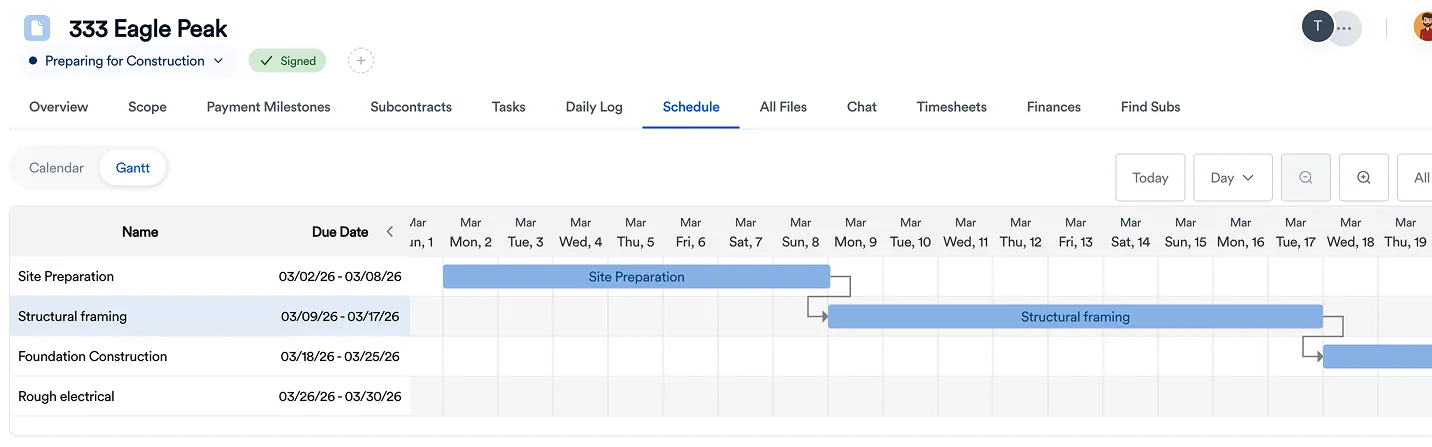
Eano Pro approaches scheduling as part of the broader workflow, not as a standalone tool.
With its task and schedule management features, you can assign work to specific crews, set dependencies between tasks, and adjust timelines as conditions change. When something shifts—whether it’s a delay, a reschedule, or a change in scope—the update is visible across the project.
That reduces the need for constant coordination.
Instead of calling or texting multiple people to relay the same update, the system keeps everyone aligned automatically. Crews know when they’re needed, and project managers have a clearer view of how everything is progressing.
What This Changes Day to Day
When scheduling becomes more reliable, the jobsite feels different.
There’s less scrambling to figure out who’s supposed to be where. Fewer last-minute changes that catch people off guard. Less time spent coordinating and more time spent actually moving the project forward.
It doesn’t make construction predictable—but it makes it manageable.
Why This Becomes Critical as You Grow
The more projects you take on, the harder it becomes to manage schedules informally.
What works when you’re running one or two jobs starts to break down when you’re juggling several at once. There are simply too many moving pieces for everything to stay aligned without a system.
At that point, scheduling either becomes structured—or it becomes a constant source of stress.
Contractors who put systems in place early tend to scale more smoothly because their schedules don’t rely on memory or constant oversight. Instead, they have a way to keep everything connected as the business grows.
Final Thought
Scheduling in construction isn’t about getting everything perfectly planned from the start. It’s about maintaining alignment as things inevitably change.
When schedules live in disconnected places, even small updates can create confusion. But when scheduling is centralized and tied to the work itself, teams can adjust in real time without losing momentum.
The result isn’t just better organization—it’s more consistent progress, fewer delays, and a job that feels a lot less chaotic to run.
Check out the Eano Pro trial or get a personalized demo.



.png)