

Construction Estimating Software for Small Business: How to Choose the Right System
The best construction estimating software for a small business is the system that fits its estimating workflow, reduces duplicate work, protects margins, and carries approved costs into project delivery. Compare takeoff accuracy, cost controls, integrations, implementation requirements, and total cost—not just the feature list. AI can accelerate plan review and estimate preparation, but an experienced estimator must still verify quantities, scope, pricing, productivity, exclusions, and risk before submitting a bid.
What Should Small Contractors Prioritize?
Small contractors need more than a tool that produces polished proposals. The software should improve the slowest and riskiest parts of the company’s estimating process.
Focus on five priorities:
- Accurate, traceable takeoffs
- Flexible cost items and assemblies
- Reliable labor, overhead, markup, and margin controls
- Clear revisions and customer proposals
- A direct connection between estimating and project management
The right balance depends on the work you perform. A remodeling contractor needs different controls than a roofer, custom home builder, or specialty contractor.
Before comparing platforms, document:
- Who prepares and approves estimates
- Which trades you estimate internally
- How you collect supplier and subcontractor pricing
- How often drawings and scopes change
- How estimates become project budgets
- How actual costs are compared with estimated costs
This prevents you from choosing software based on an impressive demonstration that does not resemble your daily operation.
Which Features Have the Greatest Effect on Accuracy?
Accuracy does not come from automation alone. It comes from making quantities, costs, assumptions, and pricing decisions visible and reviewable.
Traceable Digital Takeoffs
A takeoff should provide more than a final quantity. The estimator should be able to trace each quantity back to a marked plan condition.
Look for:
- Scale calibration
- Linear, area, volume, and count measurements
- Color-coded plan markings
- Plan overlays and revision comparison
- Quantity-to-cost connections
- Takeoff notes and audit history
Revision management is especially important. When a new drawing set arrives, the estimator should be able to identify what changed without repeating the entire takeoff.
Ask vendors to demonstrate revisions using an actual project. Confirm whether the software identifies deleted, modified, and newly added conditions clearly.
Editable Cost Items and Assemblies
Reusable assemblies reduce repetitive work, but they can create errors when estimators apply them without checking the assumptions inside.
A wall assembly may include framing, insulation, drywall, fasteners, waste, and labor. However, ceiling height, finish level, access, material specifications, and crew productivity can vary.
The system should let your team:
- Build and edit its own assemblies
- Inspect every component
- Adjust waste and productivity factors
- Maintain assemblies for different project types
- Restrict who can change standard pricing
- Record when costs were last updated
Avoid platforms that make assemblies easy to apply but difficult to inspect.
Labor and Productivity Controls
Generic labor assumptions rarely reflect how a contractor’s crews perform under real project conditions.
The software should support:
- Different rates by trade or crew
- Direct labor and labor burden
- Hourly and unit-based calculations
- Crew production rates
- Project-specific productivity adjustments
Productivity deserves as much attention as the hourly rate. Site access, occupancy, floor level, weather, staging space, and required protection can all affect installation time.
These adjustments should remain visible instead of being hidden inside a single unit price.
Material and Subcontractor Pricing
A cost database is useful only when someone maintains it.
Check whether the system supports manual updates, spreadsheet imports, supplier integrations, regional pricing, quote attachments, effective dates, and historical cost records.
Supplier integrations can reduce data entry, but contractors must still verify availability, delivery charges, minimum orders, taxes, and substitutions.
Subcontractor quotes also require review. The lowest price may exclude equipment, cleanup, permits, supervision, or part of the expected scope. The original quote and relevant notes should be attached to the estimate.
Markup and Margin Controls
The software must handle your pricing model correctly. Markup and gross margin are not interchangeable:
A 20% markup does not produce a 20% gross margin. The platform should show both clearly.
It should also support different rules for labor, materials, equipment, subcontractors, allowances, and change orders. Management should control these settings while limiting access to sensitive cost and profit information.
What Type of Software Fits Your Business?
The best category depends on what the business needs before and after the estimate.
A focused estimating tool may be sufficient when the main problem is bid preparation. It becomes less effective when staff repeatedly transfer estimate data into scheduling, purchasing, accounting, or project-management software.
For growing residential contractors, an integrated construction management platform often provides a better long-term fit. Estimating remains the starting point, but the approved scope and budget continue into production.
Contractors comparing available platforms can review this complete guide to the best construction estimating software.
When Is Stand-Alone Estimating Software No Longer Enough?
A stand-alone product may work when one person handles most bids and the company manages a limited number of active projects.
A broader construction management platform may be necessary when:
- Sales and operations use different versions of the scope
- Project managers rebuild estimates as budgets
- Change orders are tracked through emails or spreadsheets
- Purchase orders do not reference budgeted costs
- Actual costs are reviewed only after project completion
- The same information is entered into several systems
- Management cannot see projected profit during the job
- Estimate revisions are difficult to trace
At this stage, faster estimating solves only one part of the problem.
Construction management software can connect estimating with CRM, proposals, scheduling, purchasing, project communication, change orders, job costing, and financial reporting. This gives the estimate operational value after the contract is signed.
How Can AI Reduce Estimating Work?
AI-assisted estimating can reduce repetitive plan review, quantity entry, classification, and estimate setup.
Depending on the platform, AI may help:
- Read and organize project documents
- Identify common plan elements
- Generate preliminary quantities
- Match quantities with cost items
- Apply reusable assemblies
- Categorize estimate information
- Flag incomplete or conflicting data
- Create an initial scope structure
This gives the estimator a structured starting point. Instead of spending most of the process entering information, the estimator can focus on scope gaps, pricing decisions, exceptions, and project risk.
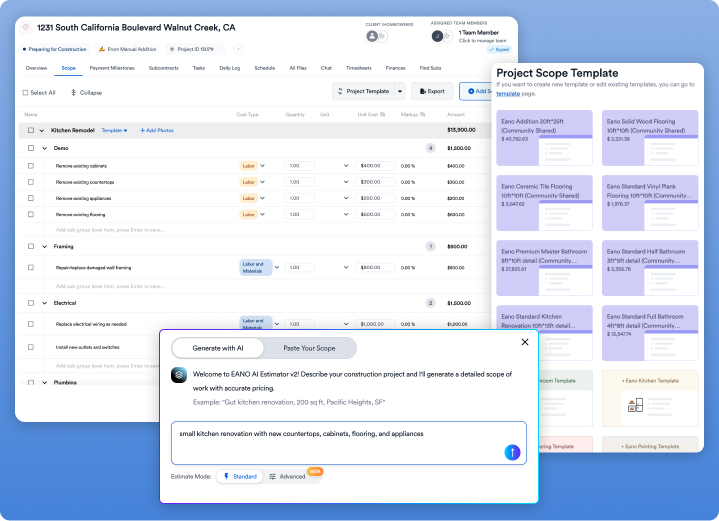
Eano combines multilingual AI construction estimating with CRM, proposals, scheduling, project management, and financial workflows. The value is not limited to preparing an estimate faster. Approved information can continue into the construction-management process.
AI will not create much value if the company’s assemblies, labor assumptions, and price lists are incomplete or outdated. It can automate the use of existing information, but it cannot make weak cost data reliable.
Where Is Human Review Still Essential?
AI-generated takeoffs and estimates should be treated as drafts.
A qualified estimator must verify:
- The plan version and drawing scale
- Measured quantities
- Notes and specifications
- Demolition and temporary work
- Existing or hidden conditions
- Site access and staging
- Labor productivity
- Waste factors
- Current supplier pricing
- Subcontractor scope
- Permits and inspections
- Allowances and selections
- Overhead and profit
- Conflicts between drawings
AI may identify a wall or floor area. It cannot inspect a site or determine how occupancy, access, weather, protection, or existing conditions will affect production.
The NIST AI Risk Management Framework emphasizes measuring and managing risks related to AI systems. In estimating, that means maintaining human accountability for the final scope, cost, and selling price.
For a closer look at the relationship between automation and financial control, see how AI construction estimating transforms cost control.
What Limitations Should You Check?
Software limitations often become clear after implementation rather than during a sales demonstration.
Data Ownership
Confirm that you can export contacts, cost items, assemblies, estimates, takeoff data, proposals, budgets, attachments, and project records.
Ask what happens to the data if you cancel. Years of company pricing and estimating history should not become difficult to retrieve.
Revision Management
The system should preserve earlier estimate versions and show:
- What changed
- Who changed it
- When and why it changed
- How the change affected cost and price
Project Handoff
Test whether an approved estimate can become a project budget, purchasing plan, schedule structure, change-order baseline, and job-cost reporting structure.
If the team must rebuild the estimate after award, the software has not solved the complete workflow problem.
Usage Restrictions
Features shown during a demonstration may require a higher subscription tier.
Confirm limits on users, projects, estimates, storage, AI processing, takeoff pages, integrations, templates, API access, and support.
How Much Does Estimating Software Really Cost?
The subscription is only one part of the investment.
Include:
- Setup and implementation
- Data migration
- Cost-database development
- Assembly and template creation
- Training
- Additional users
- Storage and integrations
- AI or takeoff usage
- Support
- Internal administration time
Vendor packages change, so verify current prices and limitations directly with each provider.
Also calculate the cost of the existing process. That may include manual takeoff hours, duplicate entry, delayed proposals, inconsistent pricing, missed scope, and time spent rebuilding budgets.
A low-cost product is not economical if it creates more work elsewhere. A higher-priced system is not valuable if the team cannot implement or consistently use it.
How Should You Test Software Before Buying It?
Do not rely only on a prepared demonstration. Test each platform using a completed project that represents your normal work.
Complete this workflow:
- Upload the plans and confirm the scale.
- Complete or review the takeoff.
- Apply your labor and material rates.
- Add subcontractor quotes.
- Include equipment, overhead, contingency, and profit.
- Produce a customer-facing proposal.
- Revise part of the scope.
- Convert the estimate into a project budget.
- Compare the result with actual completed-job costs.
The U.S. Government Accountability Office’s Cost Estimating and Assessment Guide addresses government programs, but its core standard applies more broadly: a reliable estimate should be comprehensive, well documented, accurate, and credible.
Do not compare only the final price. Review quantities, missing scope, labor hours, productivity, waste, supplier pricing, subcontractor coverage, overhead, and expected margin.
What Should You Ask During a Demonstration?
Ask questions that expose how the software performs under real project conditions:
- Can every quantity be traced to a plan measurement?
- How does the system handle revised drawings?
- Can we build and edit our own assemblies?
- Can we apply different labor and productivity rates?
- Which parts of the estimate does AI generate?
- How does the platform flag uncertain AI results?
- Can estimators correct AI-generated quantities?
- Are AI or takeoff volumes limited?
- Can internal costs and markup remain hidden?
- Can an accepted estimate become a project budget?
- Can we compare estimated, committed, and actual costs?
- Can we export all company data?
- Which features require a higher plan?
Include estimators, project managers, accounting staff, and field leaders in the evaluation. Each role will identify different workflow problems.
What Mistakes Should Small Contractors Avoid?
Choosing by Feature Count
More features do not guarantee a better fit. Prioritize the capabilities your team will use on most projects.
Automating an Inconsistent Process
Software cannot fix unclear scope rules, outdated costs, or inconsistent margin decisions. Standardize the process before automating it.
Accepting AI Output Without Review
AI can accelerate the first draft. Assign a qualified person to approve quantities, scope, costs, assumptions, and pricing.
Ignoring Implementation Work
Labor rates, cost codes, assemblies, proposal templates, permissions, and approval rules require clear owners. Include this work in the buying decision.
Failing to Compare Estimated and Actual Costs
After project completion, compare estimated and actual labor, materials, subcontractors, equipment, changes, and gross profit. Use the largest differences to improve future assumptions.
.png)